


Welcome to the May edition of the CVAT Digest. This month, we shipped two releases, v2.65.0 and v2.66.0, with updates across the annotation workspace, label and skeleton settings, data import and export, webhooks, and CLI, including:
- Annotation layers for dense scenes
- Flexible label and skeleton editing
- New filters for skeleton annotations
- Safer annotation import options
- More reliable exports and webhooks, and more.
Annotation layers for dense scenes
In v2.66.0, we added a new way to manage how annotations are arranged on the canvas: layers.
Layers let you group annotations and control their visual order on the canvas, so you can decide which annotations appear behind, in front of, or between others. This is useful when a scene has multiple levels of overlap, for example, a pedestrian in front of a car, another car behind it, and other objects further back in the frame.
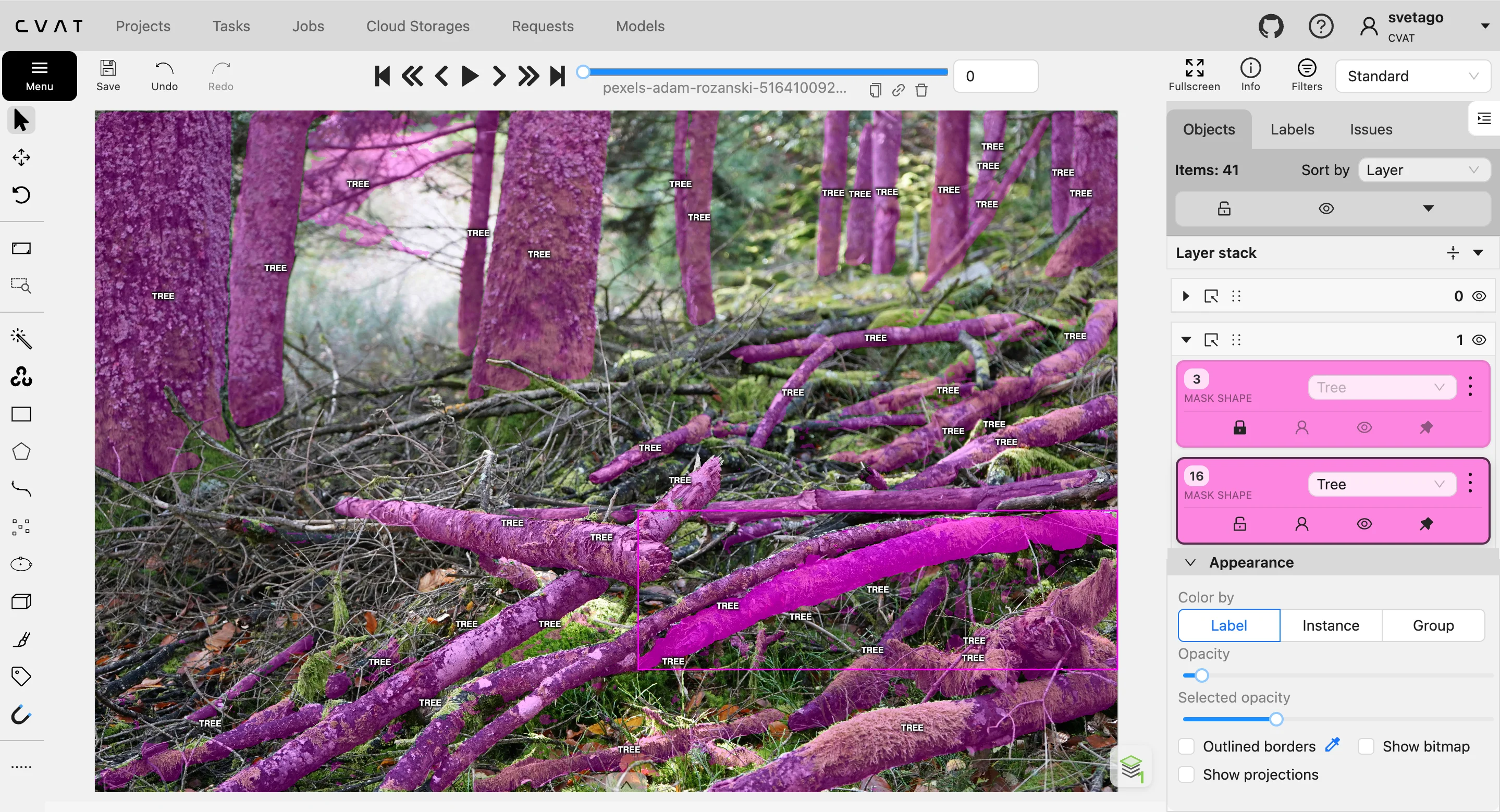
The layers are now shown in a stack in the Objects sidebar along with annotations, where you can easily change their order, move annotations between layers, create a new layer, or merge several layers together. You can also filter annotations by layer during labeling or validation for a cleaner, more convenient view, and see layer information directly in canvas object details.
This update makes annotation projects with dense scenes easier to work with by helping you find, select, and arrange annotations when objects overlap or partially hide each other.
More flexible label and skeleton editing
In v2.65.0, we made it easier to update label and skeleton configurations after a project or task has already been created. You can now delete existing label attributes, including attributes on skeleton sub-labels, directly from the label configuration flow. You can also add, edit, and delete skeleton element attributes after task or project creation.
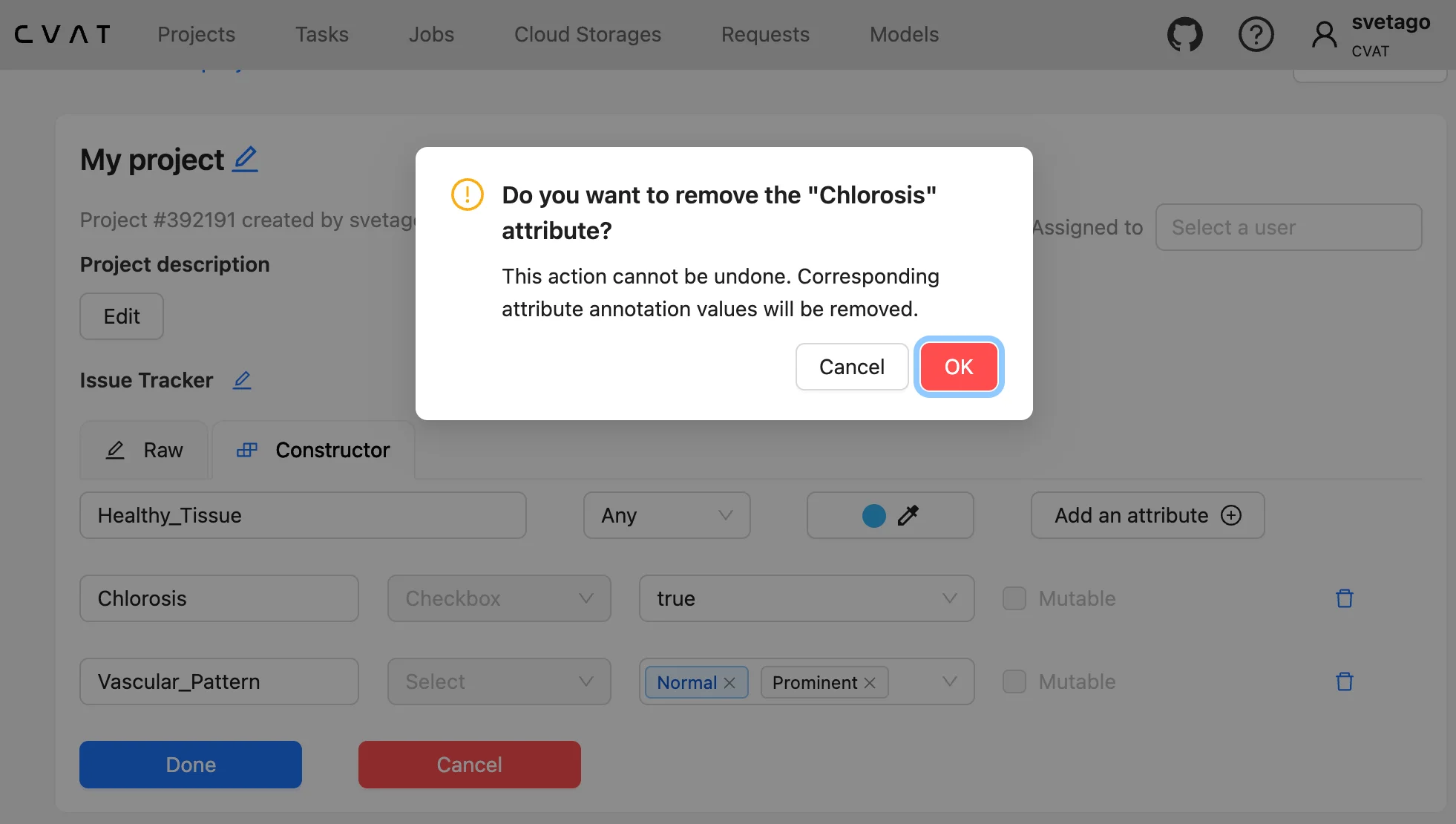
When deleting a saved attribute, CVAT shows a warning that all annotation data associated with this attribute will be removed. This warning is also shown in the raw label editor, including for skeleton element attributes. The confirmation dialog also shows which label the attribute belongs to, so you can better understand what exactly will be affected before confirming the change.
We also added stricter validation for attribute definitions. CVAT now blocks unsafe changes that could break existing annotations, while still allowing safe updates, such as adding new values to a select attribute. This helps teams adjust labeling specs when project requirements change, without accidentally invalidating existing work.
New filters for skeleton annotations
In v2.65.0, we added new filtering options for skeleton annotations. The Filters modal now includes a separate filter builder for skeleton elements, so you can filter skeletons by sub-label, element attributes, and element occlusion independently from object-level filters.
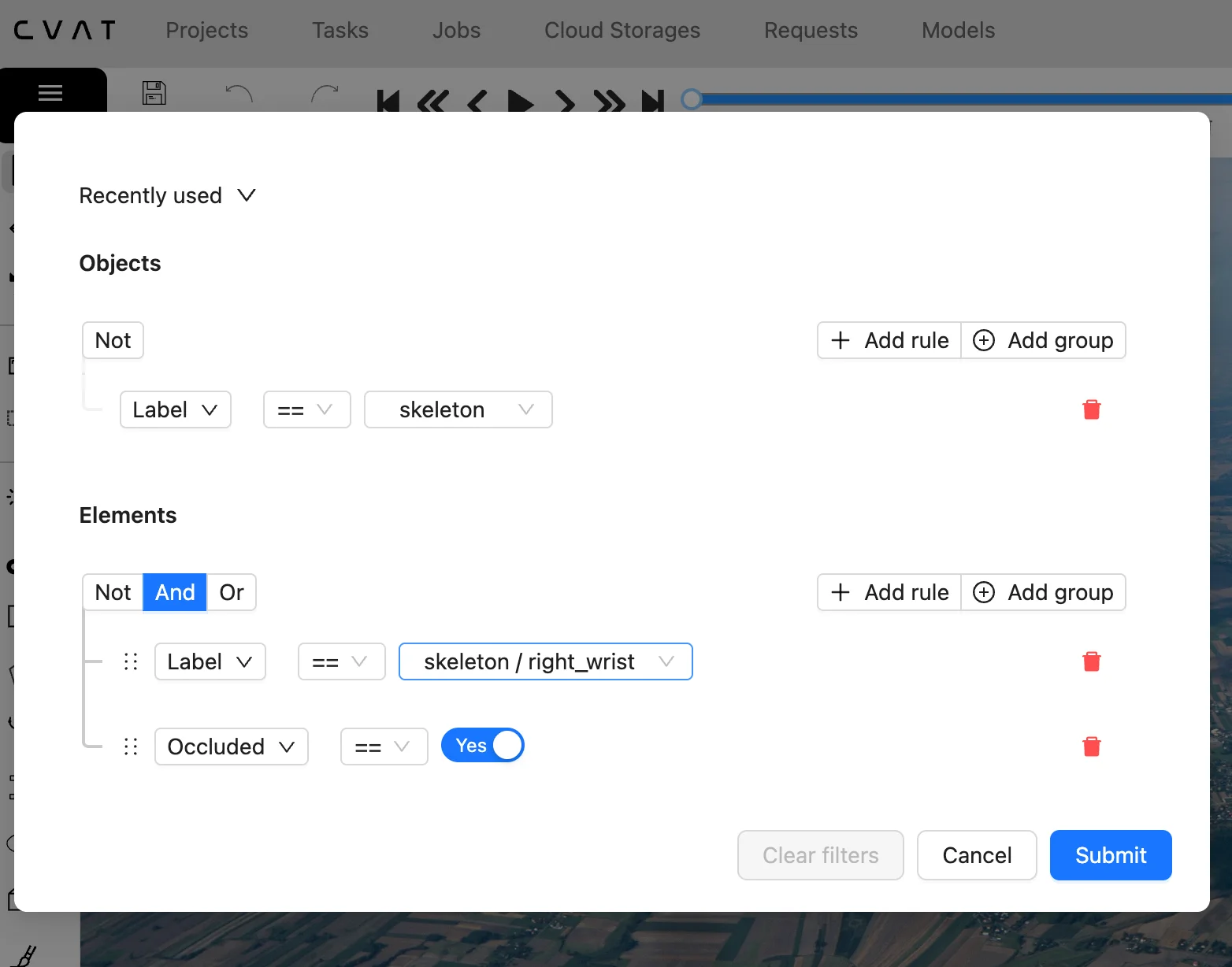
When a filter matches, CVAT still selects the parent skeleton annotation, but the canvas and sidebar show only the matching skeleton elements. This helps you focus on the exact parts of a skeleton that need attention, instead of checking every element manually.
This update makes labeling, review, and validation more efficient for skeleton-based projects, especially when tasks contain many objects or detailed skeleton structures.
Import annotations without overwriting existing work
In v2.65.0, we added a safer way to import annotations into existing tasks and jobs. You can now choose whether to replace existing annotations or append imported annotations to the annotations that are already there.
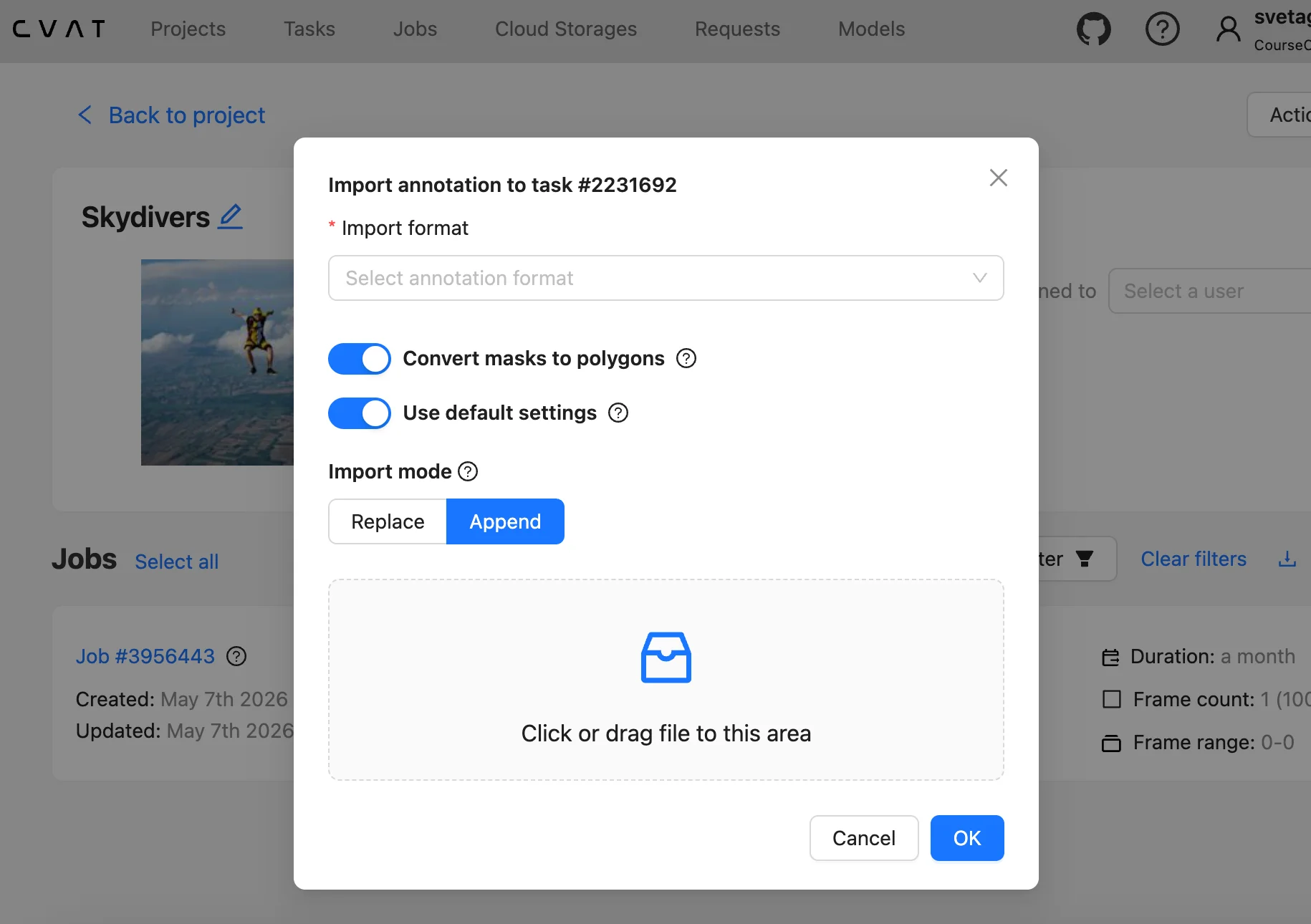
The previous behavior is still available as the default: importing annotations replaces the current annotations. With the new append mode, imported annotations are added on top of the existing ones instead. This is useful when you need to merge external annotation work into an existing task or job, add annotations from another file, or continue working without losing annotations that have already been reviewed or corrected.
This update makes annotation import more flexible and reduces the risk of accidentally overwriting useful work during import.
Cancel running export requests
In v2.65.0, we added the ability to cancel export requests that are already running. Previously, CVAT could cancel only requests that were still waiting in the queue, so if an annotation export, dataset export, or backup export had already started, you had to wait until it finished.
Now, you can cancel running export requests from the Requests page. After cancellation, CVAT updates the request status and stops the operation on the server side.
This is useful for large tasks, datasets, or backups that can take a long time to export. If an export was started by mistake or is no longer needed, you can stop it instead of waiting for it to complete.
More reliable webhook deliveries
In v2.65.0, we improved webhook behavior for automated workflows. CVAT now retries webhook deliveries when they fail because of server errors, connection errors, or timeouts, so temporary issues no longer cause the event to be dropped after the first attempt.
We also added new webhook events for dataset exports and project or task backups. These events fire when an export or backup finishes, whether it completes successfully or fails, so external systems can receive the result without repeatedly checking request status through the API.
This update makes CVAT easier to connect with external pipelines, monitoring tools, and internal systems that depend on export or backup completion events.
Project-level CLI commands
In v2.66.0, we added new project-level commands to the CVAT CLI. You can now back up and restore projects, export project datasets, and create project tasks from a dataset using the command line.
This is useful for teams that manage CVAT projects through scripts, scheduled jobs, or CI/CD workflows. Instead of handling these operations only through the UI or custom API calls, you can run them directly from the CLI.
This update makes project maintenance easier for teams that need repeatable workflows for backups, migration, dataset export, or dataset synchronization.
Username updates from the Profile page
In v2.65.0, we added the ability to change your username directly from the Profile page. Previously, username updates were supported by the API, but there was no option to update it in the UI.
The same username validation rules apply: usernames must be between 5 and 150 characters and can include letters, numbers, and @, ., +, -, _. This is a small but useful account management improvement for teams that need usernames to stay consistent, readable, or aligned with internal naming rules.
Other technical updates
May releases also included additional developer-facing, API, and self-hosted deployment updates. For the full technical list, see the release notes for v2.65.0 and v2.66.0.




.svg)
.png)

.png)







.png)