


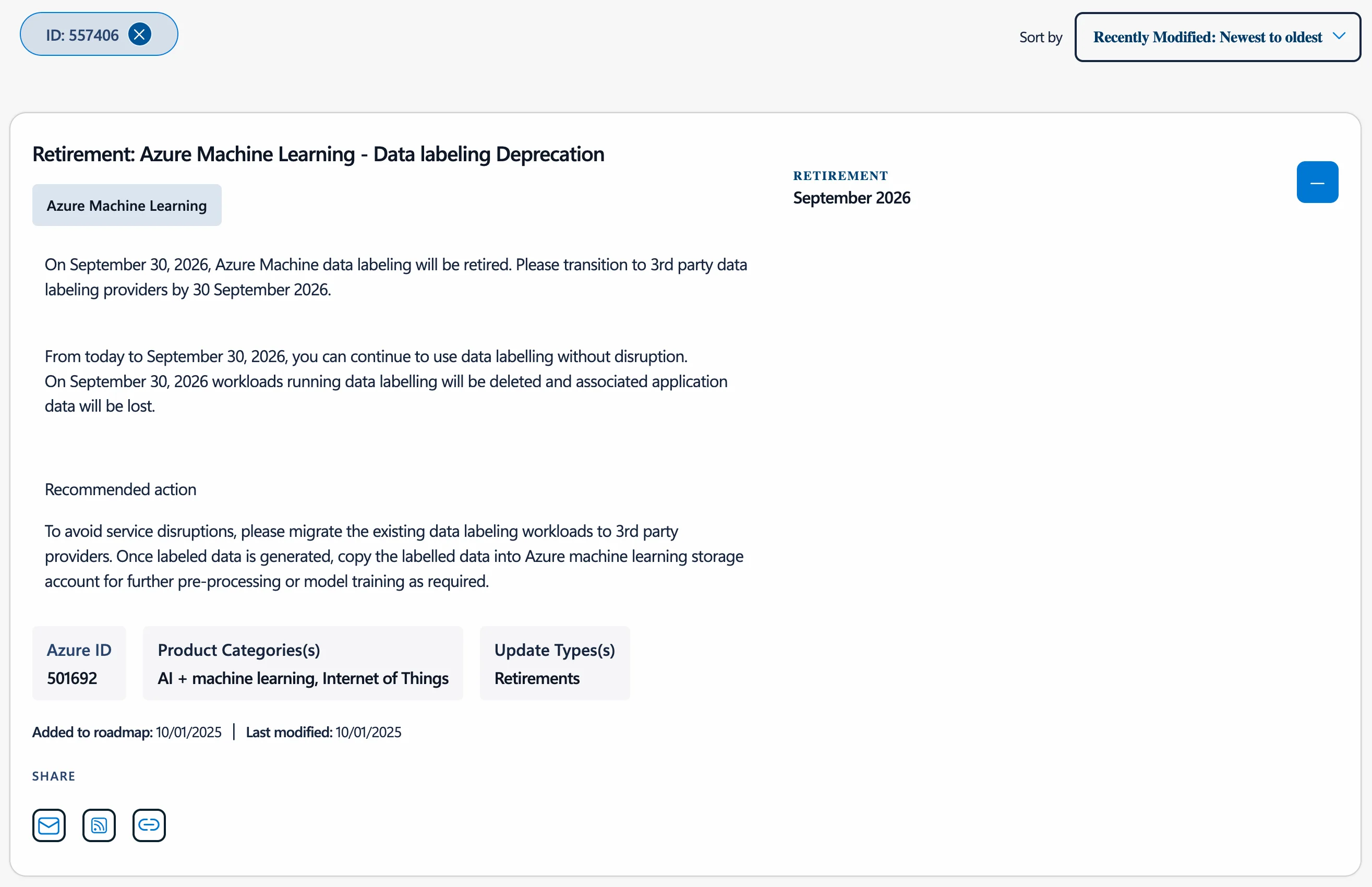
Microsoft has officially announced the retirement of Azure ML Data Labeling on September 30, 2026. On this date, the service will be permanently shut down, all active labeling workloads in Azure ML Studio will be terminated, and associated application data will be permanently deleted.
To prevent pipeline disruptions, engineering and data science teams must evaluate alternative third-party annotation platforms and plan an orderly infrastructure transition well ahead of the deadline.
To assist teams executing this evaluation, this article provides a direct, technical side-by-side comparison between the data labeling component of Azure ML Studio and CVAT (Computer Vision Annotation Tool). We examine how both platforms handle core data formats, project setup, annotation tools, AI-assisted labeling, quality control, deployment, and pricing.
The following breakdown outlines where each tool fits based on your infrastructure strategy, data sensitivity requirements, and specific project types.
TL;DR: CVAT vs. Azure ML Data Labeling
Platforms Overview & Comparison Criteria
Before we dive into the side-by-side comparison of the two platforms, let's first take a look at how they approach annotation.
CVAT (Computer Vision Annotation Tool) is an open-source annotation platform in active development since 2018. It supports image, video, 3D point cloud, and audio annotation with manual tools (bounding boxes, polygons, masks, keypoints, cuboids), AI-assisted labeling, quality control, and team collaboration. It is designed for vision and ML teams that need deployment and workflow flexibility.
CVAT offers three deployment options: free self-hosted (MIT license), managed cloud (CVAT Online), and enterprise (CVAT Enterprise) with added security and SLAs for on-premises use.
Azure ML data labeling is a tool within the Azure ML platform. It is built for teams using Azure, allowing labeling and direct integration into Azure ML training pipelines. It supports image, text, and audio annotation and includes ML-assisted labeling for supported project types. It is only available as a cloud solution within Azure.
While Azure ML supports the whole ML training pipeline, in this review, we will only compare its data labeling component to CVAT and the features both tools offer for building data annotation pipelines, including:
- Supported data formats and import/export options
- Project setup, dataset splitting, and team management
- Annotation editor and main labeling tools
- Quality control and validation
- AI-assisted labeling features
- Performance analytics and reporting
- Integration with MLOps pipelines and external tools
- Deployment flexibility and data control
- Pricing and total cost of ownership (TCO)
Criteria #1: Data Management & Formats
Let’s start with the basics—the type of data you can label on both platforms, and where you can upload it from.
Supported Input Formats
CVAT was originally designed for computer vision annotation, so it supports image, video, and 3D point cloud workflows. Following recent platform updates, CVAT also natively supports audio annotation, introducing a dedicated workspace equipped with waveform controls and interval region tags.
In comparison, Azure ML data labeling focuses on image, text, and audio annotation. Unlike CVAT, which is tailored for computer vision, Azure ML is a general MLOps tool. It does not support native 3D point cloud annotation or frame-by-frame video interpolation. Instead, users must extract video frames individually, which disables timeline tracking and interpolation.
The difference becomes more apparent when looking at the specific file extensions and data uploading workflows.
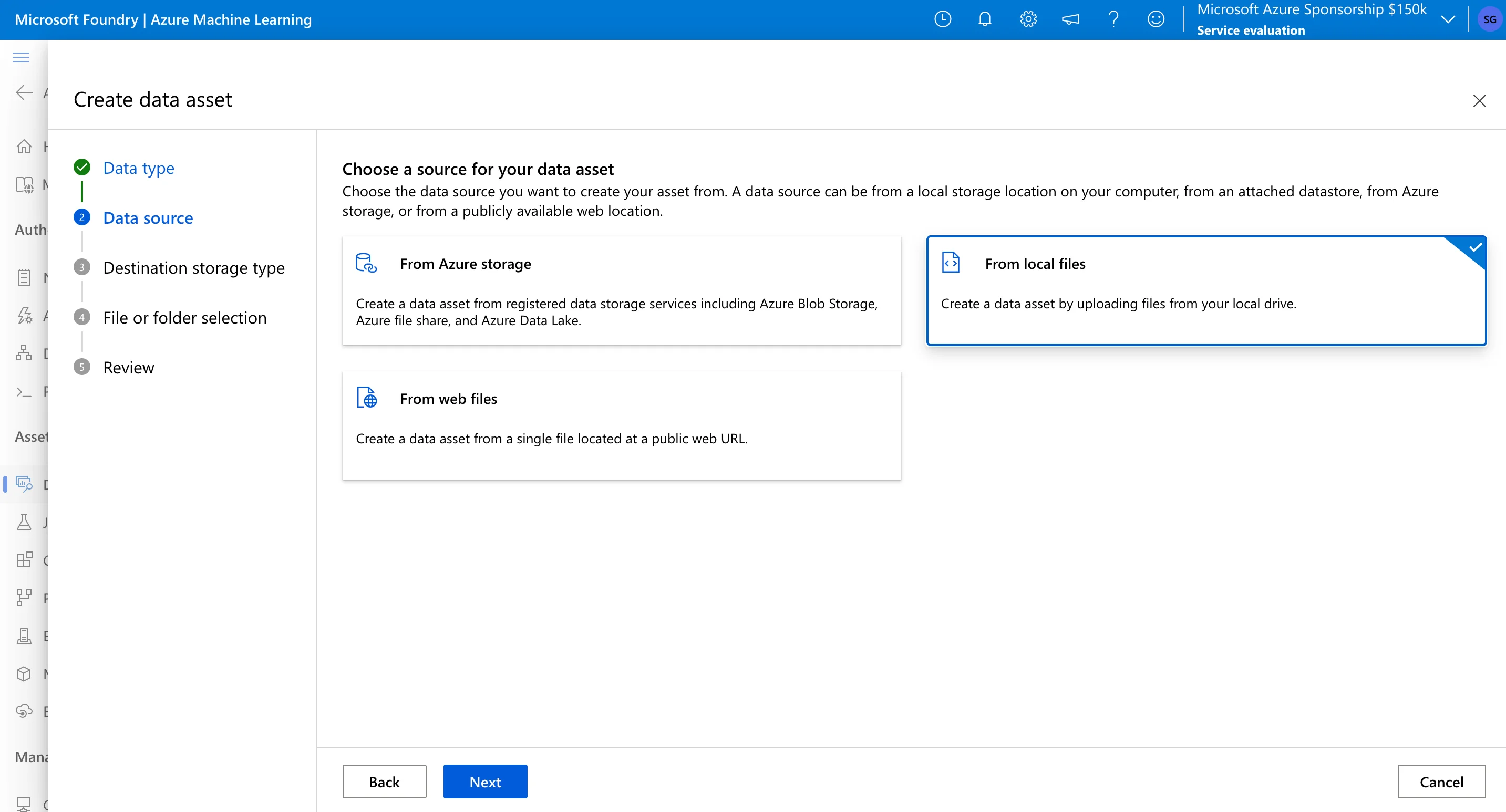
Azure ML lets you upload data assets from various sources, including local folders, workspace datastores, Azure Storage, and public URLs. However, data must be flat. For images, Azure supports formats such as .jpg, .jpeg, .png, .bmp, .tif, .tiff, and DICOM files. For text labeling, Azure supports .txt, .csv, and .tsv files. For audio labeling, Azure supports .wav and .mp3 files.
After import, Azure wraps these files into managed Data Assets, which works well for Azure-native pipelines but can add conversion steps for non-Azure workflows.
CVAT supports a storage-agnostic workflow. You can connect AWS S3, Google Cloud Storage, Azure Blob Storage, or local file shares without first importing the data into a platform-managed asset format. Because it uses the Python Pillow library and FFmpeg under the hood, CVAT supports a broad set of image, video, 3D, and audio file formats:
- Images: .jpeg, .png, .bmp, .gif, .ppm, .tiff, and even .pdf files.
- Videos: .mp4, .avi, .mov, .mkv, .webm, and more without requiring pre-splitting.
- 3D / LiDAR: .pcd and .bin.
- Audio: .wav and .mp3.
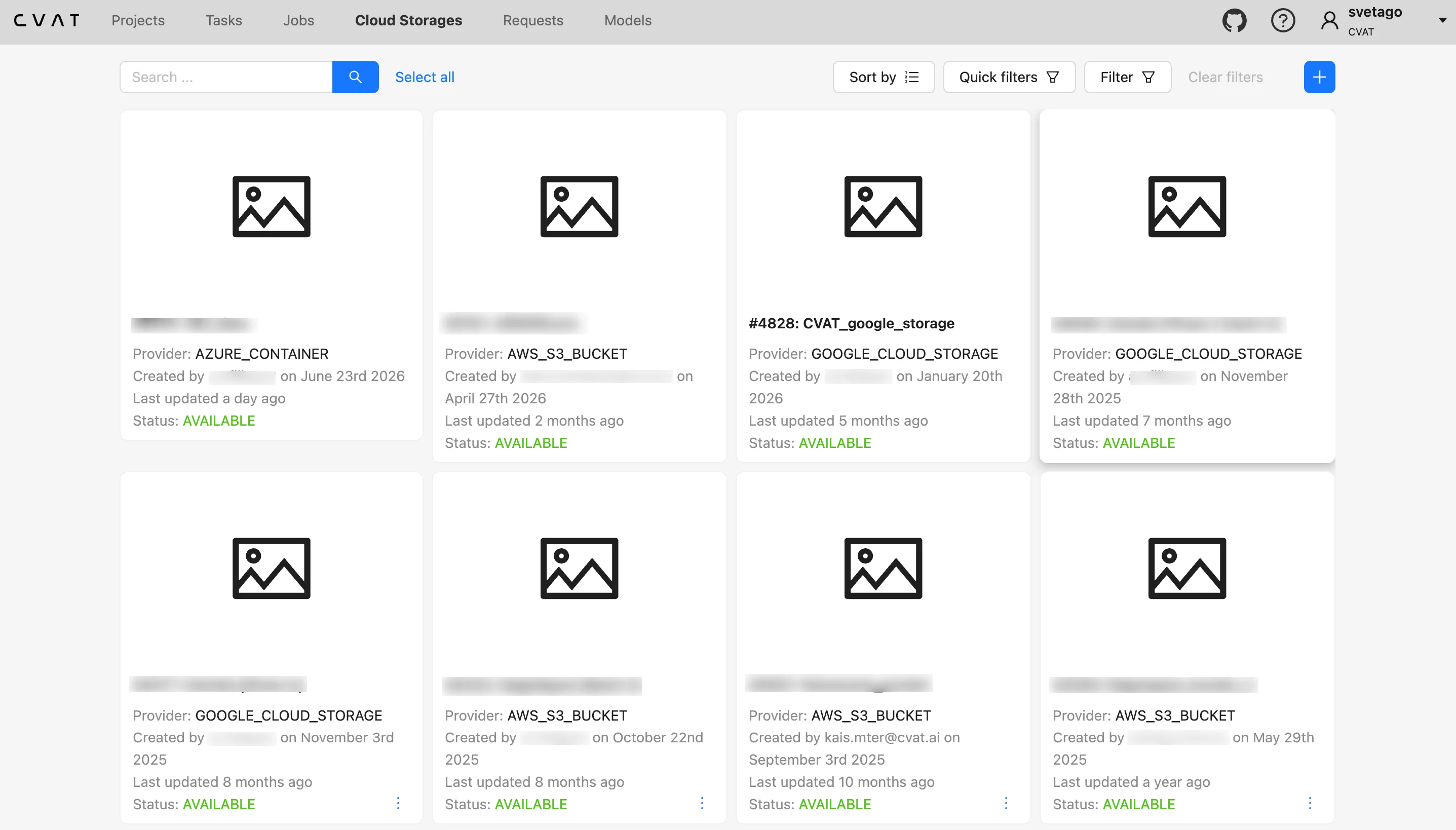
Export Options
Once your labeling team is done, you need to get those annotations into your training pipeline.
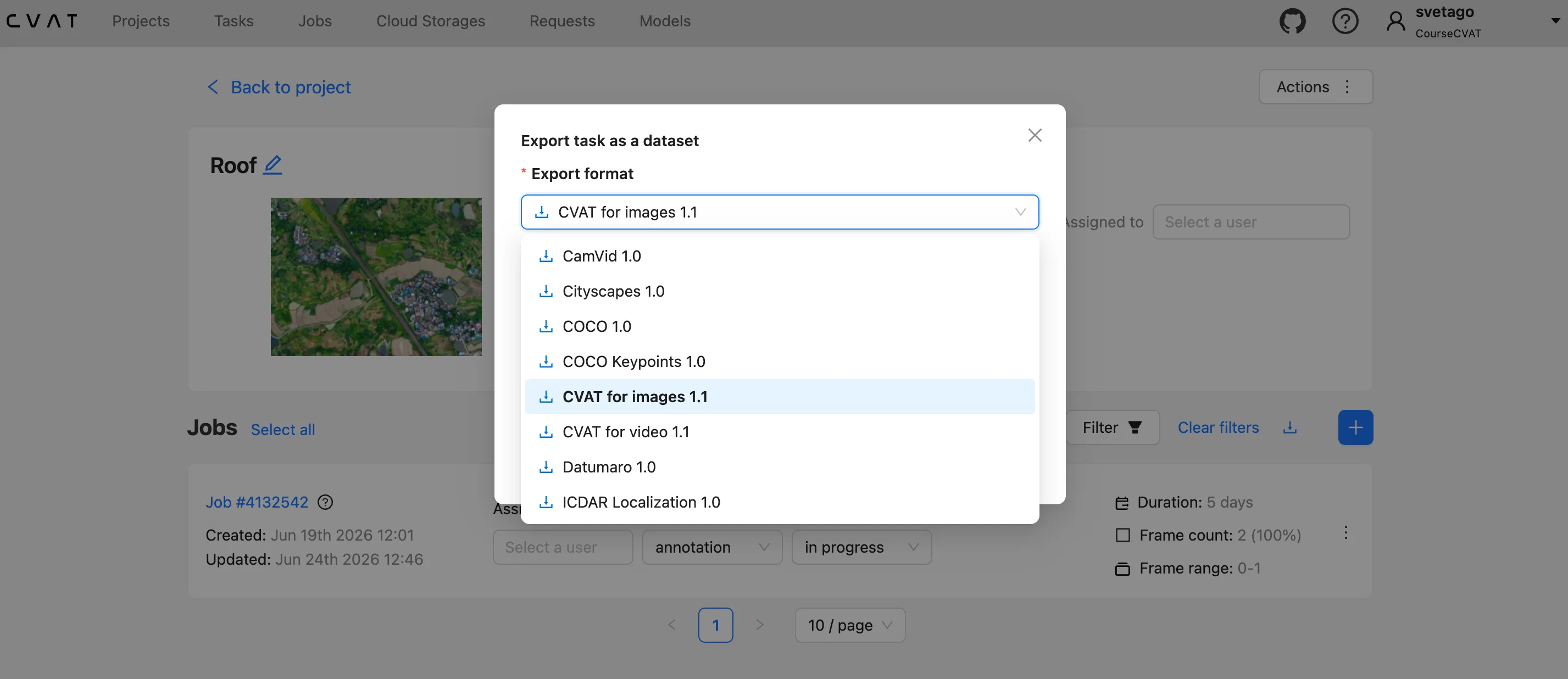
CVAT exports annotations to 20+ task-specific formats, including COCO, YOLO, Pascal VOC, and KITTI.
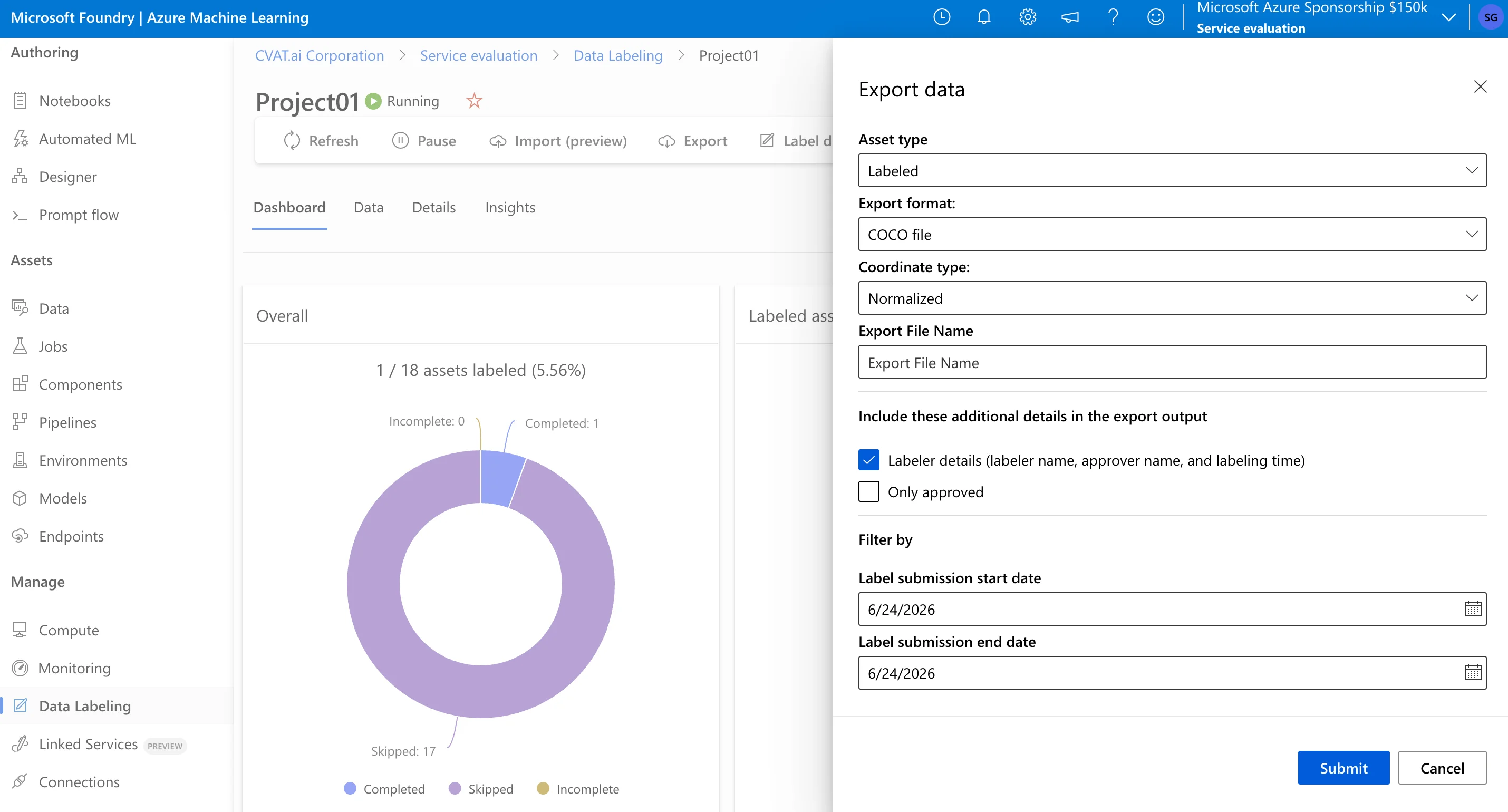
Azure ML data labeling export options depend on the project type:
- Azure ML Dataset / MLTable: Azure can export labeled data as an Azure Machine Learning dataset or MLTable data asset, depending on the project type and API version.
- COCO Format: For supported image labeling projects, Azure can export annotations in standard COCO JSON format. Coordinate output can be configured as either normalized values or absolute pixel coordinates.
- CSV Files: For project types other than Text Named Entity Recognition, Azure can export labels in CSV format.
- CoNLL Files: For Text Named Entity Recognition projects, Azure can export labels in CoNLL format. This export requires assigning a compute resource and runs offline as part of an experiment run.
Key Takeaway
For teams working with video, 3D point clouds, or pipelines that require many downstream annotation formats, CVAT provides broader format and storage flexibility. It can connect to external cloud or local storage and export to a wider set of task-specific formats, including YOLO, Pascal VOC, KITTI, COCO, and others.
Azure ML data labeling fits workflows where the dataset and downstream training process remain inside Azure ML. It supports image, text, and audio labeling, but its native format selection and annotation workflow are narrower for teams that need video annotation, 3D point cloud support, or many non-Azure export targets.
Criteria #2: Project Setup & Team Assignment
After you have loaded your raw data into one of the platforms, the next logical step is to set up the project and all the corresponding labeling parameters, including class labels and attributes.
Depending on the size of your dataset and your labeling pipeline, this is also the time to split the dataset into manageable chunks and assign them to your teammates or an external team of annotators.
Let’s compare how Azure ML data labeling and CVAT handle this.
Project Creation and Label Definition
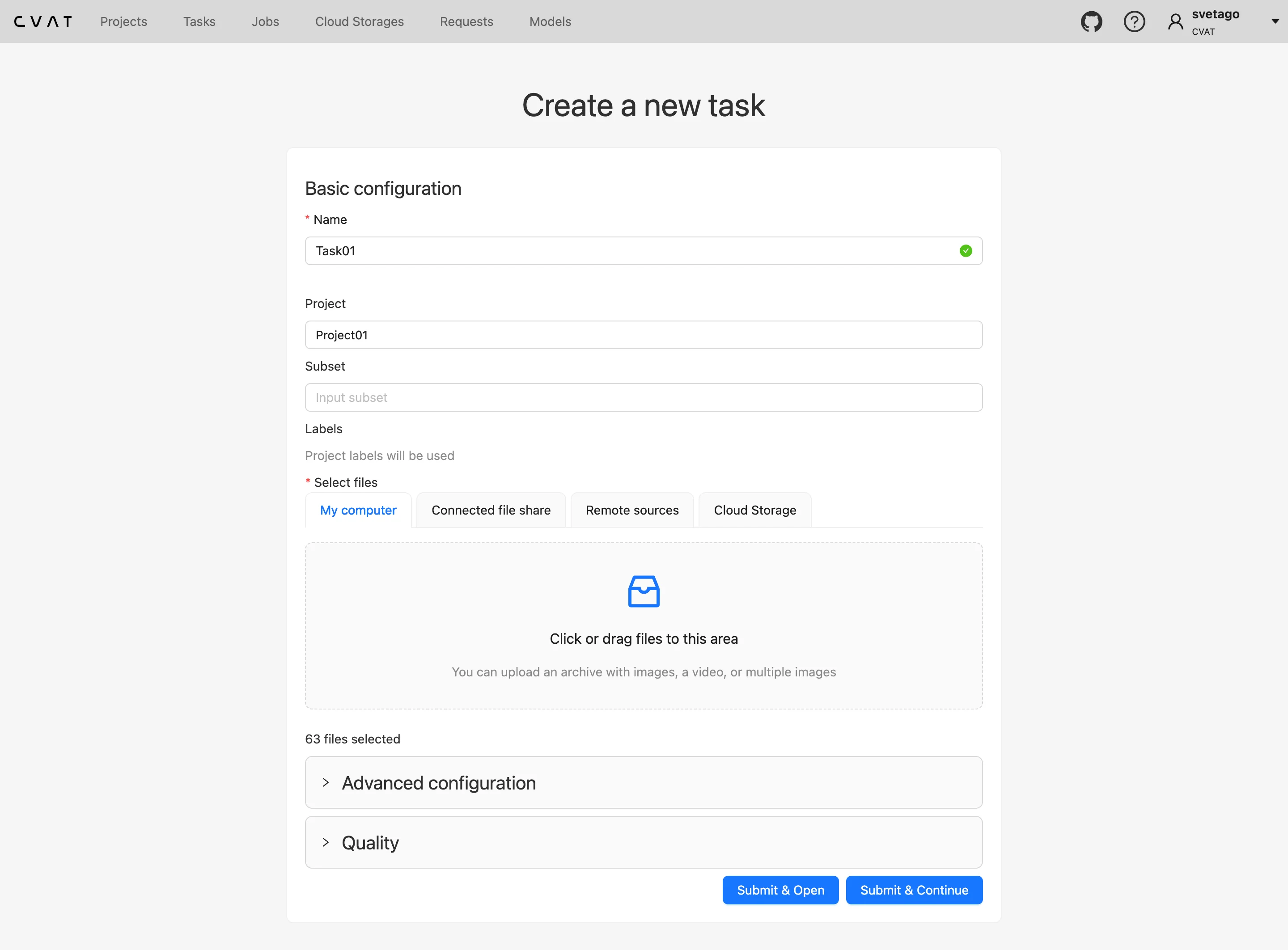
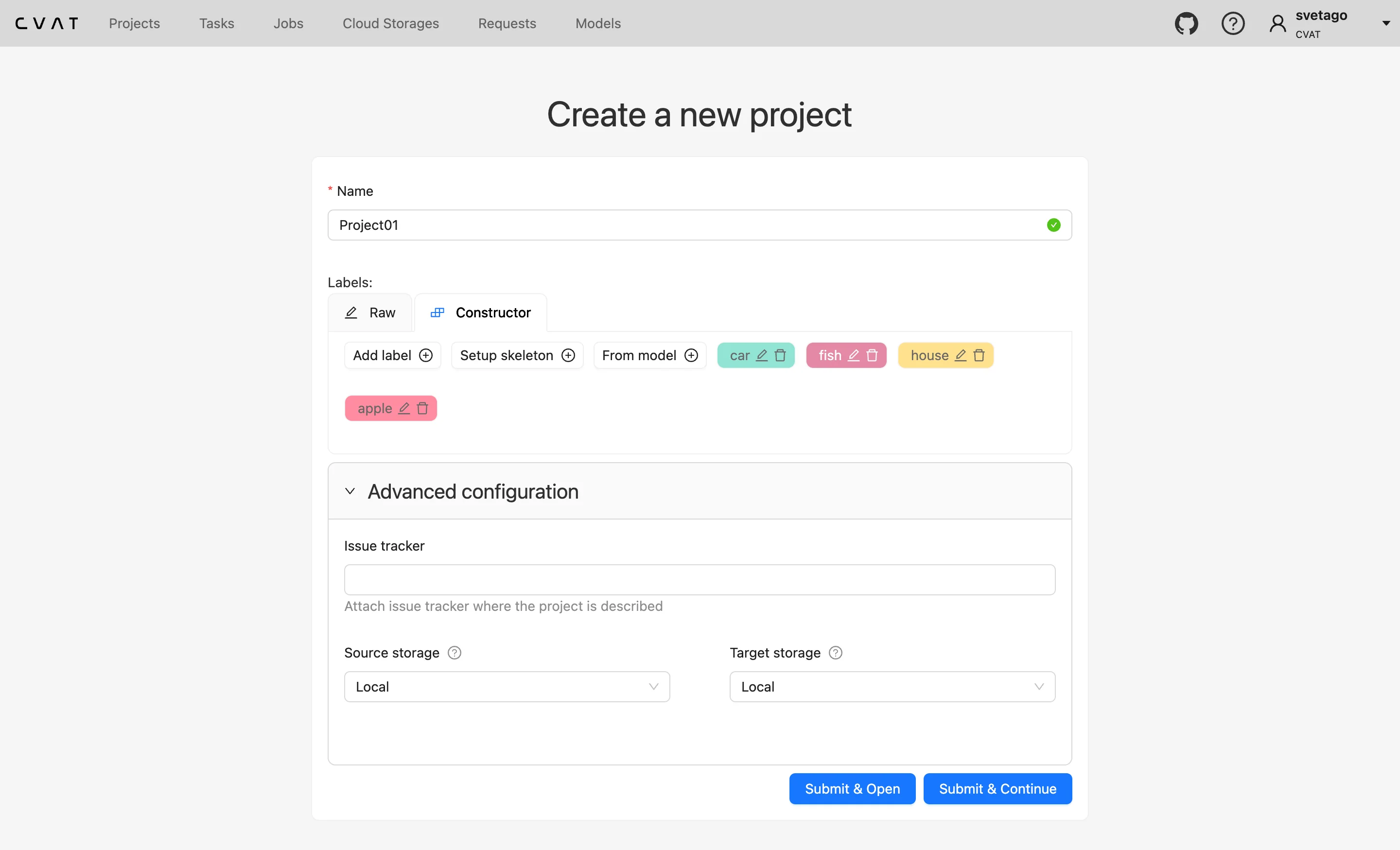
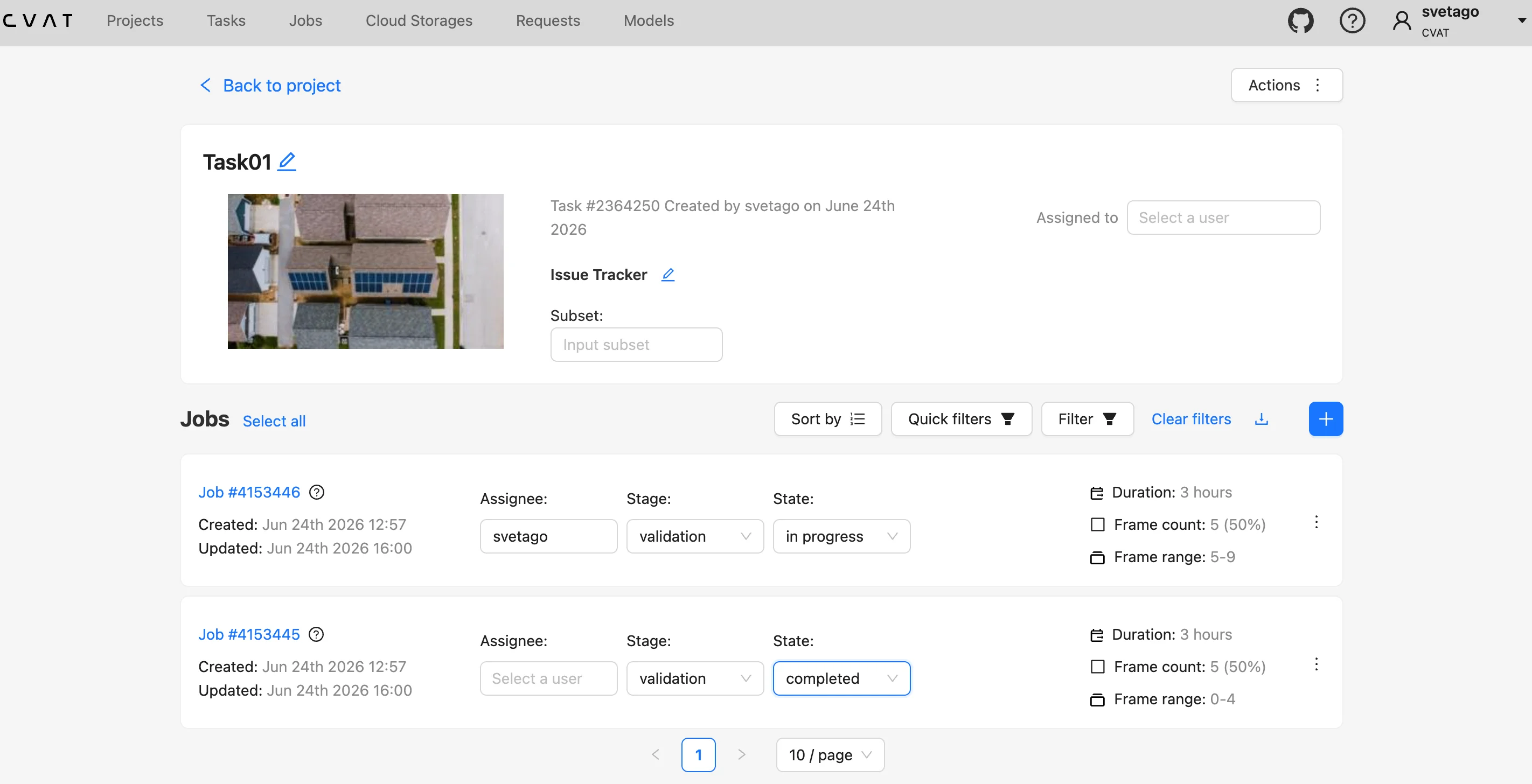
CVAT uses a “Project → Task → Job” hierarchy. You can start either by creating a project or by creating a standalone task. A project is used to define and reuse labels across related tasks, including label attributes such as text fields, checkboxes, or dropdowns. CVAT also supports raw JSON mode for label configuration, allowing you to copy and reuse complex labeling schemas across projects or tasks.
After creating a project, you create a task inside it, upload your images, videos, or 3D data, add task instructions or labeling guidelines in Markdown format, and split the dataset into jobs for annotation or review. This structure is useful when several datasets or annotation batches share the same labeling schema, or when a larger dataset needs to be divided into smaller jobs and assigned to different annotators or reviewers.
Azure ML uses a step-by-step setup wizard where early choices determine the available labeling tools and project settings.
First, you must select your media type (Images, Text, or Audio). For images, you must choose from five specific Labeling task types: Multi-class Classification, Multi-label Classification, Bounding Box, Instance Segmentation (Polygon), or Semantic Segmentation (Masks).
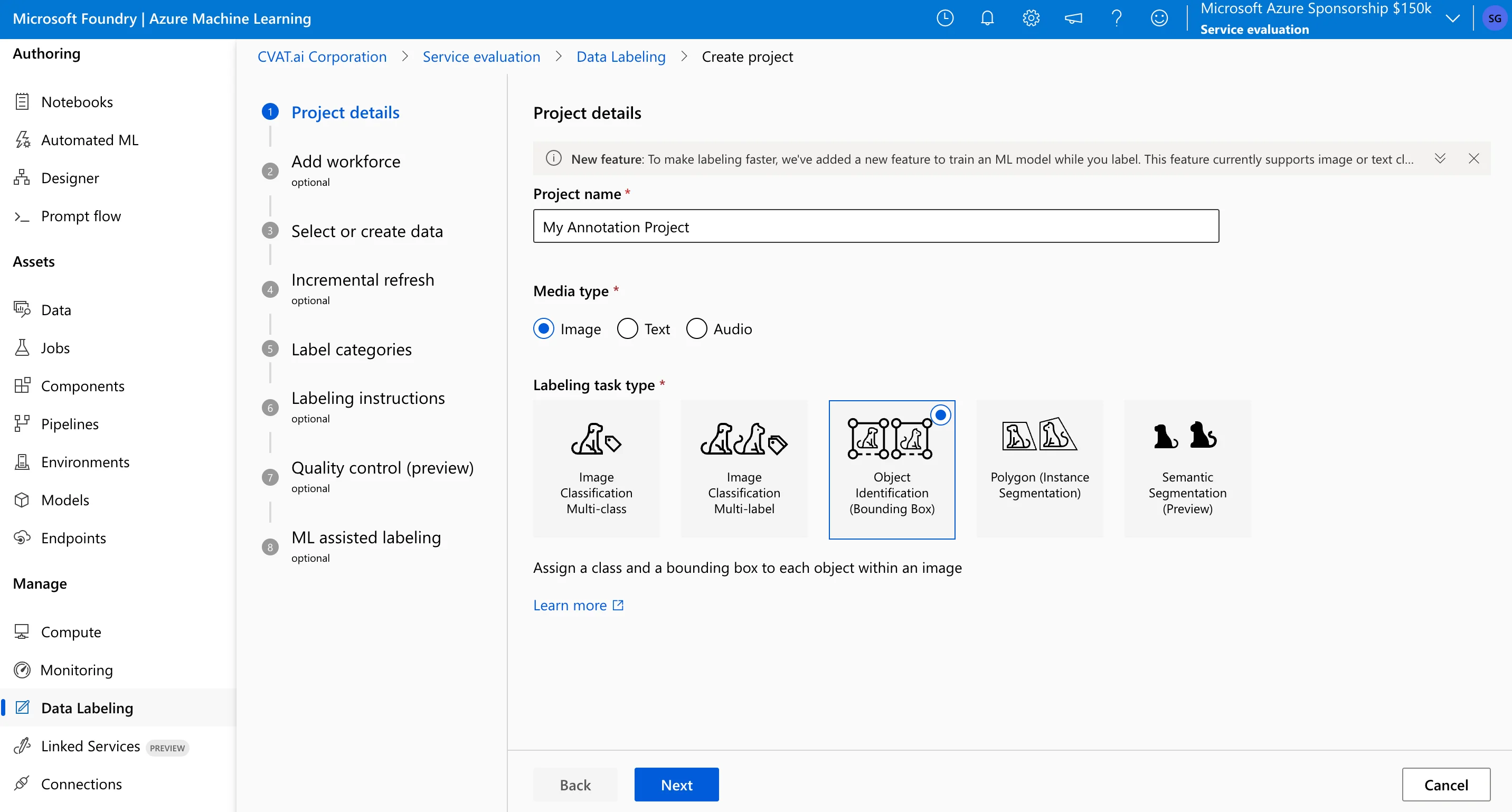
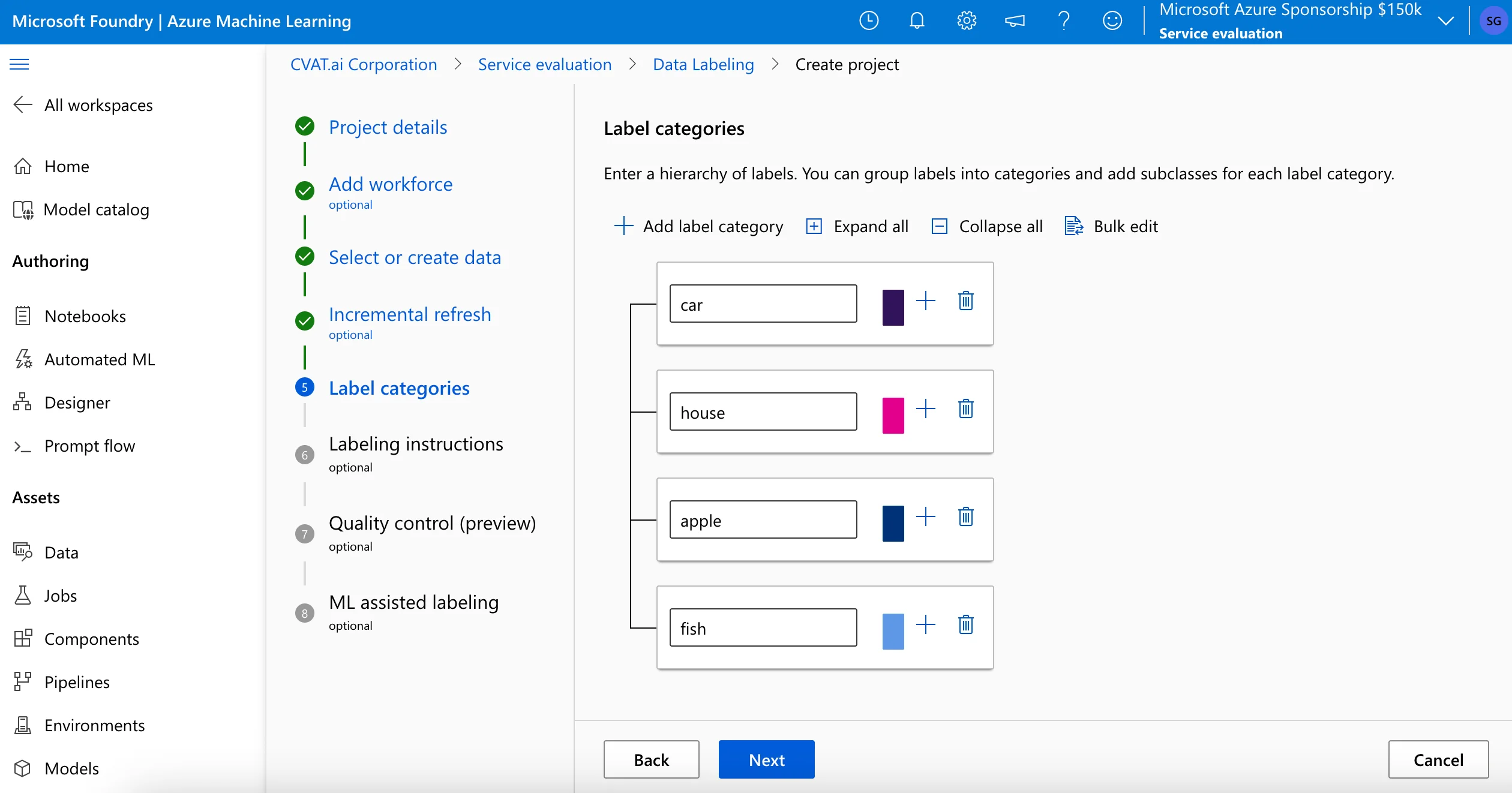
Once you pick a task type, it determines which drawing tools are available in the editor. Only after making this choice can you proceed through subsequent standalone screens to add marketplace vendors, link your data assets (either by selecting an existing dataset or creating a new one on the fly), define a flat list of label categories, and upload instructions.
Dataset Splitting and Task Distribution
Managing how data is sliced and handed out to your workforce looks completely different on both platforms.
As mentioned previously, CVAT uses a "Project -> Task -> Job" hierarchy. When you upload a large dataset, you can automatically split it into smaller "Jobs" (e.g., 100 frames per job). This structure supports direct job assignment across annotators and reviewers. You can assign different jobs within the same dataset to different annotators or reviewers simultaneously without any data overlapping.
Azure ML Data Labeling does not use the same task-and-job assignment model. You connect a data asset to the project, assign a labeling team, and the system serves items through an automatic queue when annotators start labeling.
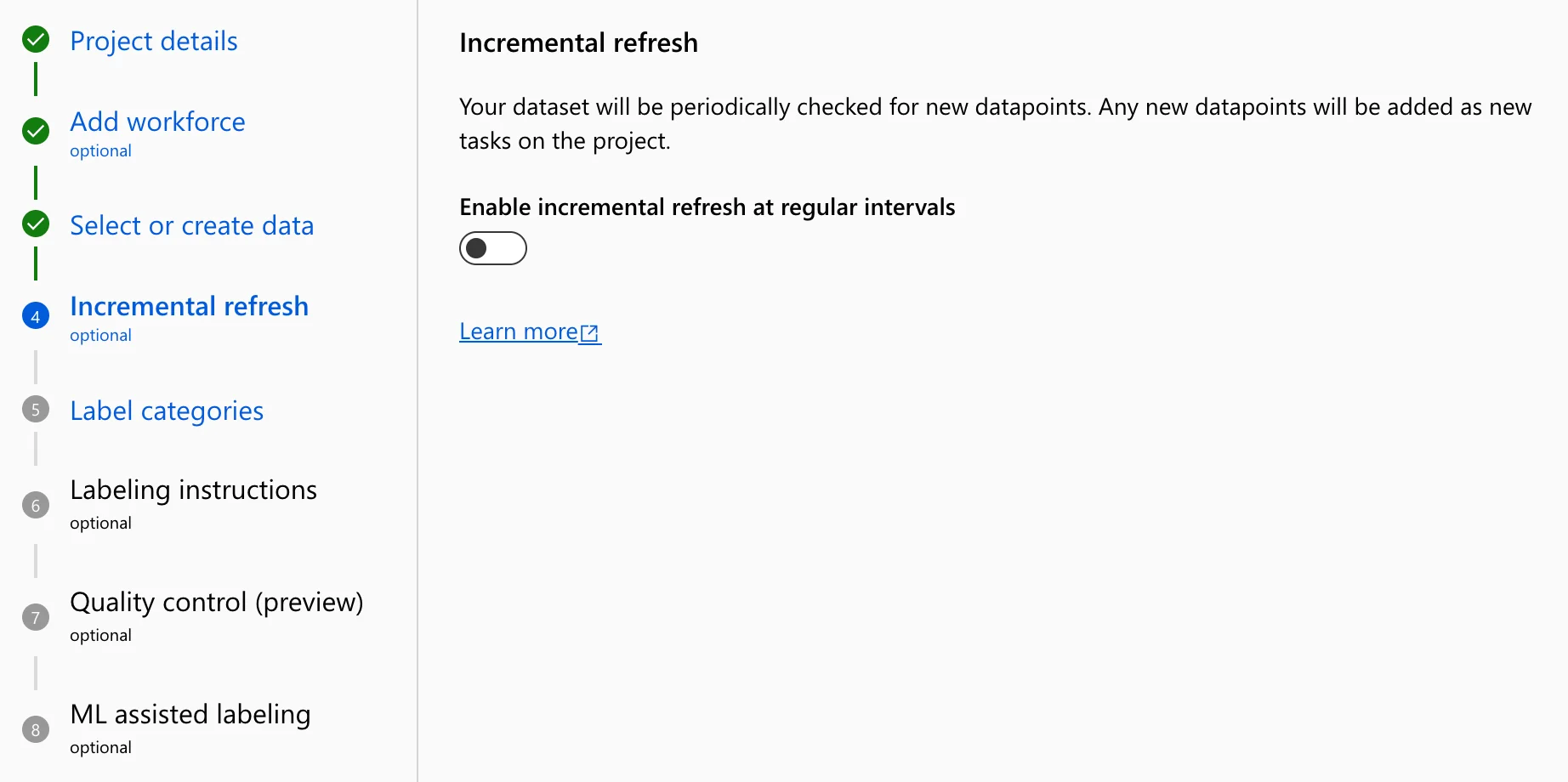
This model works for ongoing data ingestion, especially when incremental refresh is enabled, but it gives managers less direct control over assigning specific subsets of data to specific annotators.
Assigning Annotators and Other Team Roles
User management is crucial, especially if you work with external vendors or have strict compliance requirements.
Azure ML Data Labeling relies on Microsoft Entra ID and Azure RBAC for access management, so internal teammates can be added through existing corporate identity and permission controls. It provides two options for labeling teams:
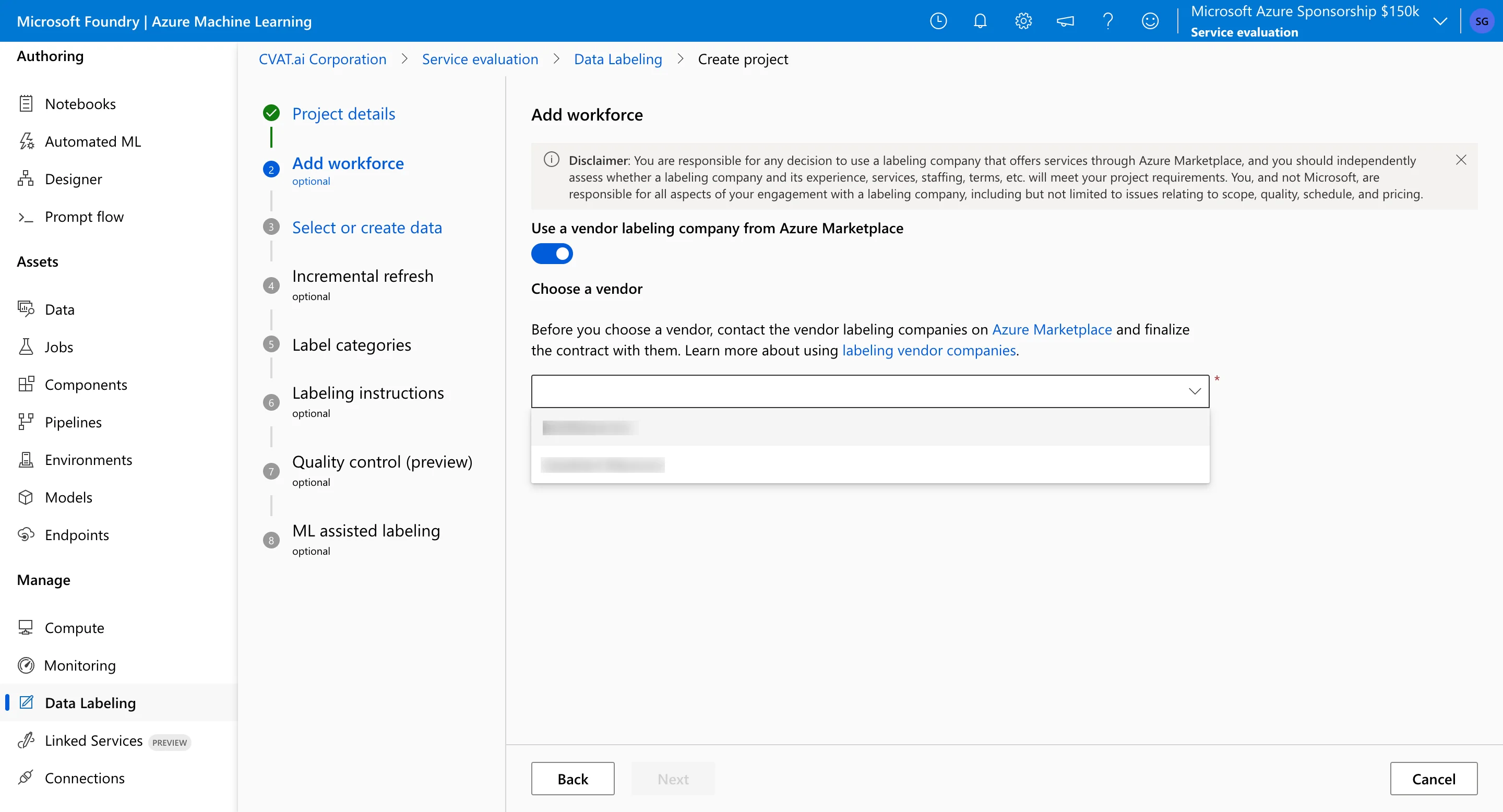
- Enterprise Vendors: You can turn on the Azure Marketplace vendor option directly in the setup wizard, select a certified labeling company, and connect them to the project through the Azure Marketplace workflow.
- Internal or Independent Teams: You assign permissions using the built-in Labeler role or custom configurations (like Labeling Team Lead or Vendor QA). If your workers are independent contractors not found in the marketplace, you must manually invite them as guest users through your corporate Microsoft Entra ID.
CVAT features its own independent user management system based on Organizations and Workspaces, using a split-layer role configuration. At the system-wide level, users hold Global Roles (Admin, Worker, or the default User). When operating within a specific workspace team, the platform enforces the Organization Roles: Owner, Maintainer, Supervisor, and Worker.
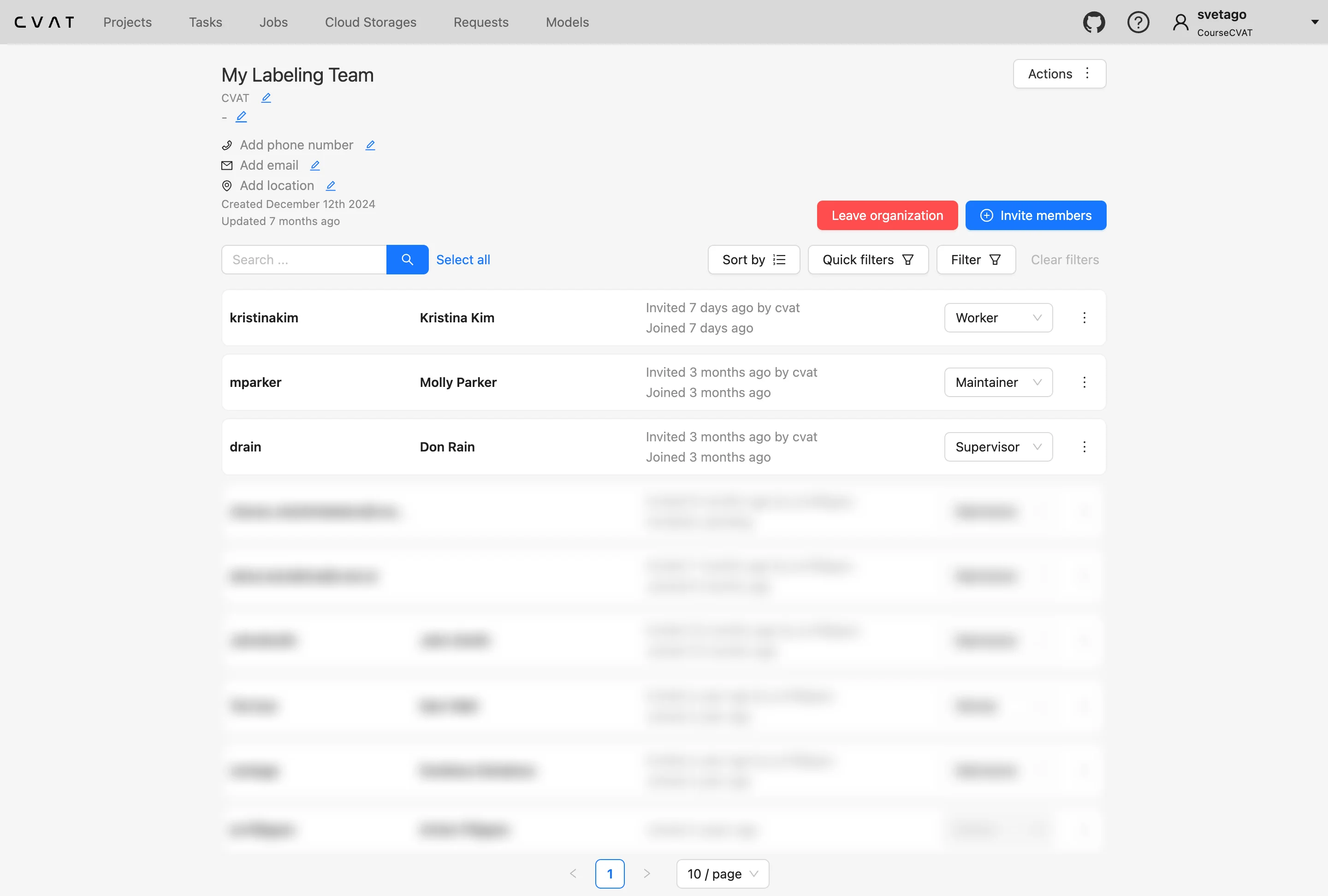
While this local account configuration allows you to invite internal or external users by email, enabling corporate single sign-on (SSO) on a self-hosted instance requires your DevOps team to manually configure external authentication protocols like LDAP or OAuth2.
Key Takeaway
CVAT and Azure ML data labeling use different project organization models. CVAT separates work into projects, tasks, and jobs: projects store reusable label schemas, tasks contain the uploaded dataset and instructions, and jobs split the dataset into smaller units for annotation or review. This structure is useful when several annotation batches share the same labels, or when managers need to assign specific parts of a dataset to different annotators or reviewers.
Azure ML uses a wizard-based setup flow where the selected media type and labeling task determine the available tools and project configuration. Instead of splitting data into manually assigned jobs, Azure connects data assets to a project and distributes items through an automatic labeling queue. This fits Azure-managed workflows and Marketplace vendor setups, but gives project managers less direct control over assigning specific dataset subsets to specific workers.
Criteria #3: Annotation Interface and User Experience
Once the project is configured and assigned, day-to-day productivity relies heavily on the workspace where annotators spend hours tracing, clicking, and tagging. The design, responsiveness, and layout of this workspace directly impact your engineering timelines and data quality, especially when scaling up a project to thousands of assets.
The way CVAT and Azure ML approach this workspace design reveals two entirely different operational approaches.
Core Annotation Tools and Precision Controls
The two platforms expose annotation tools differently:
CVAT provides an annotation workspace with tools for 2D bounding boxes, polygons, polylines, points, masks, and tags. It also includes assisted drawing options such as magnetic polygon tracing, auto-bordering, object merging, and annotation propagation across frames. For specialized computer vision workflows, CVAT supports ellipses, skeleton keypoints, and 3D cuboids for LiDAR point clouds.
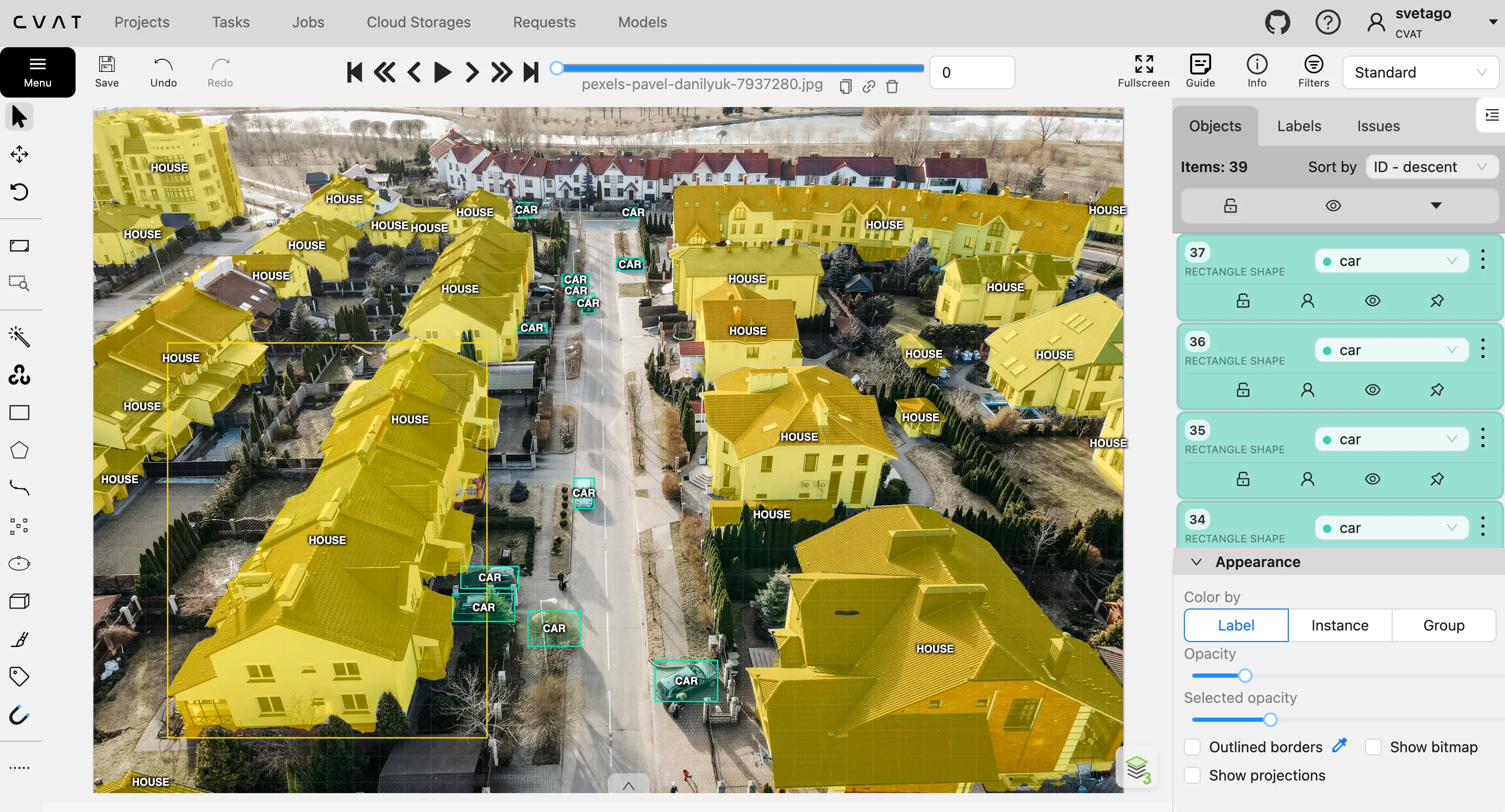
In addition, CVAT provides annotation controls such as transparency settings, brightness and contrast adjustment, layer controls, and keyboard shortcuts for common actions.
Azure ML data labeling provides a task-specific interface based on the project type selected during setup. It includes keyboard shortcuts and basic brightness and contrast settings, but the workspace controls are relatively limited. If you create an object detection project, the annotation workspace only exposes bounding box tools for that task. Other labeling modes, such as image classification or instance segmentation, are configured as separate project types rather than as tools available together in the same workspace.
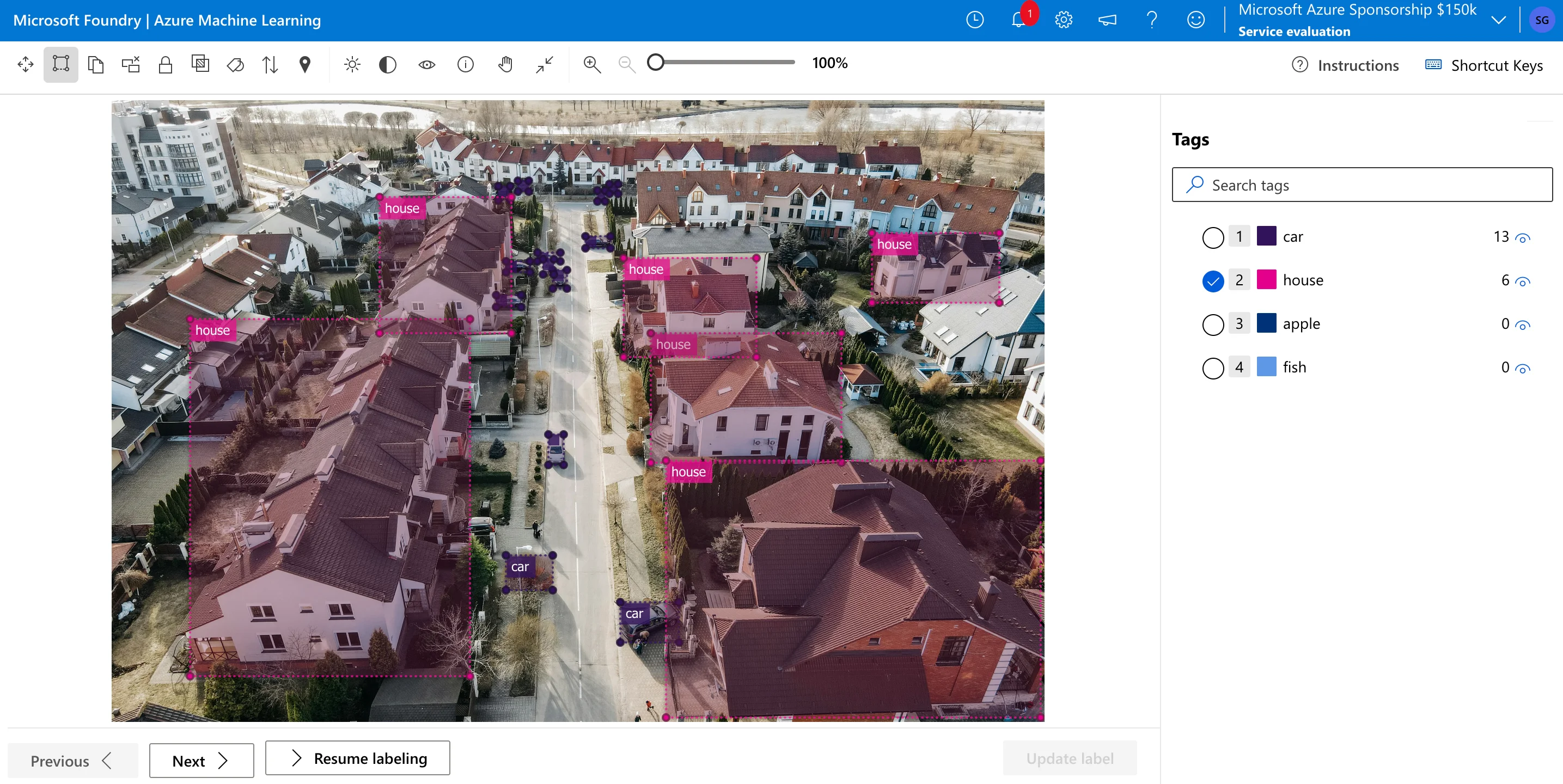
CVAT can also be configured for a narrower workflow, for example by using single shape mode when a task should use only one shape type. However, by default, CVAT exposes a broader set of annotation tools in the same workspace, so teams can annotate different objects with different shape types when a project requires mixed geometries. Azure ML data labeling does not provide the same range of specialized CVAT tools, such as polylines, skeleton keypoints, or video-oriented tracking controls.
Handling Video Data and Temporal Continuity
Working with sequential frame data highlights the biggest functional divide between the two systems:
CVAT includes a video timeline with interpolation support. An annotator can draw a shape on one frame, adjust it on a later frame, and have CVAT interpolate the intermediate positions. CVAT also preserves object IDs across frames, which is useful for tracking tasks.
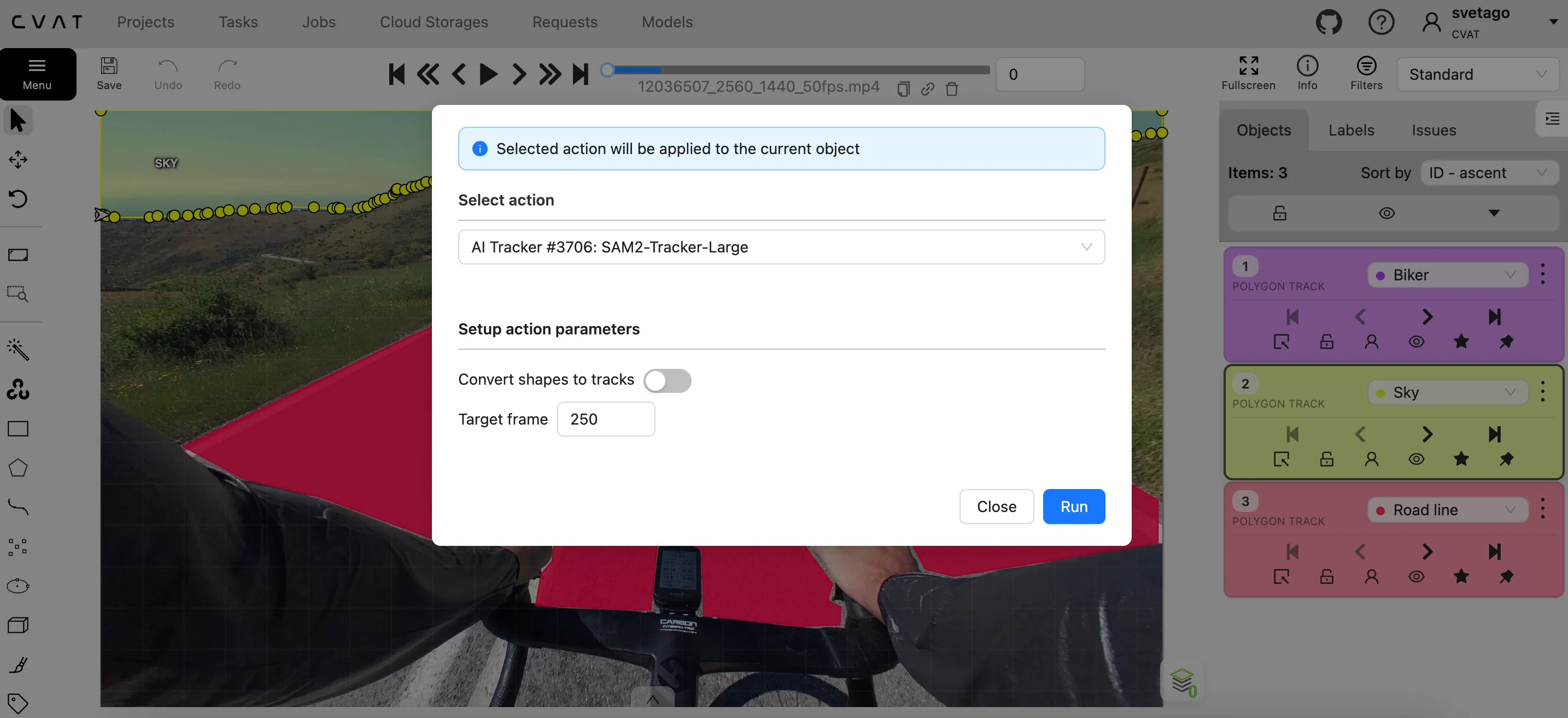
Azure ML data labeling does not feature a native video timeline or tracking engine. As noted in the data formats section, videos must be broken down into individual image files prior to or during ingestion. Because each image is treated as an isolated asset in the labeling queue, annotators cannot track an object’s ID across a timeline or utilize interpolation to skip repetitive work.
Key Takeaway
CVAT is better suited for workflows that require mixed shape types, video interpolation, 3D cuboids, or skeleton keypoints. Azure ML uses a more task-specific interface for image classification, bounding box, polygon, and mask labeling projects.
Criteria #4: AI-Assisted Labeling Tools
Manual annotation is often a significant bottleneck in machine learning pipelines. To accelerate this process, both platforms offer AI-assisted features that use neural networks to automatically predict or refine labels. However, the architectural approaches to model deployment and customization differ between the two systems.
Integration Architecture and Model Flexibility
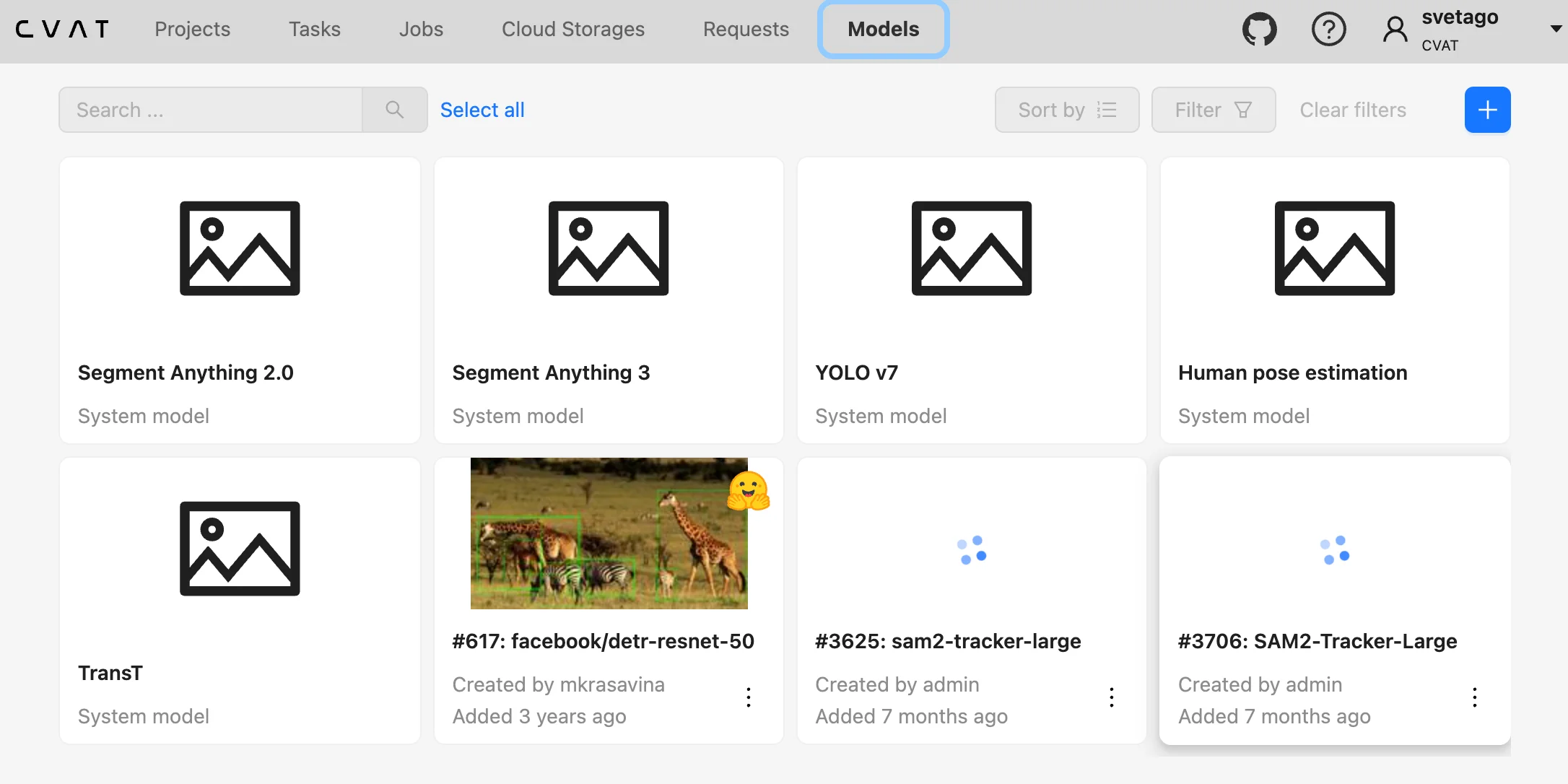
CVAT integrates with foundation models such as Segment Anything. SAM 2 supports video tracking workflows, while SAM 3 adds image segmentation with visual prompts and label-based text prompts.
For infrastructure, it uses the serverless Nuclio platform to host these foundation models inside your cluster. Alternatively, CVAT supports an agent-based workflow using CVAT AI agents. These agents operate independently of the main server; you register a custom model metadata package via the CVAT CLI and run a lightweight Python service on your own local GPU or external hardware. The agent streams data from the platform via API, runs it against your custom model weights (such as a custom YOLO or Hugging Face model), and returns the annotations. This allows developers to deploy custom AI logic across a team without altering the core server infrastructure.
Azure ML data labeling uses ML-assisted labeling as a background human-in-the-loop workflow. After some items are manually labeled, Azure can use transfer learning from a pretrained model to support two types of assistance: clustering and prelabeling.
In classification projects, clustering visually similar images together helps labelers review multiple related items on the same page.
After enough labeled data is available, Azure can also train a model on the manually labeled items and use it to generate prelabels for unlabeled data. For image classification, these prelabels are predicted tags; for object detection, they are predicted bounding boxes that labelers review and correct before submitting the page.
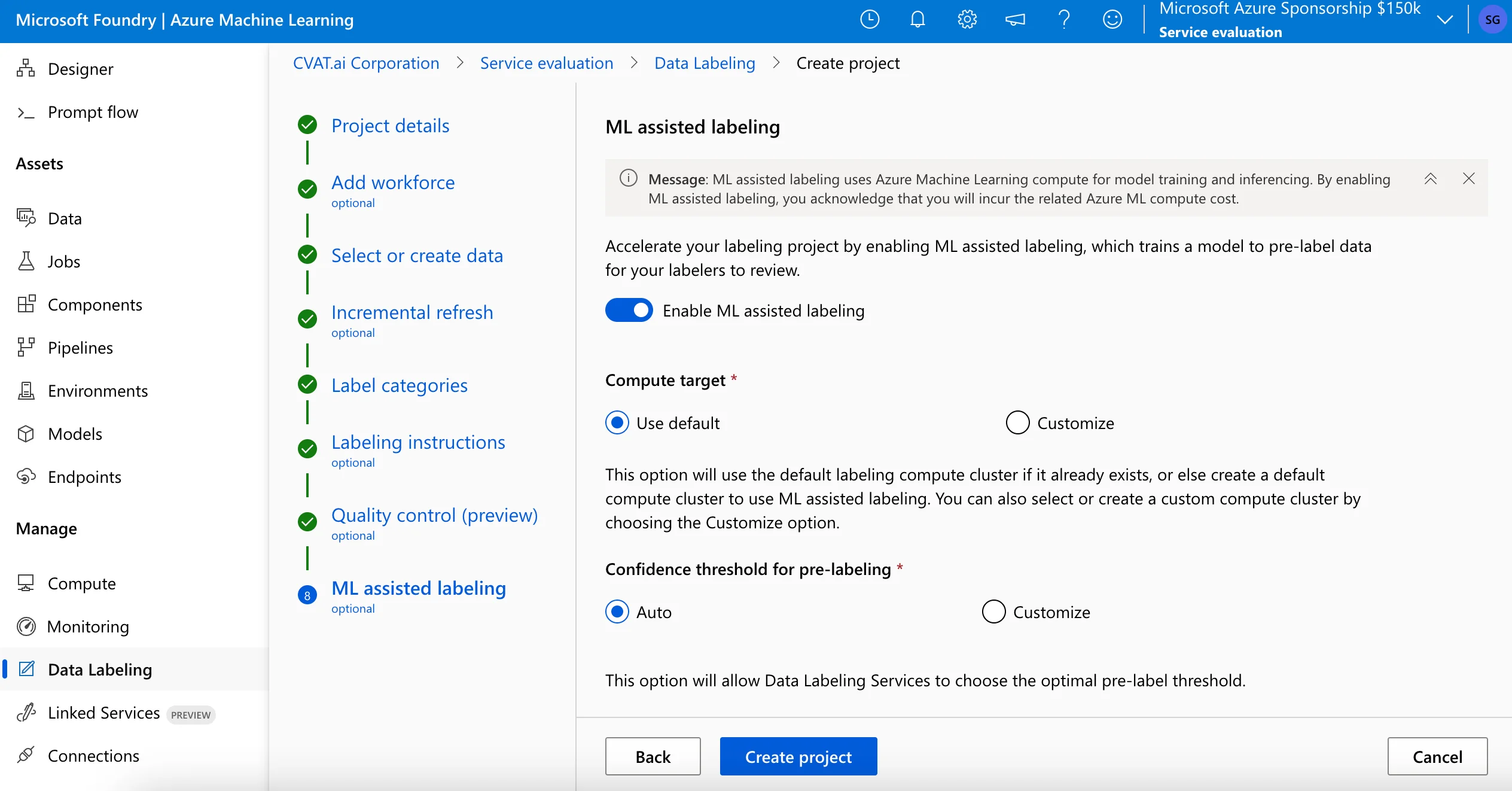
The number of manually labeled items required before assisted labeling starts is not fixed and can vary by project. Azure evaluates the trained model against a test set and displays prelabels only when predictions exceed a confidence threshold.
ML-assisted labeling also has project-type limitations: clustering is not used for object detection or text classification, ML-assisted labeling is not available for Semantic Segmentation (Preview), and medical images with .dcm extensions are excluded from ML-assisted labeling.
Interaction Models for the Annotator
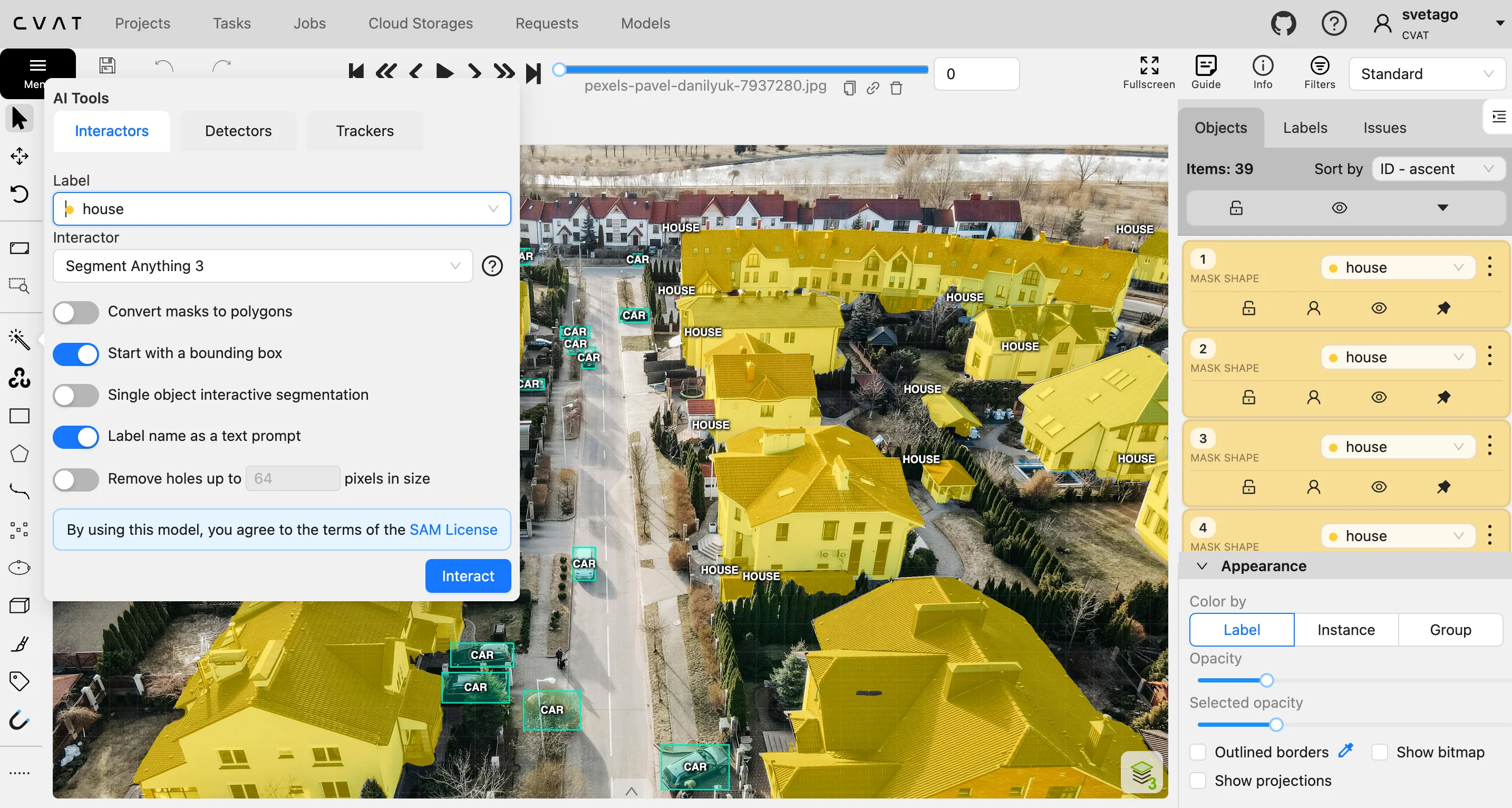
CVAT focuses on interactive model-assisted annotation, meaning that annotators can actively use AI tools frame by frame. For example, with the SAM integration, a labeler places a few bounding points over an irregular object, and the model generates a polygon contour.
Furthermore, as part of its SAM 3 integration, CVAT supports label-based text prompts. You can use the label names defined in your project as textual signals; when you click one example object, SAM 3 combines that visual cue with the text prompt to automatically search for, detect, and outline all other matching instances across the entire image. This eliminates the need to repeatedly click identical objects one by one, combining human guidance with on-the-fly multimodal foundation models.
Azure ML data labeling is designed around background assistance rather than interactive prompting. When ML-assisted labeling is enabled, the system uses manually labeled data to train a model and then supports later labeling through clustering or prelabeling, depending on the project type. The annotator’s role is to review grouped items or correct predicted tags and bounding boxes, rather than to interactively prompt a foundation model within the canvas.
Key Takeaway
CVAT is better suited when teams need interactive model-assisted annotation, Segment Anything integrations, or custom model deployment through AI agents or Nuclio. Azure ML is better suited when teams prefer a managed ML-assisted workflow that trains from accumulated manual labels and later supports clustering or prelabeling.
Criteria #5: Quality Assurance & Validation
Once shapes are on a canvas, validating that those annotations are accurate is critical before feeding them into a production model. Inconsistent review cycles can reduce dataset quality.
Validation Loops and Feedback Mechanisms
The structural workflow for checking data determines how easily your team can track progress and fix mistakes:
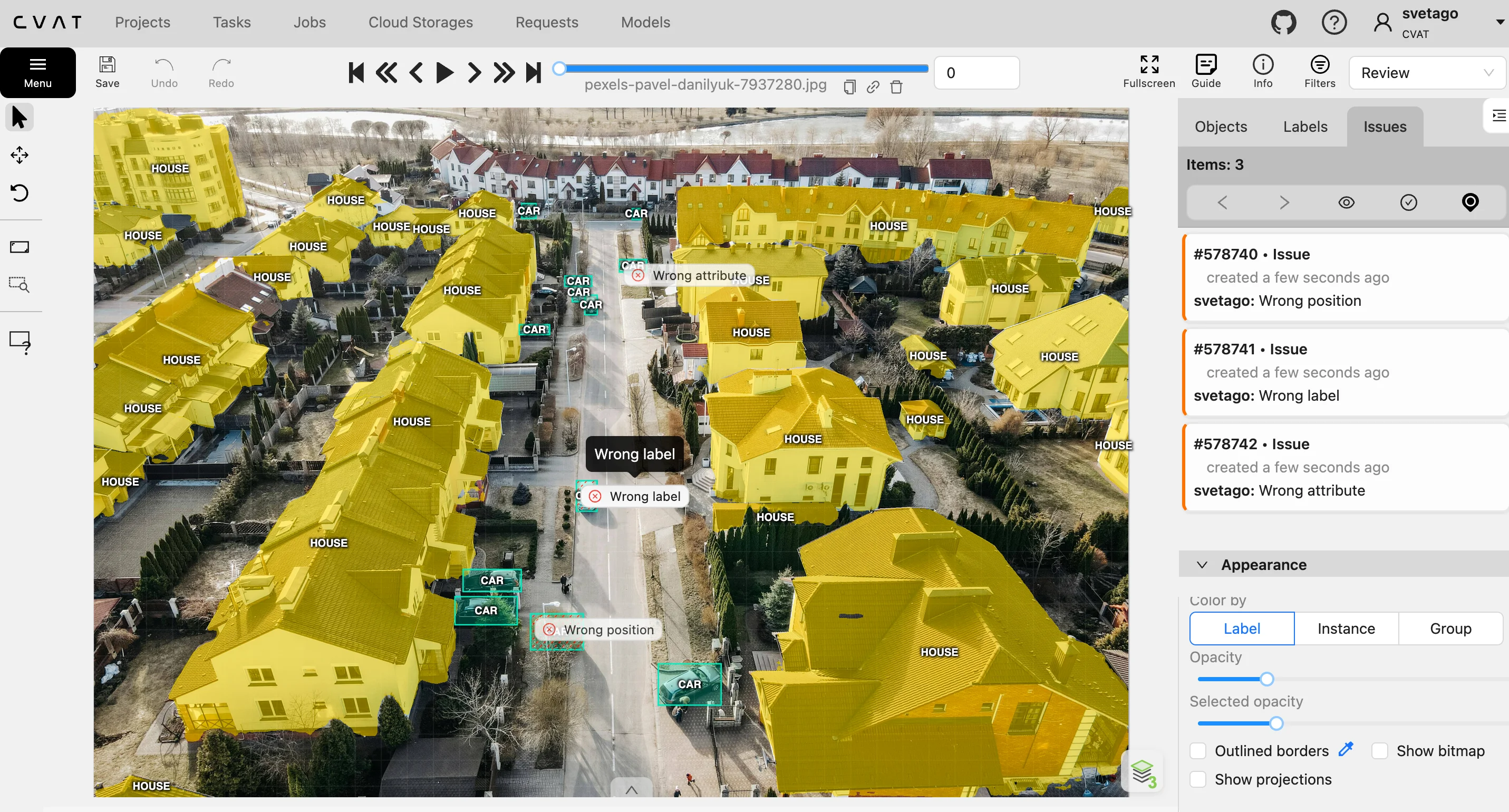
CVAT utilizes a structured review loop built directly into its workspace hierarchy. A job transitions through three distinct phases: annotation, validation, and acceptance, with each phase tracking its own workflow states: new, in progress, rejected, or completed.
When a reviewer takes over during the validation stage, they can lock annotations, adjust vectors, or leave specific visual comments pinned directly to a pixel or a bounding box. If errors are found, the job state is updated to rejected, and it is returned to the original annotator with specific feedback and an audit trail until the workflow advances to the acceptance stage and is marked as completed
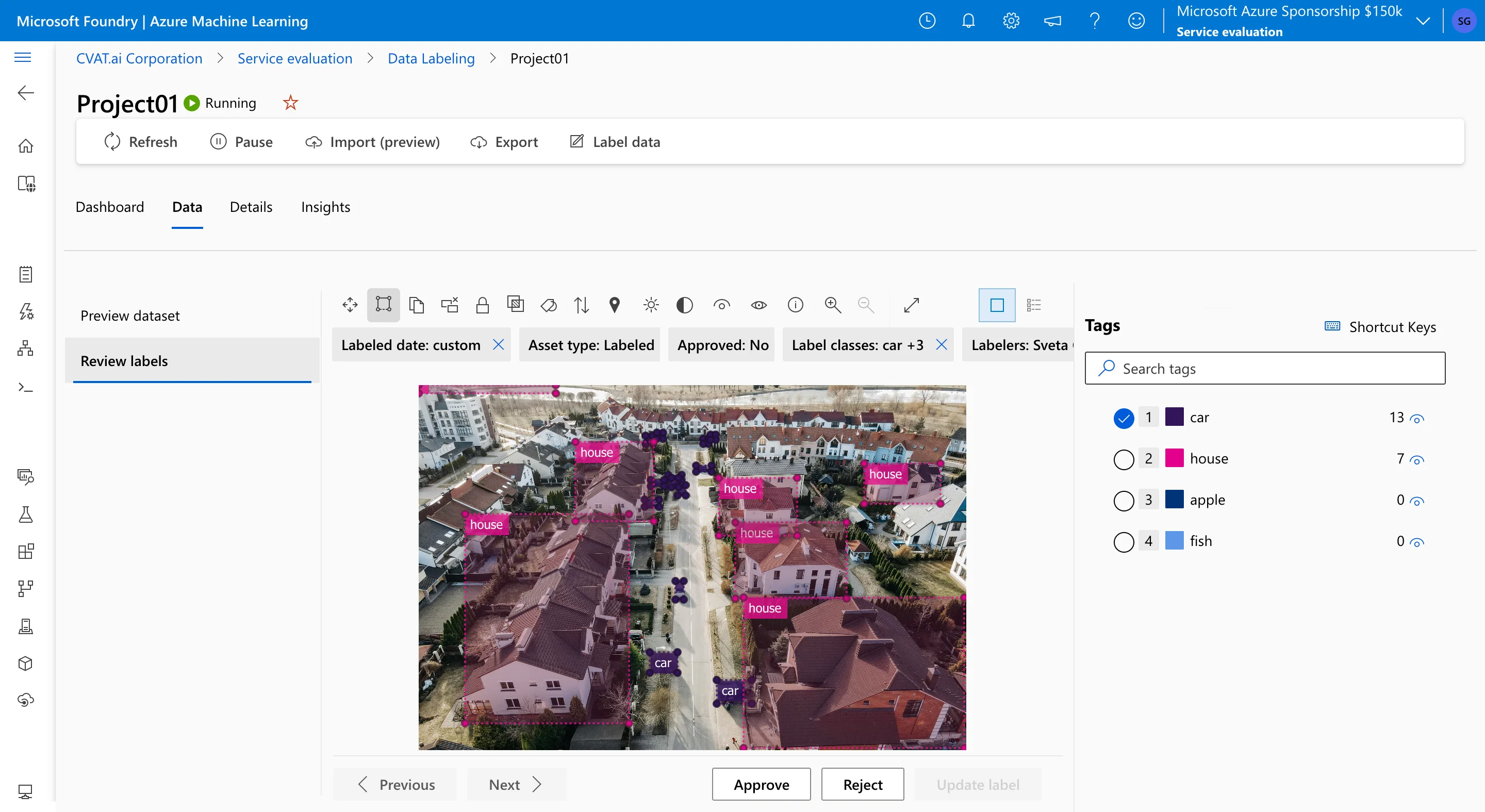
Azure ML data labeling organizes its QA through a simpler, queue-based review system. Project managers assign a review pool, and items flagged for inspection appear in an interface with global Approve and Reject buttons. However, Azure ML does not provide the same job-level review structure or shape-level commenting workflow as CVAT. When an asset is rejected, it is returned to the general labeling pool for correction.
Advanced Automated QA, Honeypots, and Consensus
When scaling up annotation, relying on manual, single-person reviews can introduce human bias. Both platforms offer automated frameworks to compare annotation quality across workers or reference data:
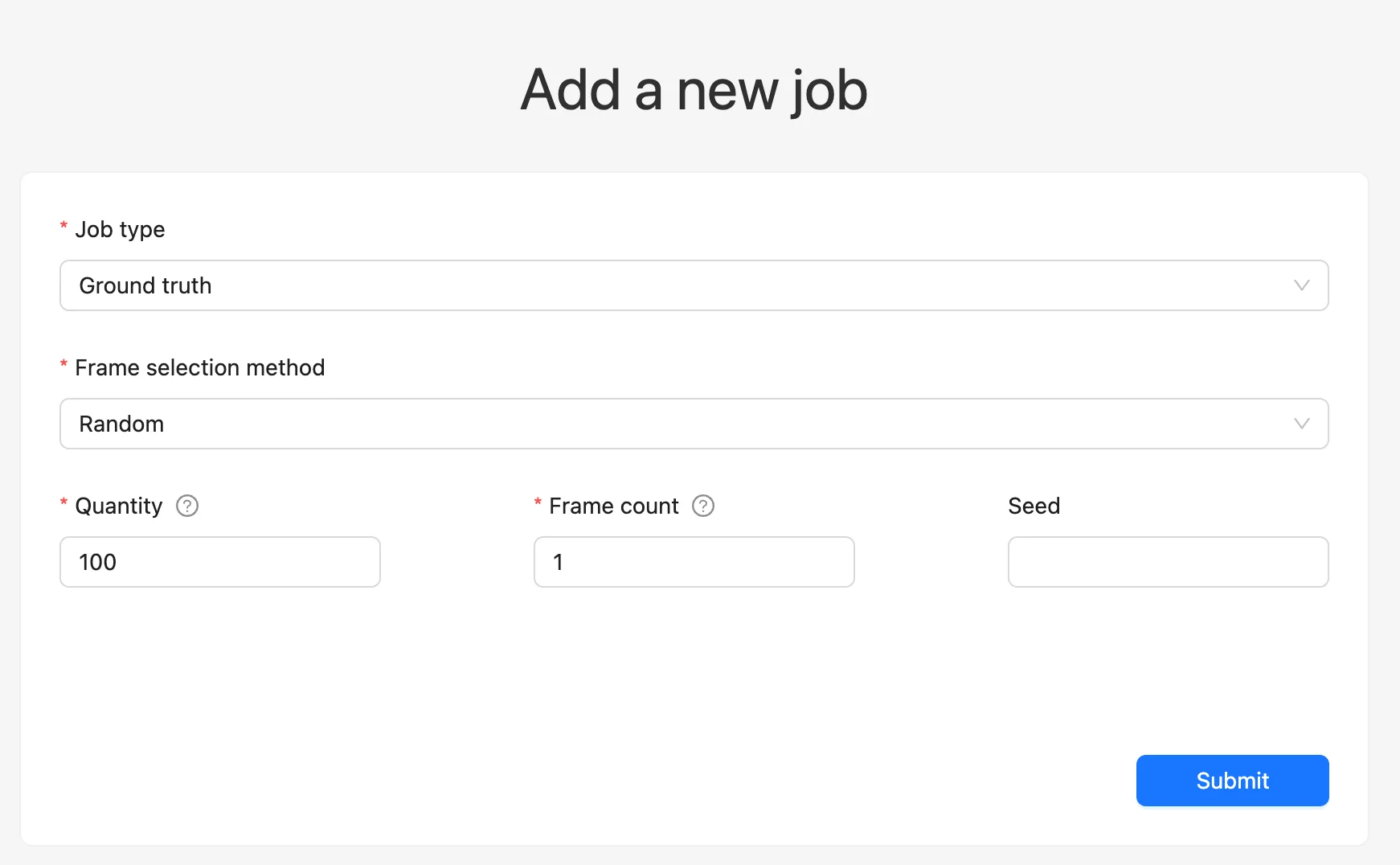
CVAT supports several quality-control mechanisms beyond manual review. This includes creating a dedicated Ground Truth job within a task to serve as a reference dataset. Once configured, a task can run in Honeypots mode, where hidden test frames from the Ground Truth set are inserted into regular annotation jobs to check worker accuracy. If an annotator’s accuracy falls below the configured threshold, they may receive immediate job feedback or be automatically blocked.
For team-wide validation, CVAT also uses Consensus-Based Annotation to automatically merge independent replica annotations back into a single parent job. The platform calculates an algorithmic Agreement Score (0.0–1.0) and a Votes tally for each shape, mask, or tag drawn on the canvas by evaluating pairwise Intersection over Union (IoU) thresholds across different workers. Reviewers can then filter the dataset by these consensus metrics to review and resolve disputed object boundaries.
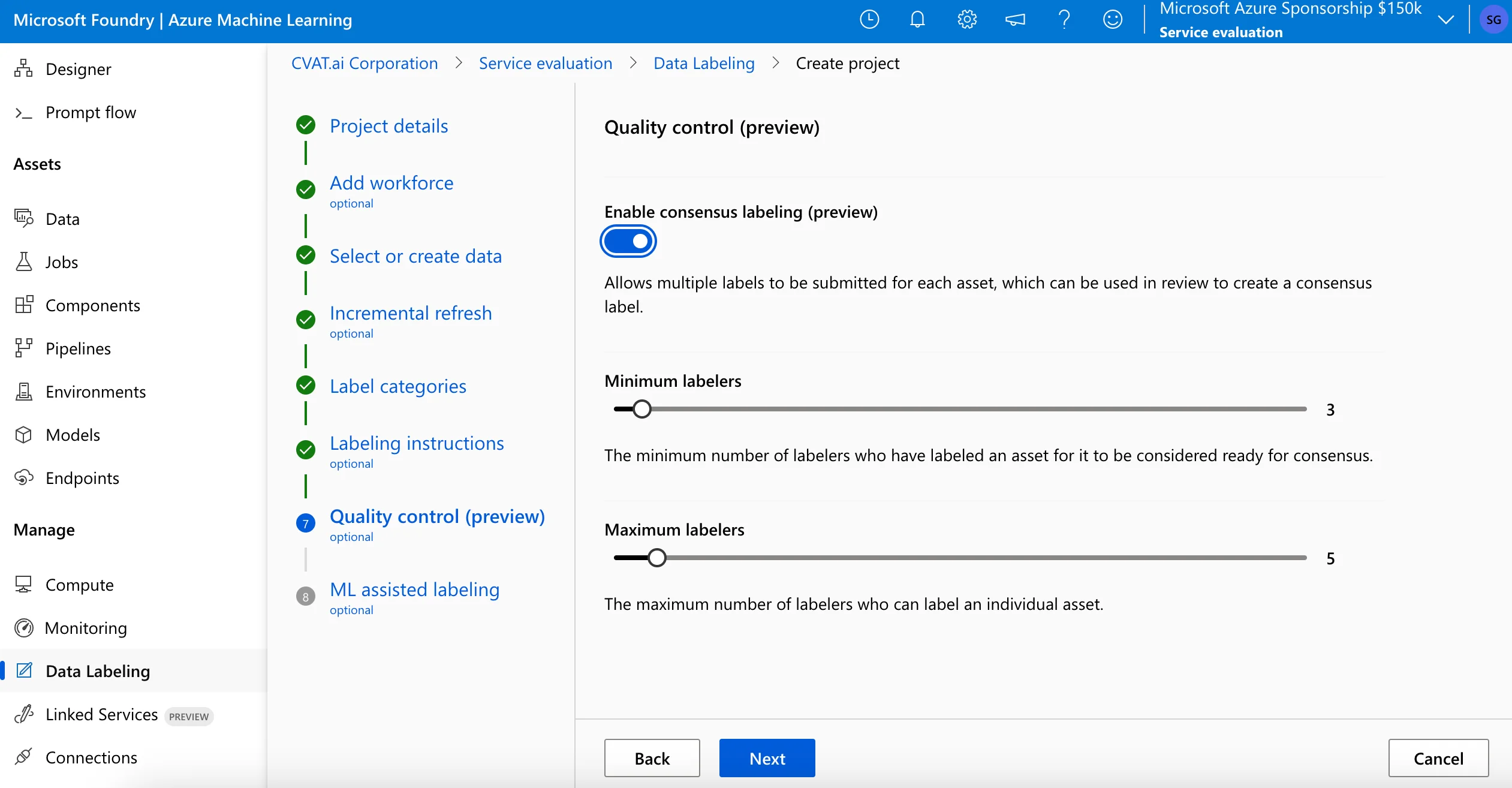
Azure ML data labeling organizes its automated QC primarily through a native feature called Consensus Labeling (double-blind verification). You can configure the project so that multiple annotators independently label the exact same image. Azure then runs background algorithms to calculate a statistical consensus score and generate a confusion matrix across the team's outputs.
However, it lacks CVAT’s annotation-level QA controls; you cannot deploy an isolated Ground Truth verification job, insert hidden Honeypot items into labeling queues, track distinct vote weights on specific overlapping vectors, or automatically block workers based on configured quality thresholds.
Key Takeaway
CVAT provides more annotation-level QA controls, including Ground Truth jobs, Honeypots, consensus metrics, and canvas comments. Azure ML provides consensus-based review within its project workflow, which is simpler but less granular.
Criteria #6: Project Performance & Analytics
Once your datasets grow into hundreds of thousands of objects, understanding team efficiency, project timelines, and dataset composition becomes vital for predicting delivery speeds and identifying bottlenecks.
Worker Performance Monitoring
Keeping tabs on individual workforce output is essential for maintaining predictable delivery speeds:
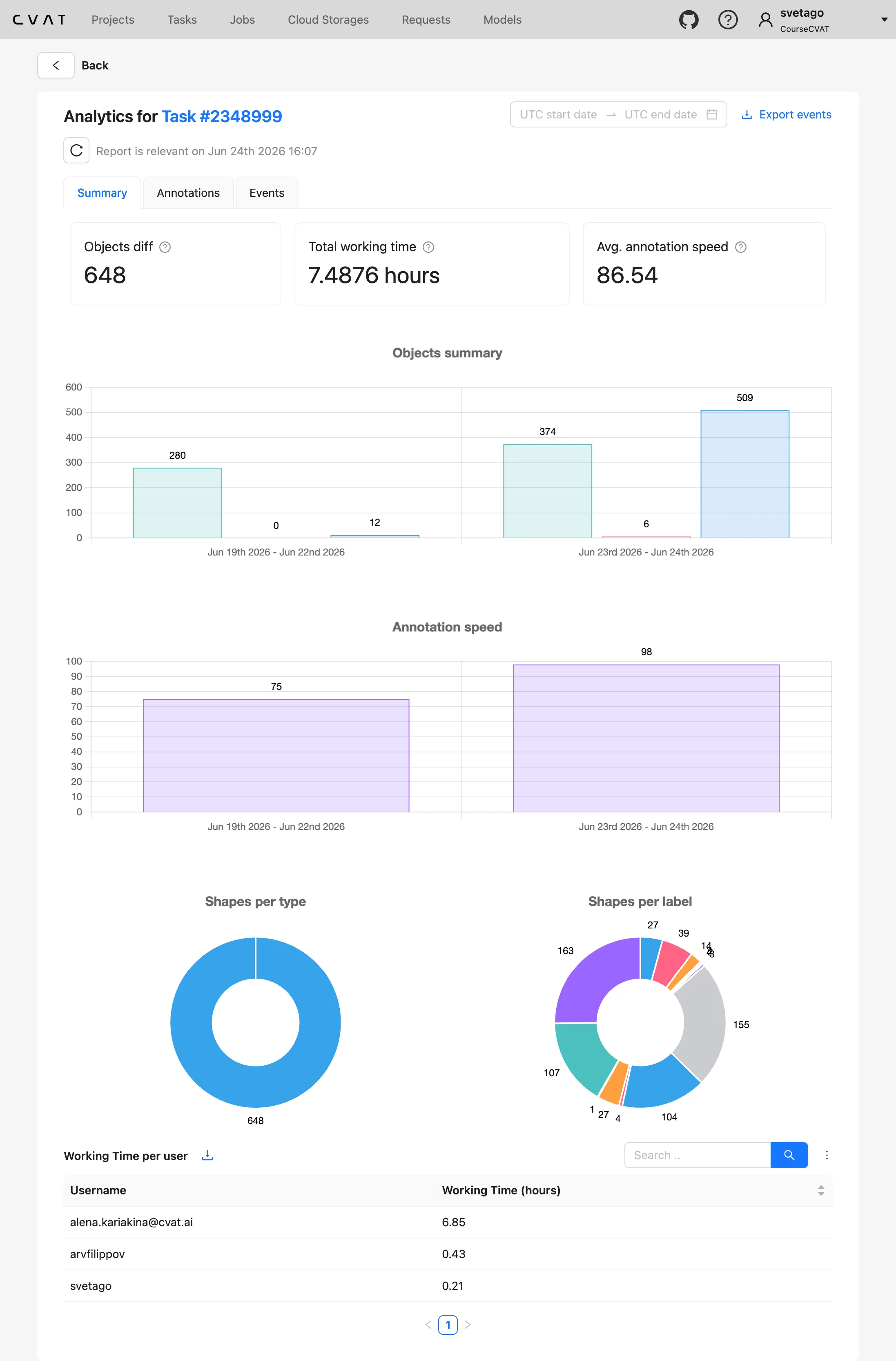
CVAT structures its operational analytics at the Project, Task, and Job levels. The platform tracks the time a user spends on a specific job, along with the activity logs (the number of added, modified, or deleted shapes).
However, performance metrics—such as final object tallies and annotation drawing speeds—are calculated as cumulative aggregates for that specific project, task, or job. This approach combines every user's edits and combined working hours, giving project managers a clear view of a task's overall annotation throughput.
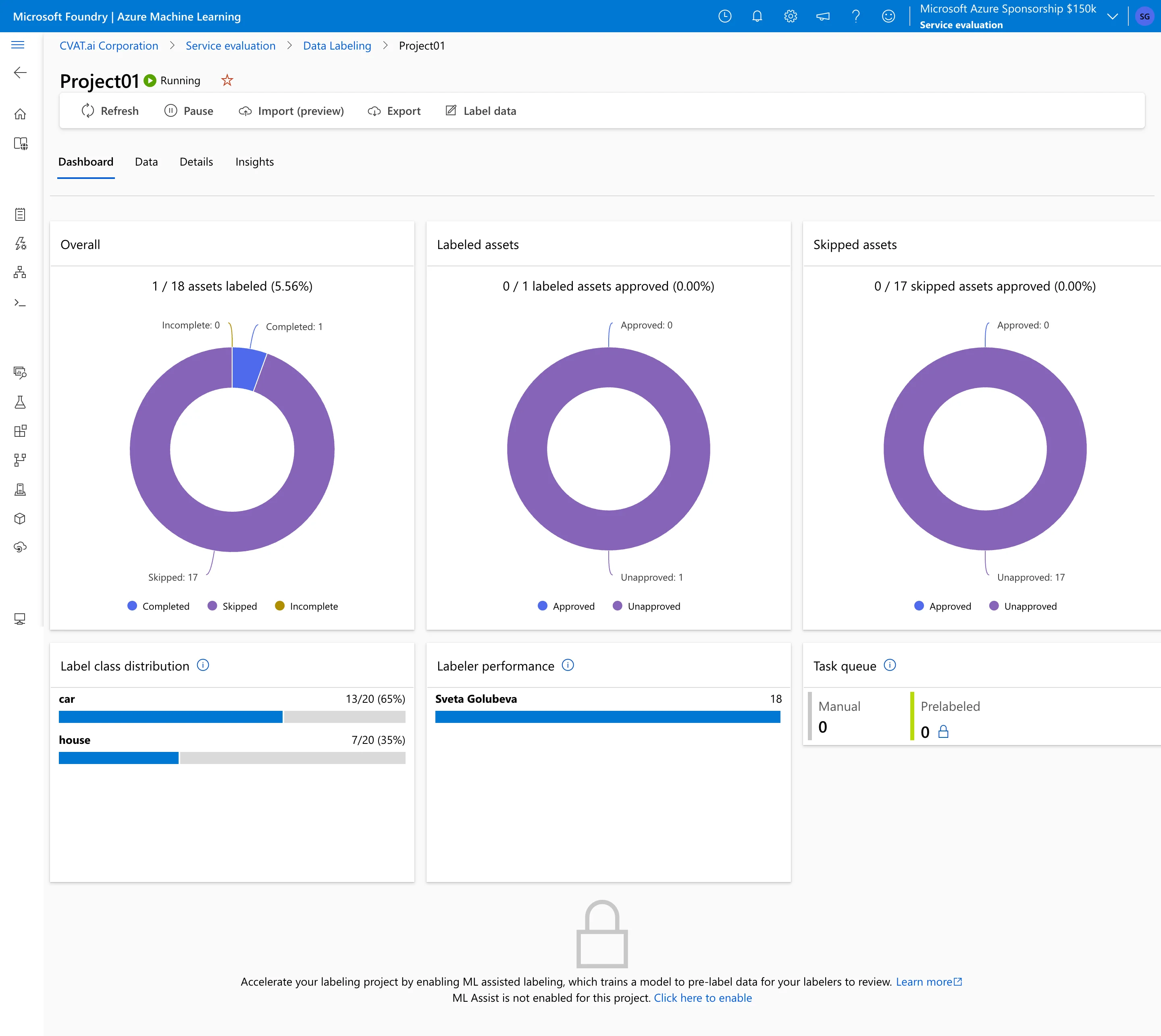
Azure ML data labeling displays project-level metrics, such as completed items per user, pending items, skipped items, and class distribution. Its reporting is more queue- and project-oriented and does not follow CVAT’s project/task/job analytics model.
Dataset and System Telemetry
Managing the high-level health of your machine learning operations requires two different types of dashboard reporting.
CVAT separates dataset analysis from infrastructure health by using distinct reporting paths. Through its built-in Analytics panel, managers can filter data by specific label distributions and track project completion rates by task and job status. For system telemetry, CVAT integrates with open-source monitoring tools such as Grafana, which is used to monitor server container resource utilization, API activity logs, and user activity.
Azure ML data labeling displays project-level metrics directly inside the Azure ML Studio dashboard via automated charts. It provides an immediate breakdown of labeled vs. skipped items, pending items, and class-label distribution across completed tasks. If you require deeper cross-project data analysis, you can connect these metrics to cloud-wide infrastructure monitors such as Azure Monitor or Azure Log Analytics.
Key Takeaway
CVAT structures operational analytics at the project, task, and job levels. It tracks user working time within a job and activity logs, such as added, modified, or deleted shapes. Metrics such as final object counts and annotation speed are aggregated for the selected project, task, or job.
Azure ML provides project-level queue and labeling metrics inside Azure ML Studio, with additional infrastructure monitoring available through Azure Monitor and Log Analytics.
Criteria #7: Integrations & Ecosystem
Connecting your data labeling platform to your wider technology stack determines the amount of manual engineering overhead your team will face when moving data between storage, labeling, and training pipelines.
Azure ML data labeling is integrated with the Microsoft Cloud ecosystem. It natively integrates with Azure Blob Storage, Azure Machine Learning Pipelines, and Azure Monitor. While this provides a direct, automated workflow for teams operating entirely within Azure, connecting it to external cloud providers (such as AWS or Google Cloud) or independent MLOps tools requires custom data-movement pipelines and API configurations.
CVAT is designed with a framework-agnostic integration model. It provides a REST API and a Python SDK for custom integrations. CVAT integrates with major cloud storage providers (AWS S3, Google Cloud Storage, and Azure Blob Storage) and can connect directly to open-source MLOps platforms such as ClearML and Hugging Face.
Additionally, developers can integrate external machine learning model repositories for automated annotation workflows using either the serverless Nuclio backend or distributed, lightweight Python AI agents.
Key Takeaway
CVAT provides more flexibility for teams that need API access, external storage connections, or integration with non-Azure MLOps tools. Azure ML provides native integration with Azure storage, Azure ML pipelines, and Azure monitoring services, which is useful when the labeling and training workflow stays inside Azure.
Criteria #8: Deployment & Data Control
Where your data labeling platform physically runs impacts data residency compliance, system latency, and infrastructure maintenance.
Azure ML data labeling is strictly a managed cloud service. It cannot be run on-premises or outside of the official Microsoft Azure infrastructure. While this eliminates all software installation and server provisioning tasks for your engineering team, it may not meet the requirements of organizations that cannot place sensitive datasets in a public cloud environment.
CVAT offers multiple deployment options. It can be used as a managed SaaS platform through CVAT Online, or deployed as a self-hosted solution through CVAT Community or CVAT Enterprise. Using Docker and Kubernetes scripts, engineering teams can host CVAT on local GPU workstations, private bare-metal servers, or isolated virtual private clouds (VPCs) across any cloud vendor, supporting private or isolated deployments, depending on configuration.
Key Takeaway
CVAT offers both managed SaaS and self-hosted deployment options, which can be useful when teams need control over infrastructure or data residency. Azure ML data labeling is managed by Azure, which reduces infrastructure maintenance but limits deployment to the Azure cloud.
Criteria #9: Pricing and Total Cost of Ownership (TCO)
Finally, when you have evaluated all the technical criteria—from data formats and UX to AI automation and compliance—pricing becomes part of the final evaluation. Choosing between CVAT and Azure ML data labeling shifts the conversation from a simple software licensing fee to a broader evaluation of long-term operational costs and infrastructure management.
Cloud Consumption vs. Fixed Subscriptions
The two platforms use different pricing models.
Azure ML data labeling does not use CVAT-style product tiers or per-seat labeling plans. Microsoft states that there is no additional charge to use Azure Machine Learning itself; costs come from consumed Azure resources, including compute, storage, and related services. Compute is billed by the second under pay-as-you-go pricing.
For a concrete reference point, using public pay-as-you-go pricing at the time of writing, ML-assisted labeling can use Standard_NC6s_v3 GPU compute, which is listed at about $3.06/hour in the East US. Storage and transfer are billed separately: Blob Hot storage is roughly $0.018–$0.0208/GB-month depending on region and configuration, and internet egress from North America or Europe is free for the first 100 GB/month, then $0.087/GB for the next 10 TB.
CVAT pricing depends on the product and deployment model. CVAT Online offers Free, Solo, and Team plans for the managed SaaS version. CVAT Community is the free self-hosted edition. CVAT Enterprise is sold as an annual subscription, with Enterprise Basic starting at $12,000/year and Enterprise Premium priced individually. Self-hosted deployments still require infrastructure, maintenance, and DevOps resources.
Key Takeaway
CVAT pricing depends on product and deployment model: CVAT Online offers Free, Solo, and Team plans, CVAT Community is free and self-hosted, and CVAT Enterprise is an annual subscription starting with Enterprise Basic at $12,000/year. Azure ML data labeling does not have separate labeling plans or seat pricing; costs depend on Azure resources used during the workflow, including compute, storage, related Azure services, optional GPU compute for ML-assisted labeling, and any separate vendor-labeling contracts.
Final Verdict: Choosing Your Machine Learning Data Labeling Engine
Now that we have analyzed the features of both platforms, we can evaluate which platform best aligns with specific pipeline requirements.
Choose CVAT if your team:
- Builds complex Computer Vision models: Requires native video-timeline tracking, frame interpolation, and specialized geometries, such as pixel masks, ellipses, 3D LiDAR point clouds, and skeleton keypoints.
- Requires modular AI automation: Needs to integrate custom model weights on localized hardware via Python AI agents or leverage foundation models like SAM 3 for text-prompted annotation.
- Demands precise operational oversight: Requires object-level consensus metrics, Ground Truth jobs, Honeypots, or project-, task-, and job-level annotation analytics.
- Maintains an independent or multi-cloud stack: Requires multi-cloud data compatibility or exports to over 20 industry formats like YOLO, COCO, KITTI, or Cityscapes.
Note: If you require an end-to-end MLOps loop, CVAT serves solely as the annotation layer and must be integrated with external pipeline tools such as ClearML, Kubeflow, or Hugging Face.
Remaining on Azure ML data labeling until retirement may be acceptable if:
- Your team operates a unified Microsoft architecture: Your raw datasets already reside in Azure Blob Storage or Data Lake, and your downstream training, deployment, and pipelines are managed entirely within Azure ML Studio.
- Your team requires low infrastructure overhead: You want a fully managed service that leverages your existing corporate Microsoft Entra ID (Active Directory) and global Azure RBAC configurations without setting up local servers.
- Your team relies on high-level statistical consensus: You plan to route duplicate tasks to distributed worker pools or Azure Marketplace vendors to evaluate data quality via double-blind team consensus matrices.
- Your team needs a short-term Azure-native workflow before retirement: You prioritize keeping data labeling, ML-assisted prelabeling, training, and deployment inside Azure ML until the service is retired.
Why Switch to CVAT from Azure ML Data Labeling?
Microsoft has officially announced the retirement of Azure ML data labeling on September 30, 2026. On that date, the service will be shut down, active workloads will be terminated, and associated application data will be permanently deleted. To prevent workflow disruptions, migrating active data labeling pipelines to an alternative provider is required.
Here is why CVAT is a viable alternative to Azure ML data labeling:
- Raw Data Can Remain in Azure Blob Storage
Because CVAT supports Azure Blob Storage connections, teams may be able to label existing Azure-hosted data without moving raw files out of Azure Blob Storage.
- COCO-Based Annotation Import
Azure ML projects export to the standard COCO format. Because CVAT natively ingests and maps COCO datasets, common image annotation structures can be imported through COCO, but teams should validate labels, attributes, coordinates, and project metadata after migration.
- Different AI-Assisted Workflow
Moving to CVAT changes the AI-assisted workflow from Azure’s background ML-assisted labeling to interactive model-assisted annotation. Your team can use interactive segmentation via SAM 3, including label-based text prompts to automatically search for and outline matching instances within a frame.
- Deployment Flexibility
Teams with private infrastructure requirements can evaluate CVAT Enterprise deployment options. You can transition to the fully managed SaaS platform at CVAT Online (app.cvat.ai) or deploy CVAT Enterprise inside a private corporate cloud network, depending on infrastructure requirements and configuration.
Step-by-Step Migration Guide
To execute this transition and prevent project downtime before the service deactivation, follow the technical walkthrough available in the official CVAT Integration Documentation.
This guide covers migration for projects created for Object Identification (Bounding Box) and Instance Segmentation (Polygon) tasks, including Azure Blob Storage integration, dataset preparation, annotation export from Azure ML, task creation in CVAT, and annotation import.
.webp)



.svg)
.png)

.png)




.png)