


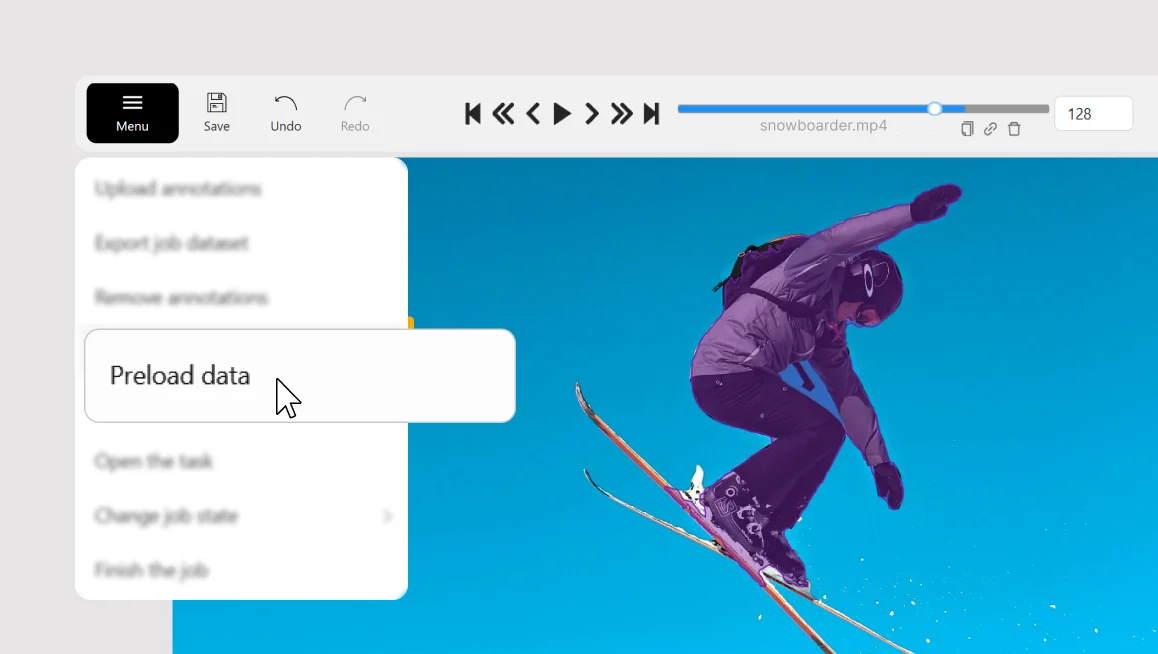
If you work with large video or image datasets with hundreds or thousands frames per job, this often means waiting for the next chunk of frames to load when you scrub the timeline or jump between frames.
The new Preload data fixes that by loading all the job chunks in the background, making frame navigation faster and smoother during annotation or review.
When to use
- Video / large tasks
- Slow network / remote storage
- Frequent scrubbing / jumping between frames
How it works
- CVAT starts downloading upcoming chunks in advance.
- You can see the progress right on the player timeline: the slider fills blue as chunks are preloaded.
- If you want to stop, click Cancel preload at any time.
How to try it
- Open a job and click the Menu button.
- Enable Preload data.
- Watch the blue progress fill up on the timeline, then jump between frames without waiting.
If you label or review video-heavy jobs and frequently scrub through frames, Preload data makes the whole labeling and review workflow noticeably faster.



.svg)
.png)

.png)




.png)