


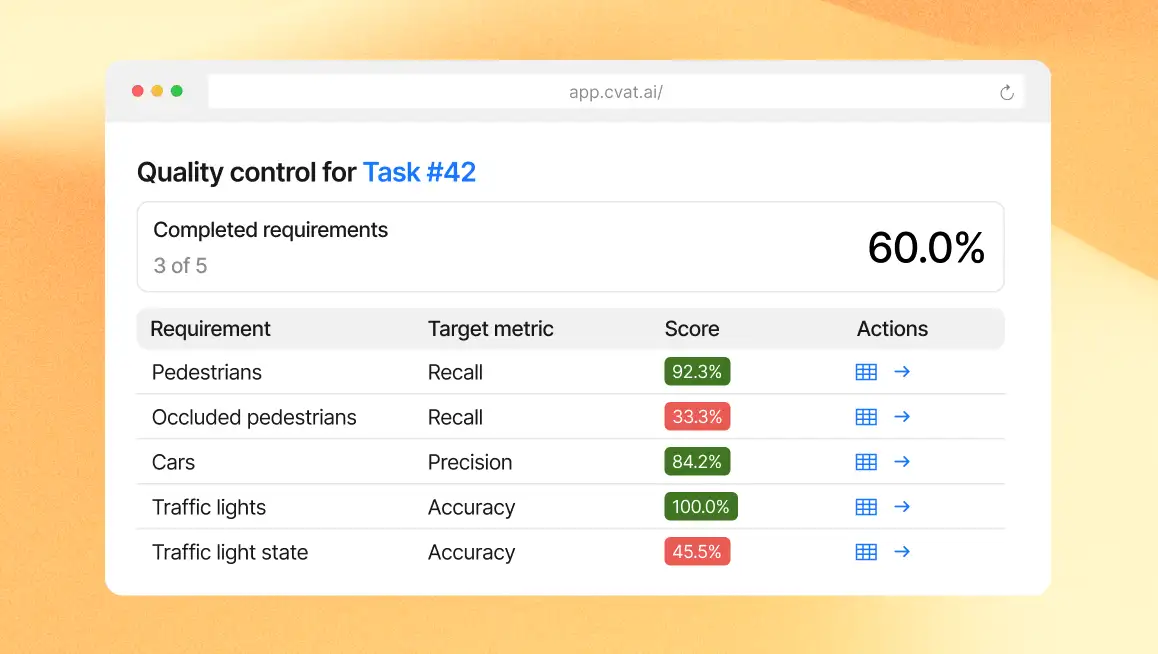
Before annotated data can be trusted for model training, validation, or delivery, teams need a reliable way to verify that it meets their quality standards.
In CVAT, annotation quality can be checked through both manual and automated review workflows. Reviewers can inspect completed work and flag issues directly, or set up automated quality checks by adding a Ground Truth (GT) job with reference annotations to the task. CVAT then compares annotations from regular jobs against this GT job to detect missing and extra annotations, label and attribute mismatches, and other errors, and provides quality metrics and reports for analysis.
Until recently, these automated quality checks were configured as a single policy for an entire task or project. Teams could choose one target metric and threshold, along with a common set of comparison parameters, and those settings were applied across all relevant annotations.
This was limiting when different parts of the dataset needed different quality criteria, for example, higher Recall for safety-critical classes, stricter Precision where false positives were costly, or different comparison rules for different annotation types. Checking these criteria separately meant changing the global quality settings and recomputing the report.
That’s why we decided to rethink the whole approach and introduce more flexible, granular quality checks with multiple quality requirements.
One dataset, multiple quality requirements
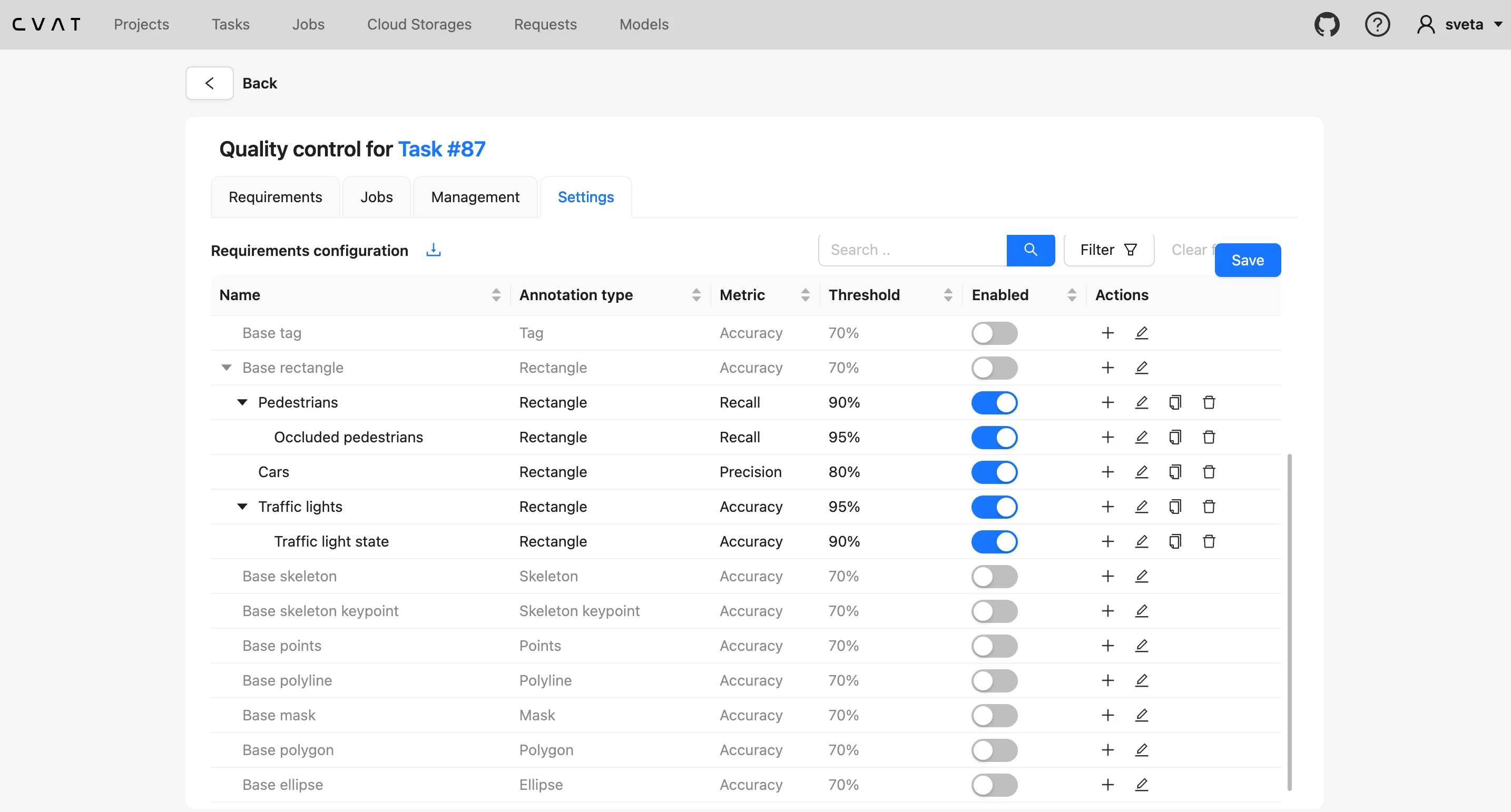
The new approach replaces a single global quality policy with multiple independent quality requirements. A quality requirement defines a specific quality condition for a selected part of the dataset.
Each requirement can specify:
- which annotations should be evaluated;
- which quality metric should be used;
- what score is required to pass;
- how annotations should be matched with Ground Truth;
- how particular attributes should be compared.
For example, the same task can now have separate requirements for:
- at least 95% Precision for car annotations;
- at least 99% Recall for pedestrian annotations;
- exact matching of an important attribute, such as state for traffic light annotations;
- a separate quality score for annotations with a specific attribute value;
- different comparison rules for rectangles, polygons, keypoints, and other annotation types.
With the new quality requirements, different parts of the same dataset no longer have to follow the same quality criteria. You can apply different metrics, thresholds, filters, and comparison rules to specific classes, annotation types, attributes, or other subsets, and evaluate them together.
This makes it easier to enforce stricter standards where they matter, distinguish between different types of annotation errors, and see exactly which quality requirements pass or fail.
Let’s take a closer look at how these quality requirements work in practice.
#1 Filter quality checks to specific annotations
Requirements can use annotation filters to define exactly which subset of the dataset they apply to. A requirement can target a particular label or narrow the evaluation further using annotation properties or attributes.
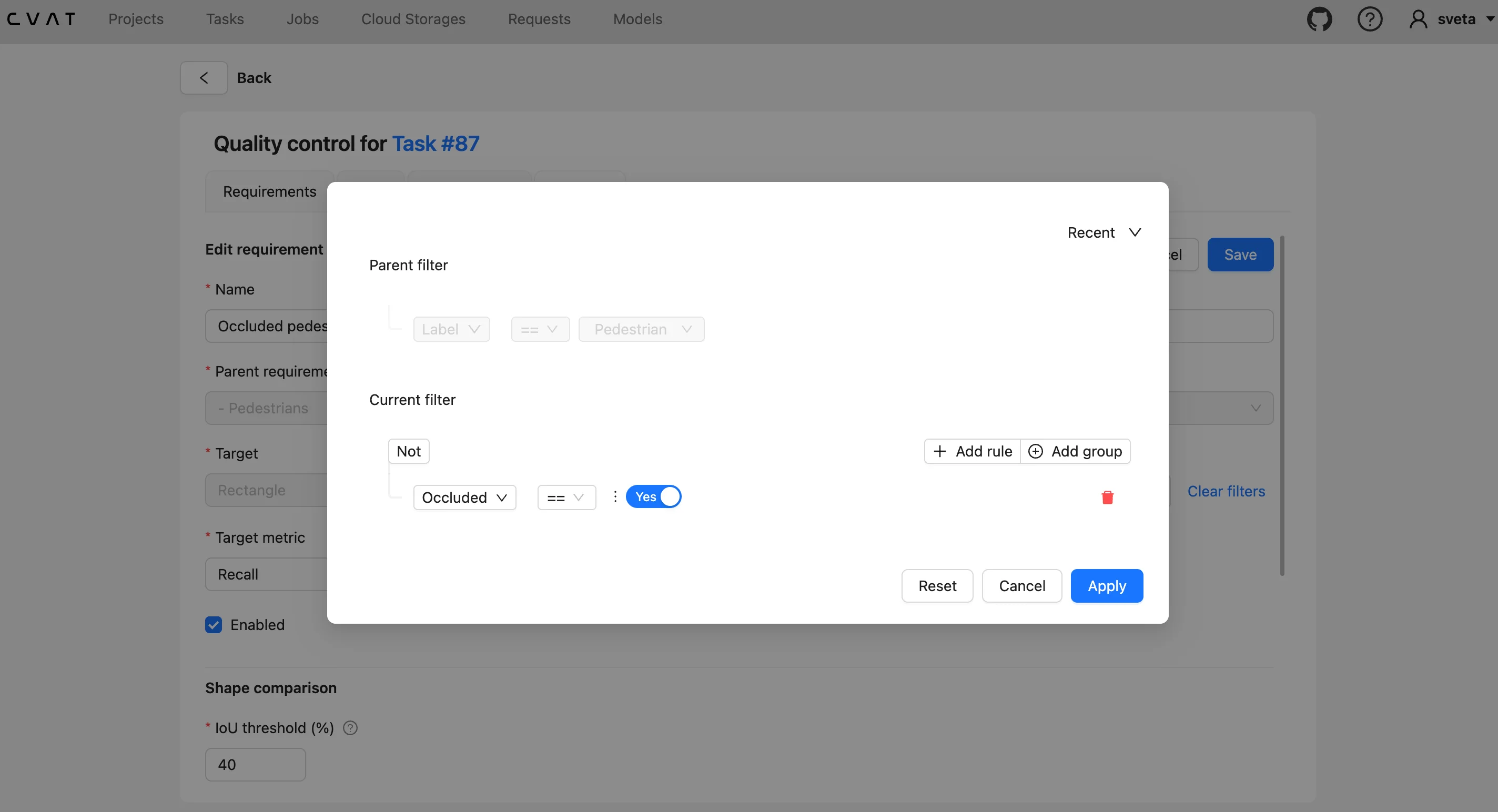
For example, you can evaluate all pedestrian annotations with one requirement, then create a more specific requirement that applies only to pedestrians with a particular attribute value.
This makes it possible to monitor quality for the classes or cases that matter most without applying the same quality criterion to the entire dataset.
#2 Build reusable requirements through inheritance
Quality requirements are hierarchical. CVAT provides base requirements for supported annotation types, and more specific requirements can build on them.
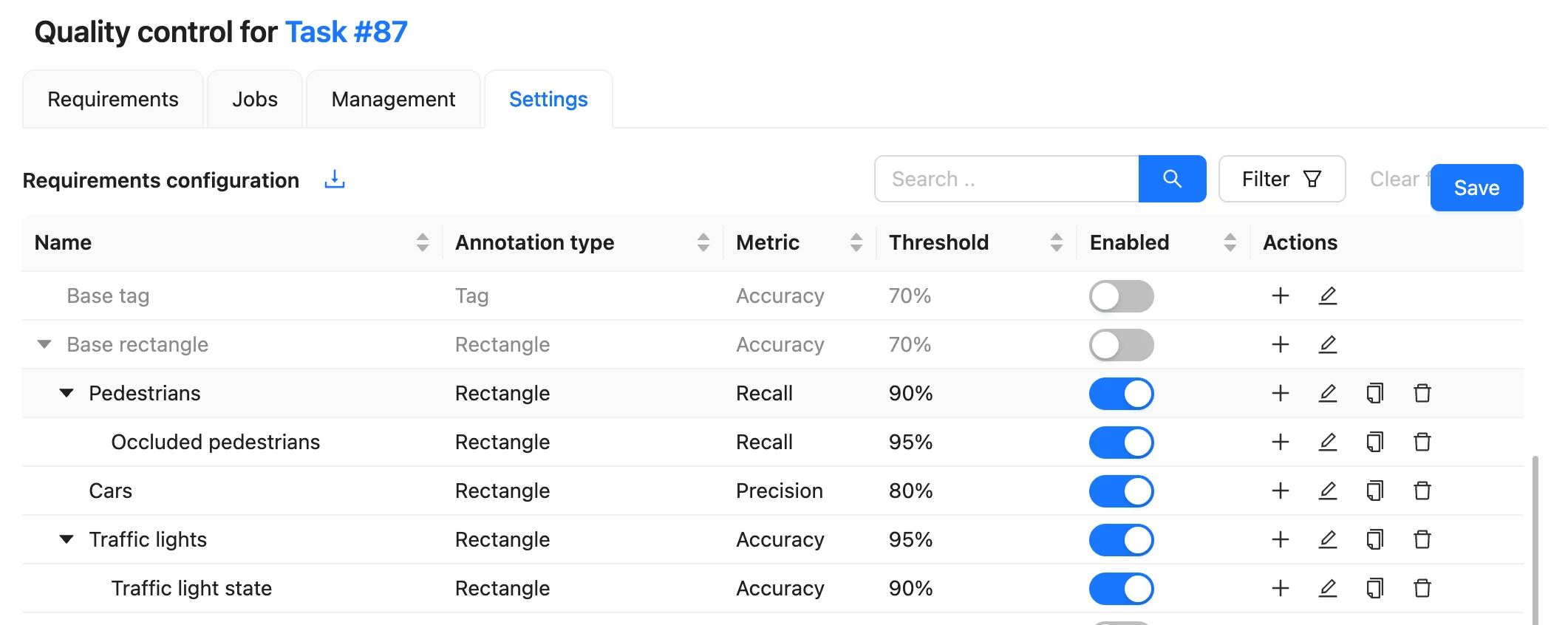
For example, you can start with a base requirement for all rectangle annotations, create a child requirement for the pedestrian label, and then narrow it further to evaluate only pedestrians where occluded = true.
Child requirements keep their parent’s annotation type. Their filters are combined with the parent filter, further narrowing the annotation subset rather than replacing it. Attribute comparison rules are combined as well, while supported comparison parameters, metrics, and thresholds can be adjusted for the child.
This lets teams keep common matching rules in the parent requirement and define only the additional filters or overrides needed for more specific quality checks.
#3 Apply different metrics and thresholds to different quality goals
Each requirement has its own target metric and acceptance threshold and can use Accuracy, Precision, or Recall as its target metric.
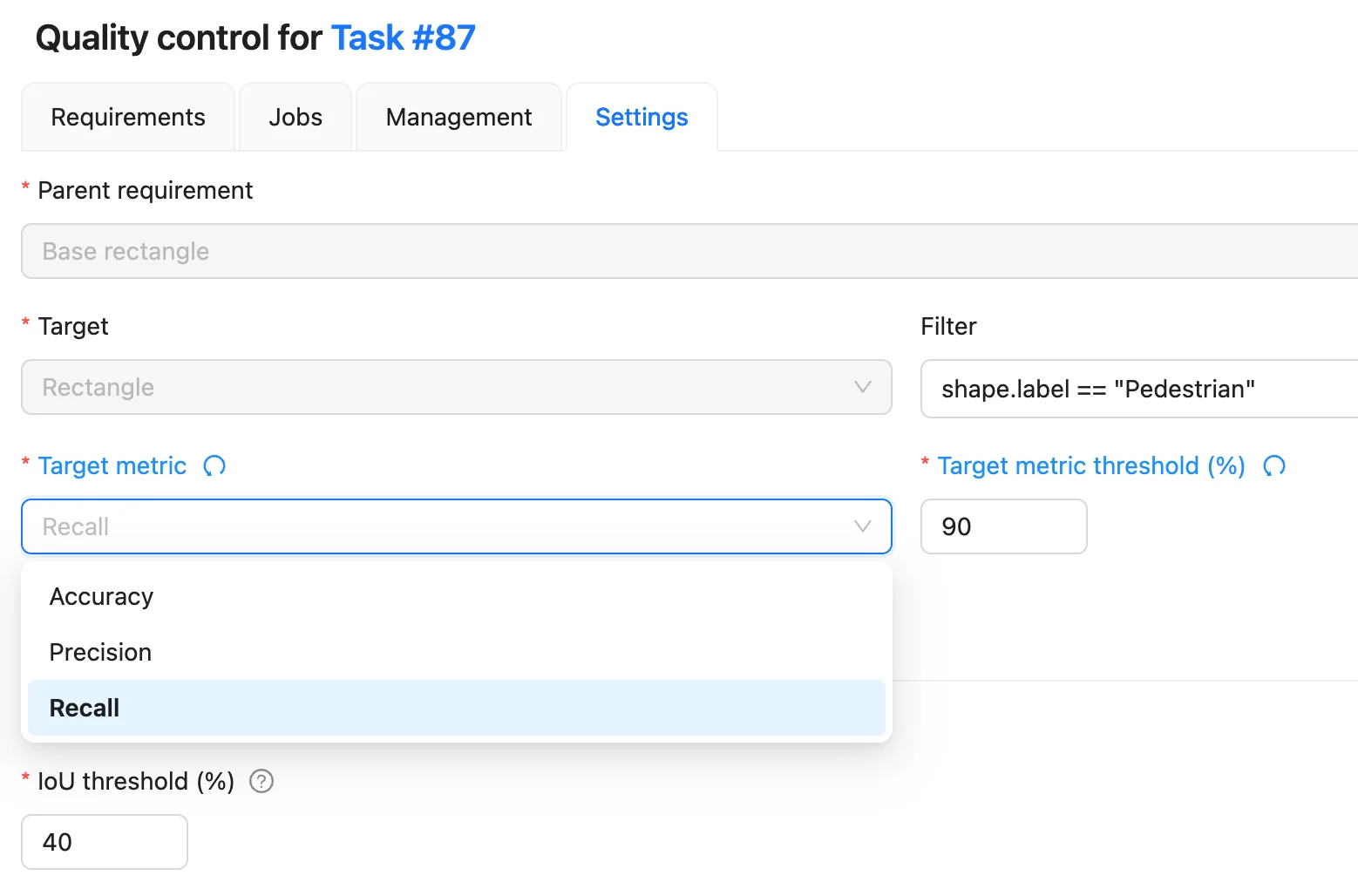
These metrics answer different quality questions.
- Recall measures how much of the Ground Truth was found. It is useful when missing objects is the main risk.
- Precision measures how many annotations produced by the annotator are correct. It is useful when unnecessary or false-positive annotations are particularly costly.
- Accuracy considers correct matches relative to correct, missing, and extra annotations.
Instead of choosing one of these metrics as the quality criterion for the whole task, teams can now use different metrics for different requirements. For example, a project can evaluate one class using Recall while evaluating another using Precision.
#4 Define attribute-specific requirements
Quality requirements can also define how particular annotation attributes should be compared instead of treating attribute comparison as one global setting.
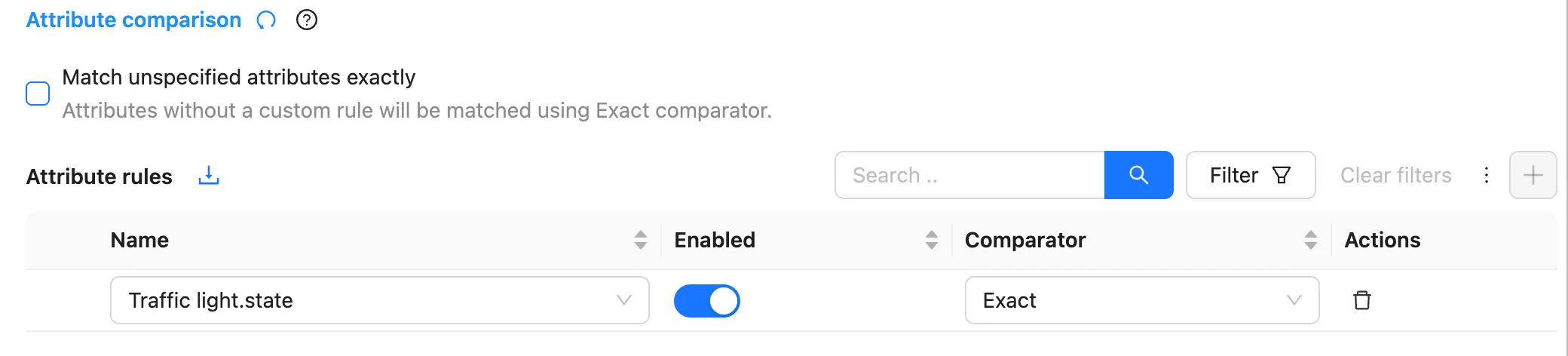
For example, a traffic light bounding box may match Ground Truth geometrically while its state attribute is incorrect. A dedicated requirement can flag the attribute mismatch separately from geometry quality.
This allows teams to distinguish between different types of annotation errors and enforce stricter rules only where they matter.
#5 See exactly which quality requirements pass or fail
Quality Reports now show the score and pass/fail status for each configured requirement, making it easier to see which specific criteria passed or failed.
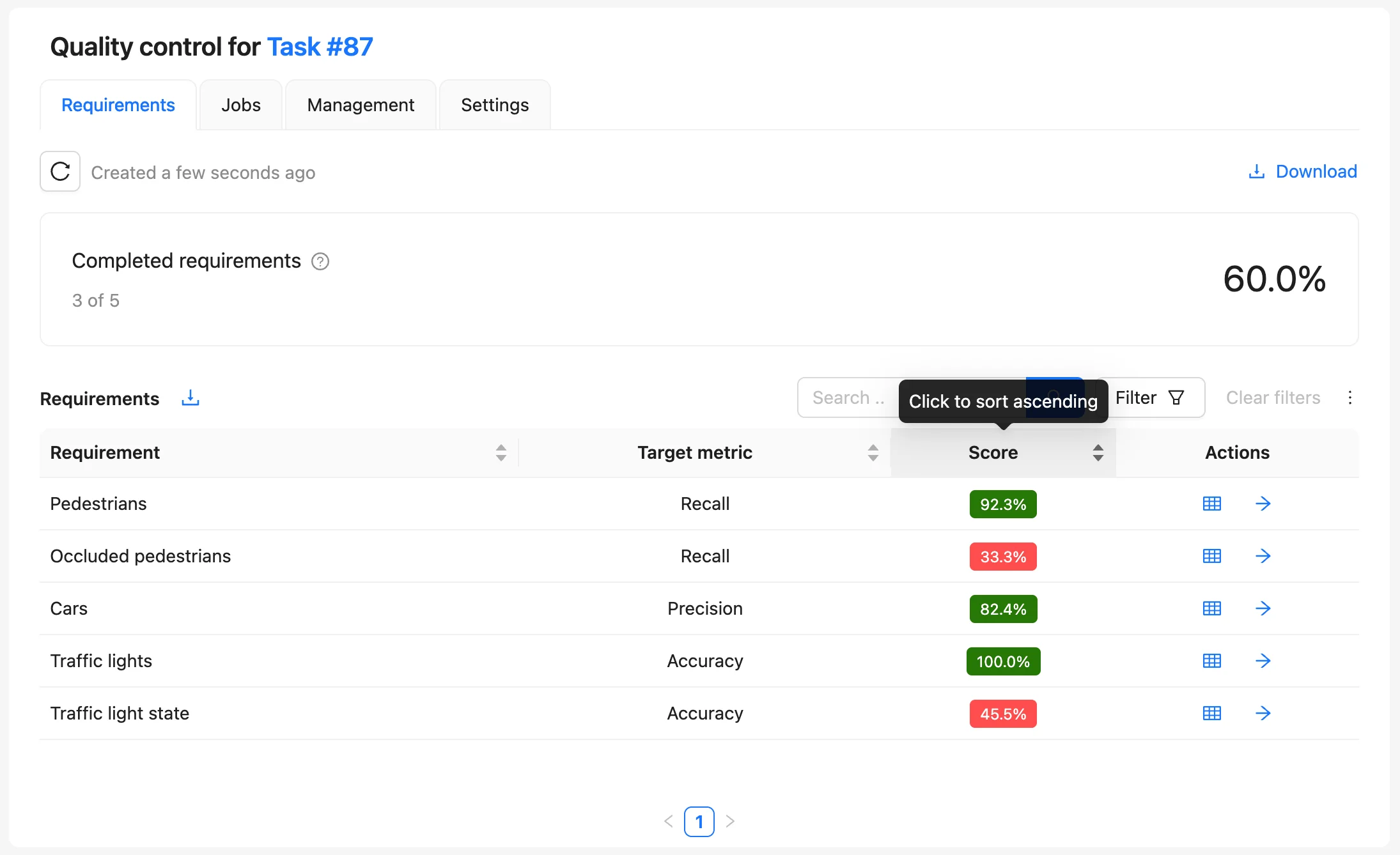
Managers can see, for example, that geometry quality passed while an attribute requirement failed, or that most requirements passed while one important class has insufficient Recall.
Requirements can be opened to inspect their results at the job level, including conflicts such as missing and extra annotations.
This makes quality reports more diagnostic: they show not only that quality is below expectations, but which quality requirement failed.
#6 Analyze each requirement with its own confusion matrix
Confusion matrices are also available per quality requirement. Users can switch between requirements and inspect how the selected subset of annotations performed. The matrices can be exported for further analysis, while the full Quality Report can be downloaded in JSON.
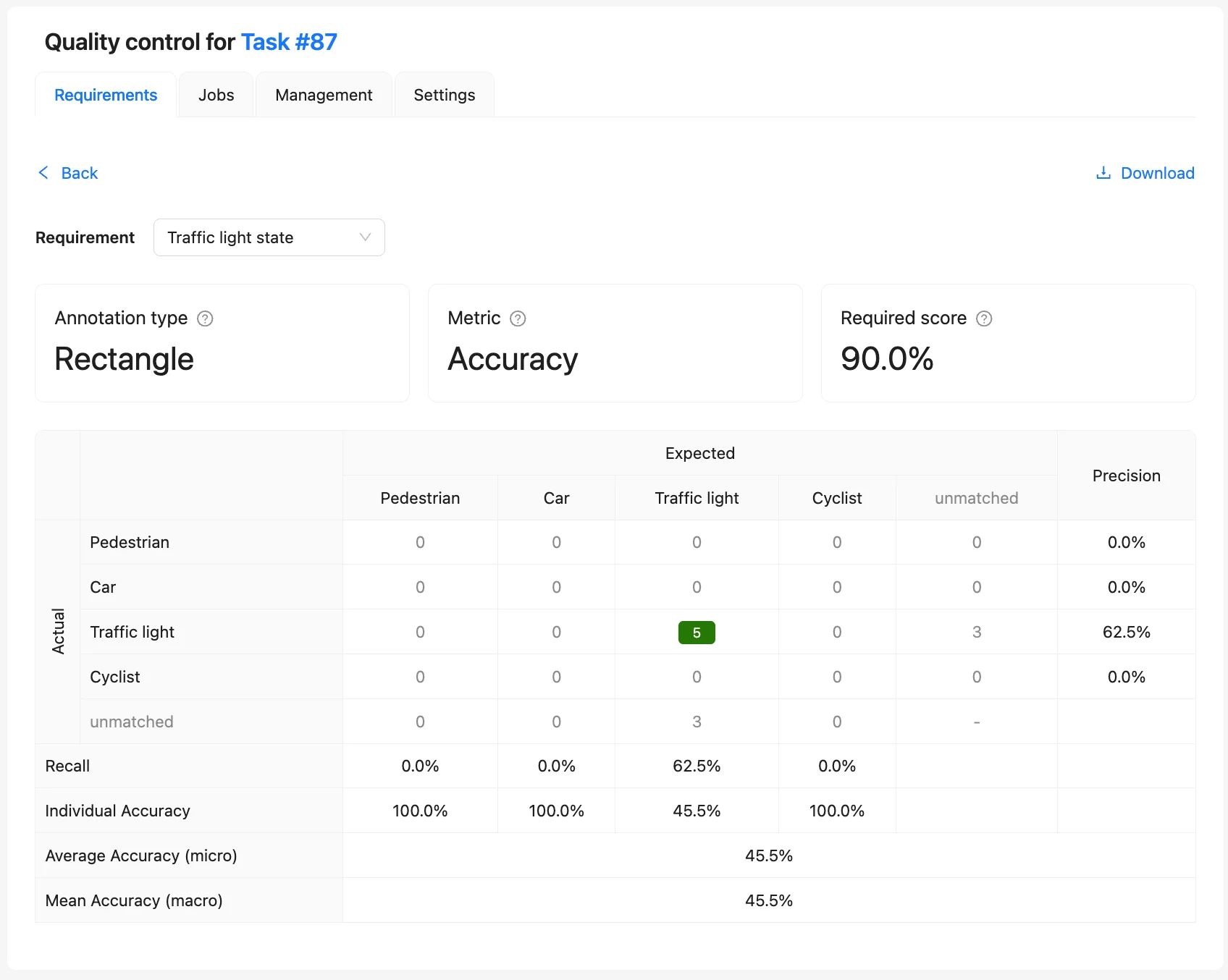
This is particularly useful when teams need class-specific or requirement-specific quality evidence for deeper analysis.
#7 Apply project-level requirements across tasks
Quality requirements can be configured at the project level and inherited by tasks. This allows teams to establish a common quality policy once and apply it consistently across multiple tasks.
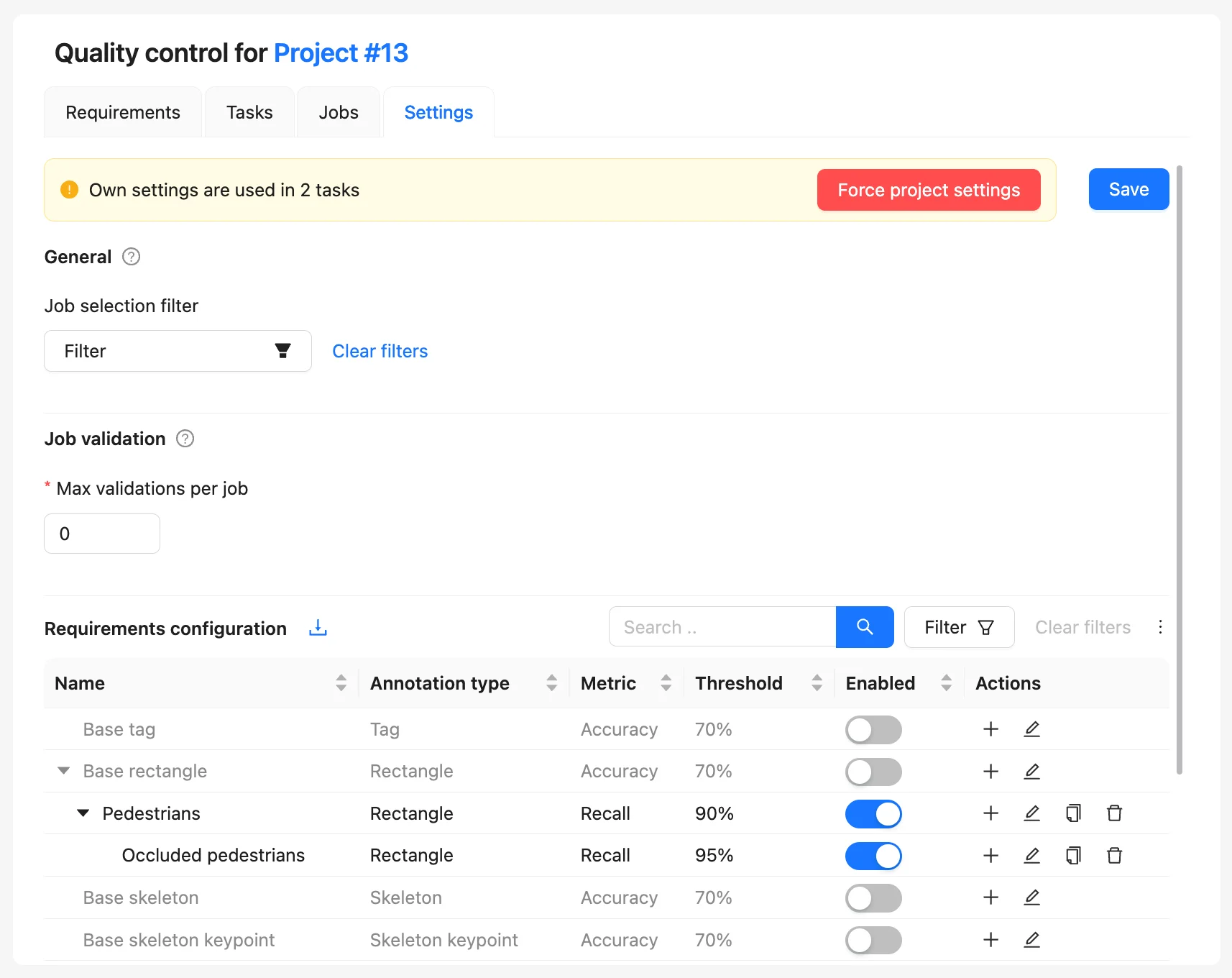
Individual tasks can still use custom requirements when they need different acceptance criteria. If a custom task configuration is no longer necessary, the task can be switched back to the project requirements.
This combines consistency across large projects with flexibility for exceptional datasets or workflows.
#8 Give annotators feedback against multiple quality criteria
Multiple quality requirements also extend Immediate Job Feedback. Previously, Immediate Feedback evaluated a completed job against the single target metric and threshold configured for the task.
With quality requirements, annotators can receive feedback based on multiple acceptance criteria and see which requirements they passed or failed when completing a job. Depending on the configured validation limit, they can correct their work and submit it again.
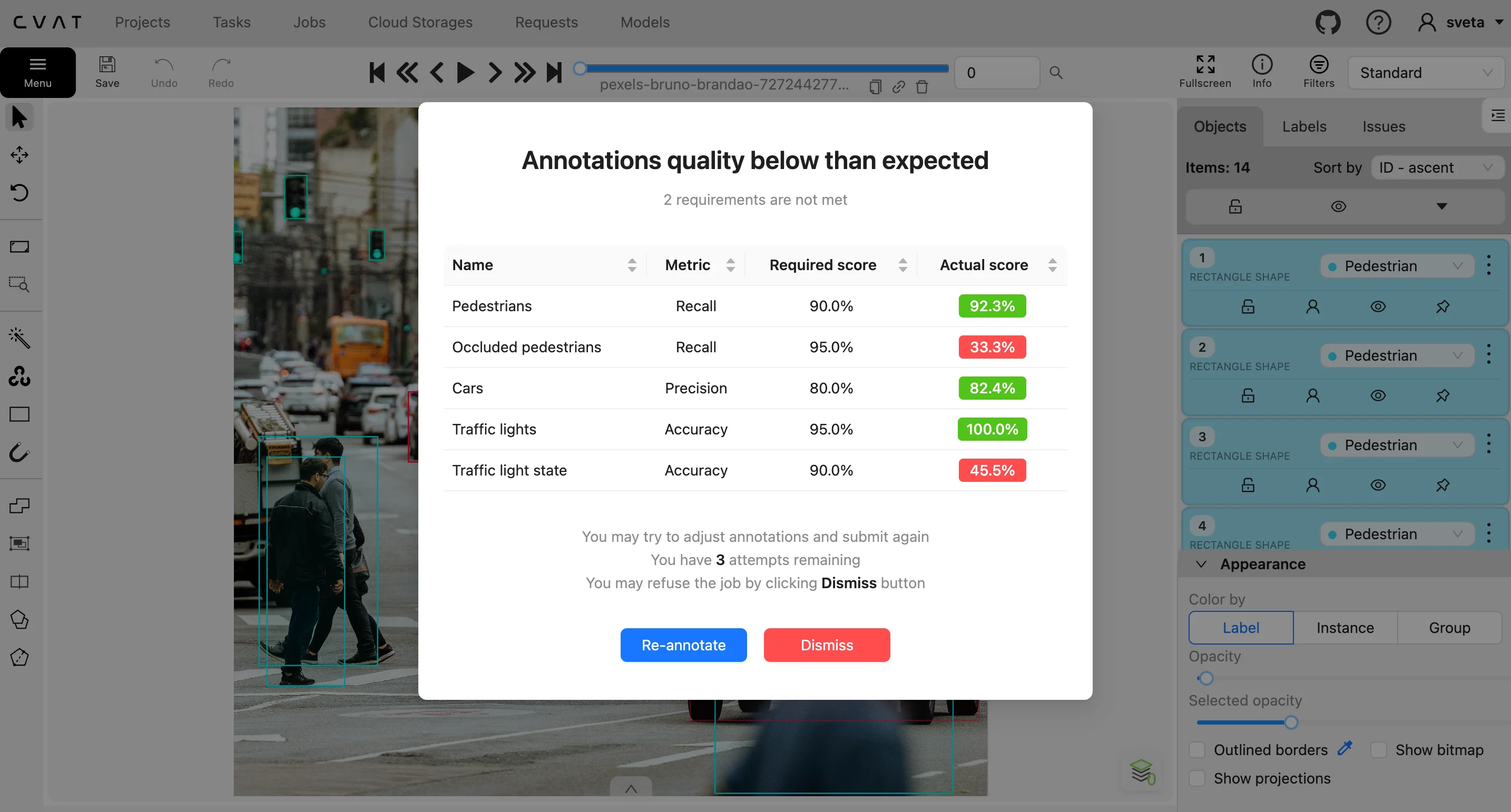
This makes feedback more actionable: instead of only knowing that an overall score was too low, annotators can understand which quality expectations their work did not meet.
Try the new quality control in CVAT today
The updated quality control lets you evaluate different parts of your dataset against different acceptance criteria at the same time. With the new quality requirements, you can now:
- set different quality standards for different classes, annotation types, attributes, or other subsets;
- use different metrics depending on the risks that matter, such as missed objects versus false positives;
- evaluate several quality criteria simultaneously instead of repeatedly changing settings and regenerating reports;
- identify exactly which aspect of annotation quality is failing;
- reuse common requirements across tasks within a project;
- maintain stricter requirements for critical annotations without making every annotation follow the same threshold;
- provide annotators with more specific feedback before work reaches final review.
For more information about automated quality control in CVAT, read the docs.
Try the new Quality Control in CVAT Online or CVAT Enterprise, and let us know what you think.




.svg)
.png)

.png)







.png)