


CVAT was built for computer vision. For years, we have helped teams turn images, videos, and 3D point clouds into structured datasets for training and evaluating AI models.
However, for physical AI and robotics, other data modalities are just as important as vision.
Robots, autonomous systems, smart devices, and other physical AI products operate in environments where sound can provide essential context. A camera can show a machine, while audio can indicate whether it is operating normally. A robot can see a person, while speech communicates what that person wants it to do. Alarms, impacts, mechanical faults, voices, and environmental sounds can reveal events that visual data may not capture.
The scale of this opportunity is growing. According to the International Federation of Robotics, 4.66 million industrial robots were operating worldwide in 2024, an increase of 9% from the previous year. As more AI systems enter physical environments, the datasets used to train them must represent more of those environments.
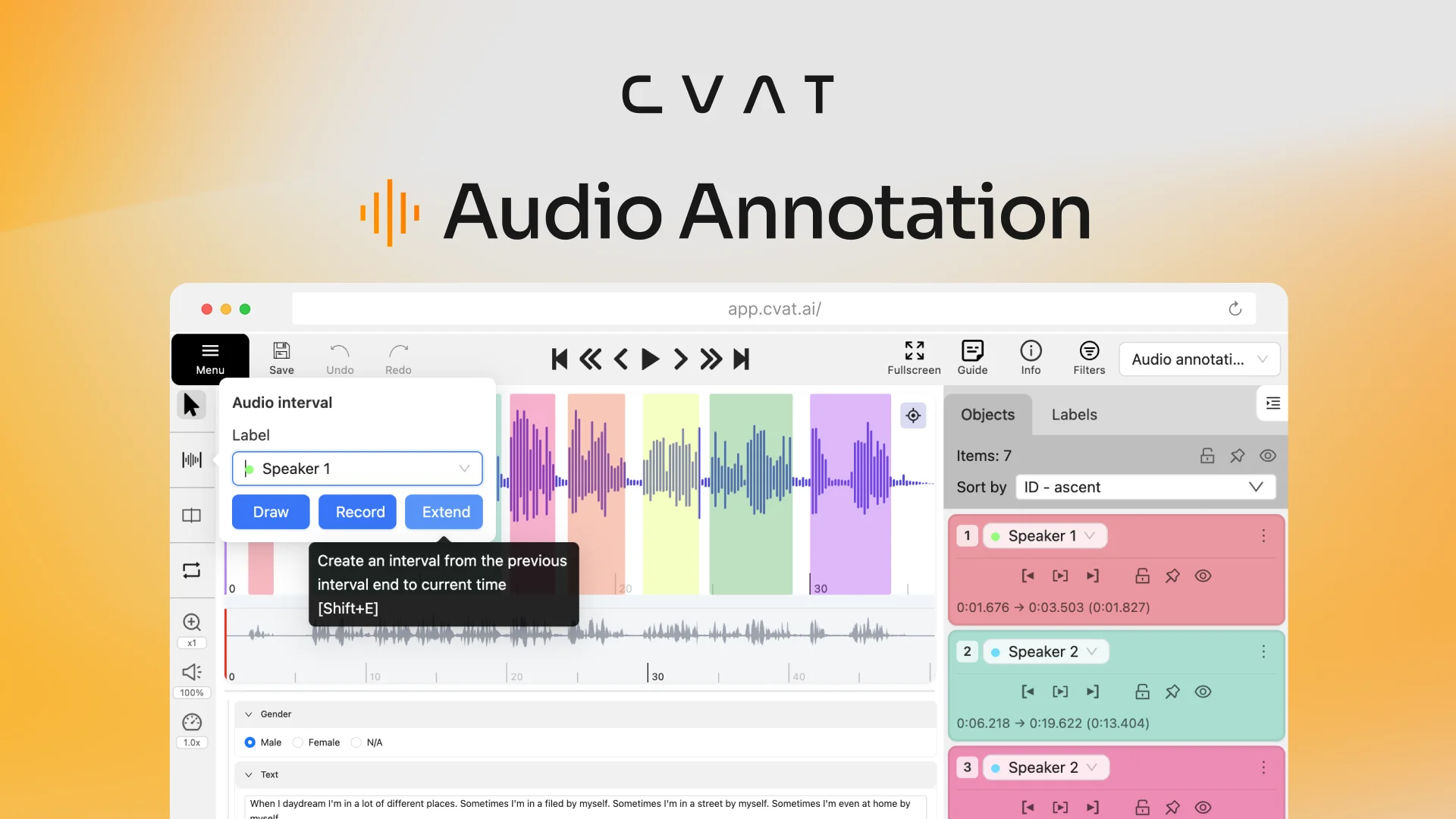
That is why we are excited to introduce support for a new data format in CVAT: audio.
Annotate speech, speakers, and sound events
The new audio format allows you to select time intervals on a waveform, assign labels, and add transcriptions and other attributes to each segment.
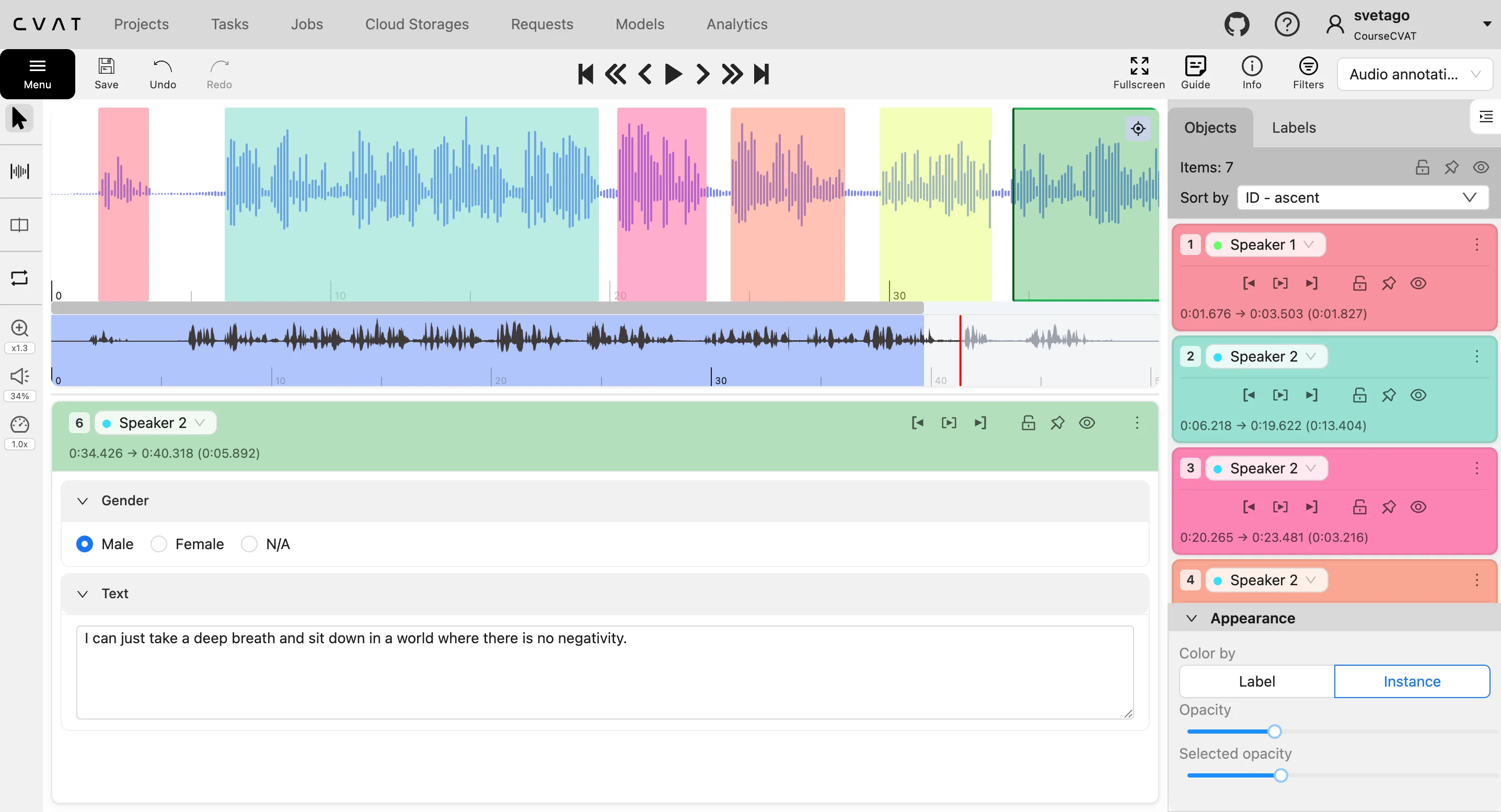
You can use it for several types of audio annotation:
- Audio-to-text transcription: transcribe speech in any language (English, Spanish, Hindi, Chinese, etc.) and connect transcribed text to the exact interval in which it was spoken.
- Speaker labeling and diarization: identify speakers and separate their individual turns in a conversation.
- Audio segmentation: divide recordings into timestamped regions, such as speech, silence, music, background noise, or other sections.
- Voice activity detection: identify intervals that contain speech and distinguish them from non-speech audio.
- Word, phrase, and phoneme annotation: segment speech at the level required by the project.
- Sound event detection: identify when alarms, impacts, voices, animal sounds, machinery, or other acoustic events occur.
- Audio classification: assign one or more categories to a segment or recording.
- Attribute annotation: capture additional information such as language, speaker, accent, emotion, sound source, severity, or recording conditions.
The diversity of potential audio labels is extensive. Google AudioSet contains 2.1 million human-labeled clips covering 5,800 hours of audio and 527 annotated sound classes, including people, animals, vehicles, tools, machinery, alarms, music, and everyday environmental sounds. Other widely used datasets focus on more specialized tasks: LibriSpeech provides approximately 1,000 hours of segmented and aligned English speech for automatic speech recognition, while ESC-50 contains 2,000 five-second recordings across 50 environmental sound classes.
CVAT now provides a dedicated workspace for turning recordings into structured, timestamped data for training and evaluating speech and sound understanding models.
Explore the audio annotation editor
The audio annotation editor brings CVAT’s familiar label-based workflow to a waveform interface designed for speech and sound.
Set up your annotation schema
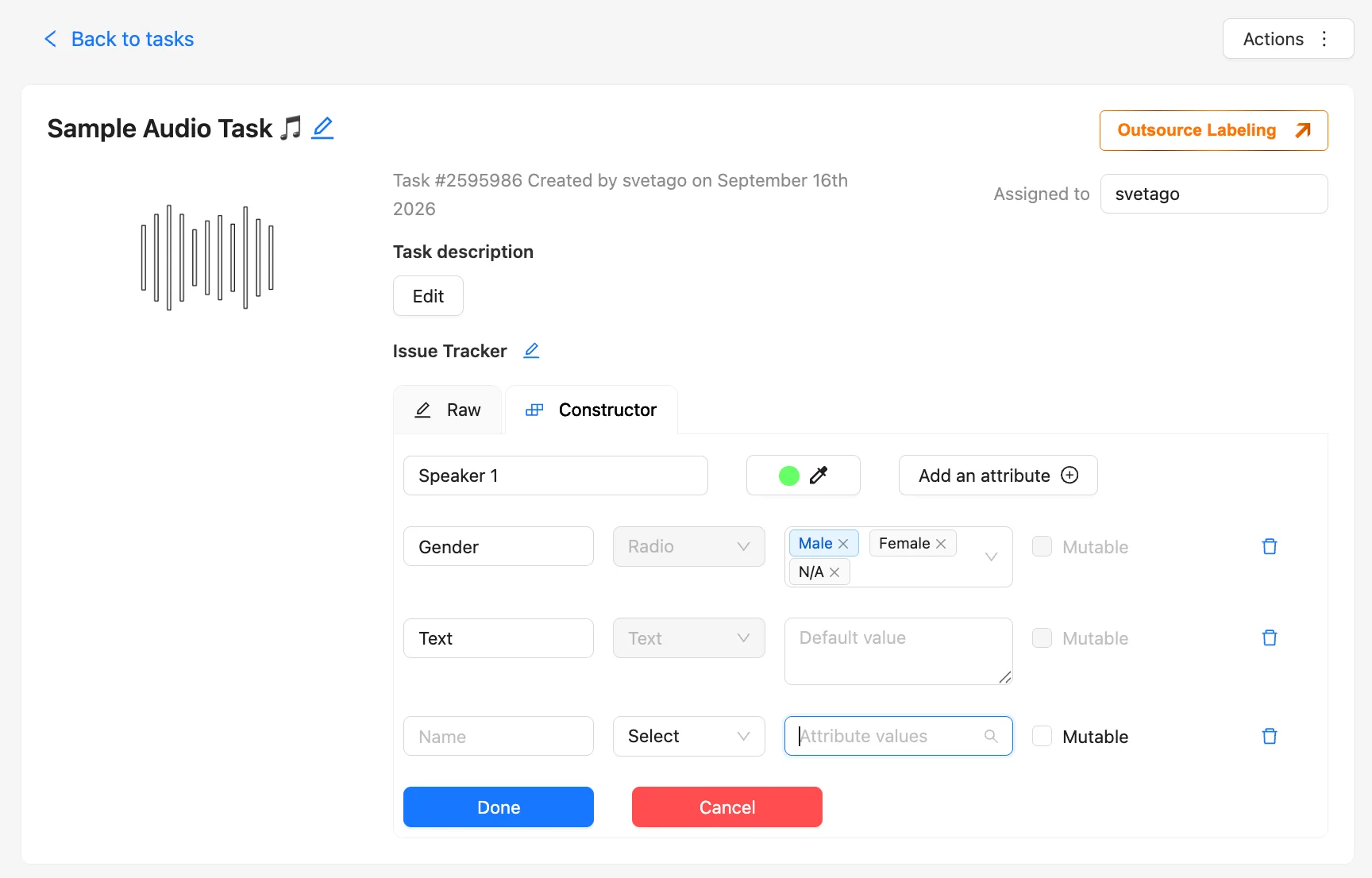
To label an audio, first create a new audio task on the Tasks page. Then upload a recording in .WAV, .MP3, .FLAC`, or ,OPUS, and define the labels and attributes.
For a conversation, you might create separate labels for different speakers and add a text attribute for transcription.
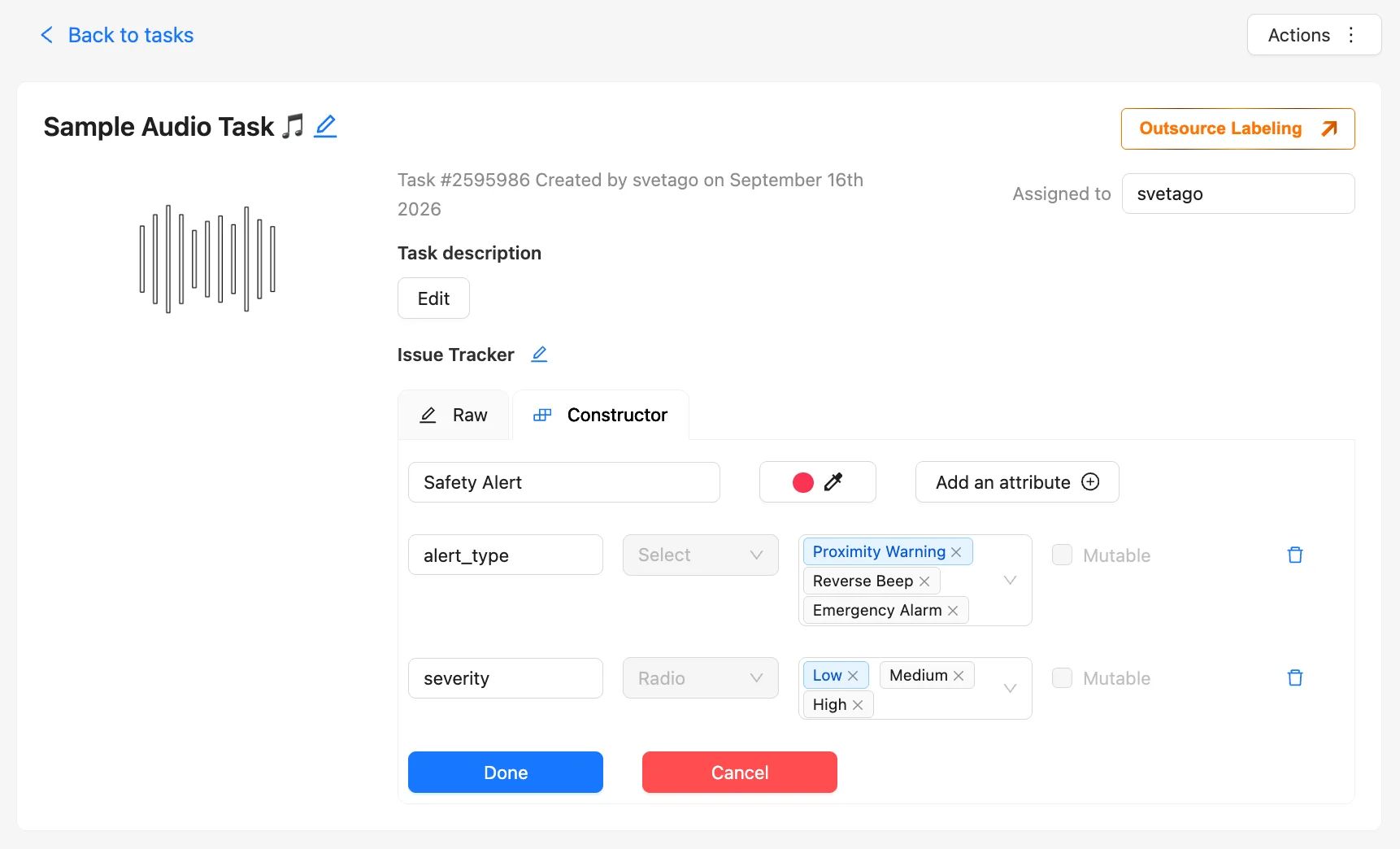
For a sound detection project, labels could represent alarms, vehicle sounds, mechanical noises, animal calls, or other events relevant to your application.
Audio tasks can also be organized within projects so that recordings share the same annotation schema.
Label audio in the way that fits your workflow
CVAT provides three modes for creating intervals:
- Draw: select and label an interval directly on the waveform.
- Record: start marking an interval when playback begins and finish it when playback is paused.
- Extend: create an interval from the end of the previous interval to the current playback position.
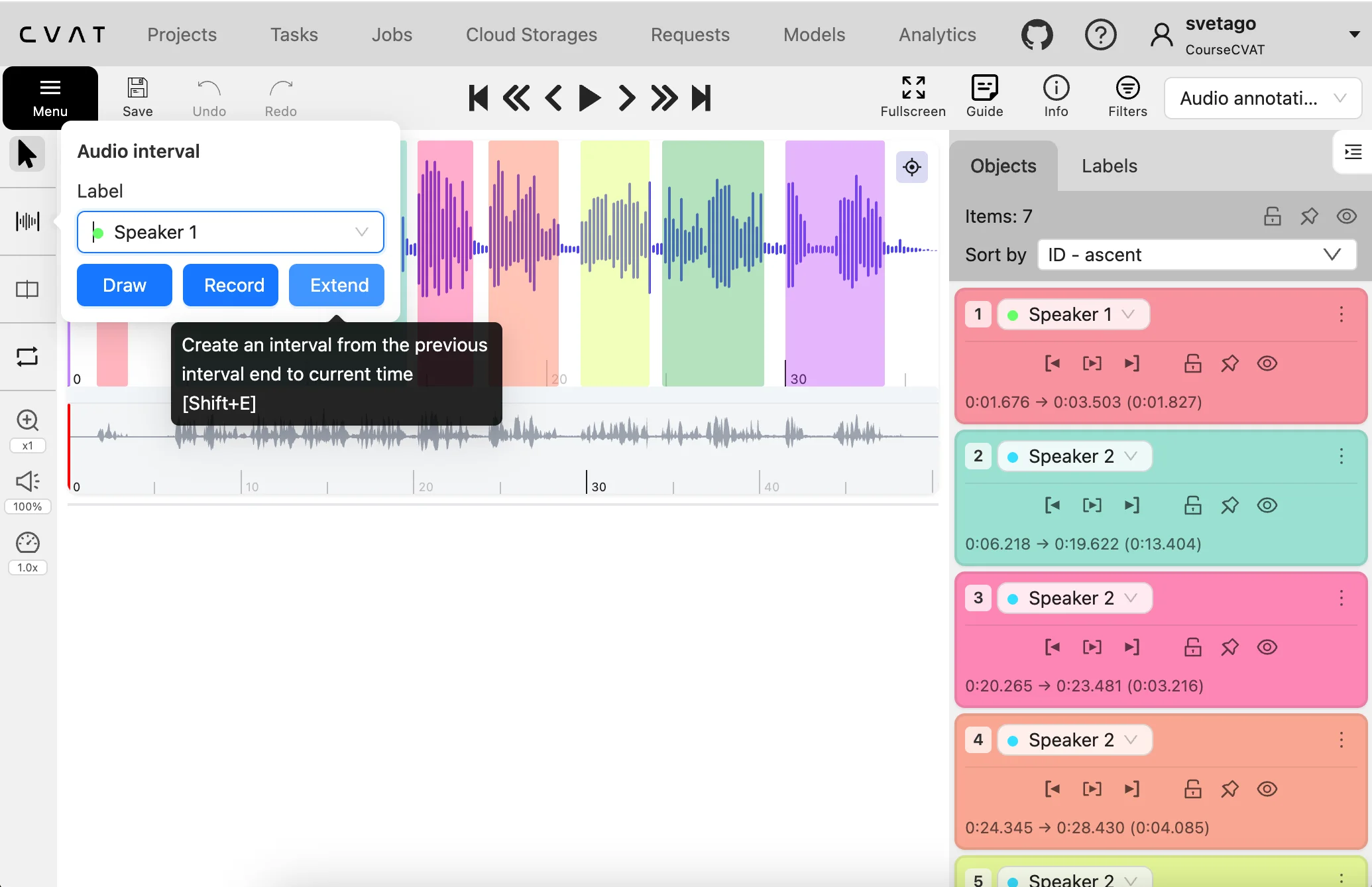
These modes support different types of work, from selecting an isolated sound to segmenting continuous conversations into consecutive speaker turns.
Keyboard shortcuts are available for common playback and annotation actions.
Create time-aligned transcriptions
Select a spoken interval, assign the appropriate speaker or speech label, and enter the transcription into a text attribute.
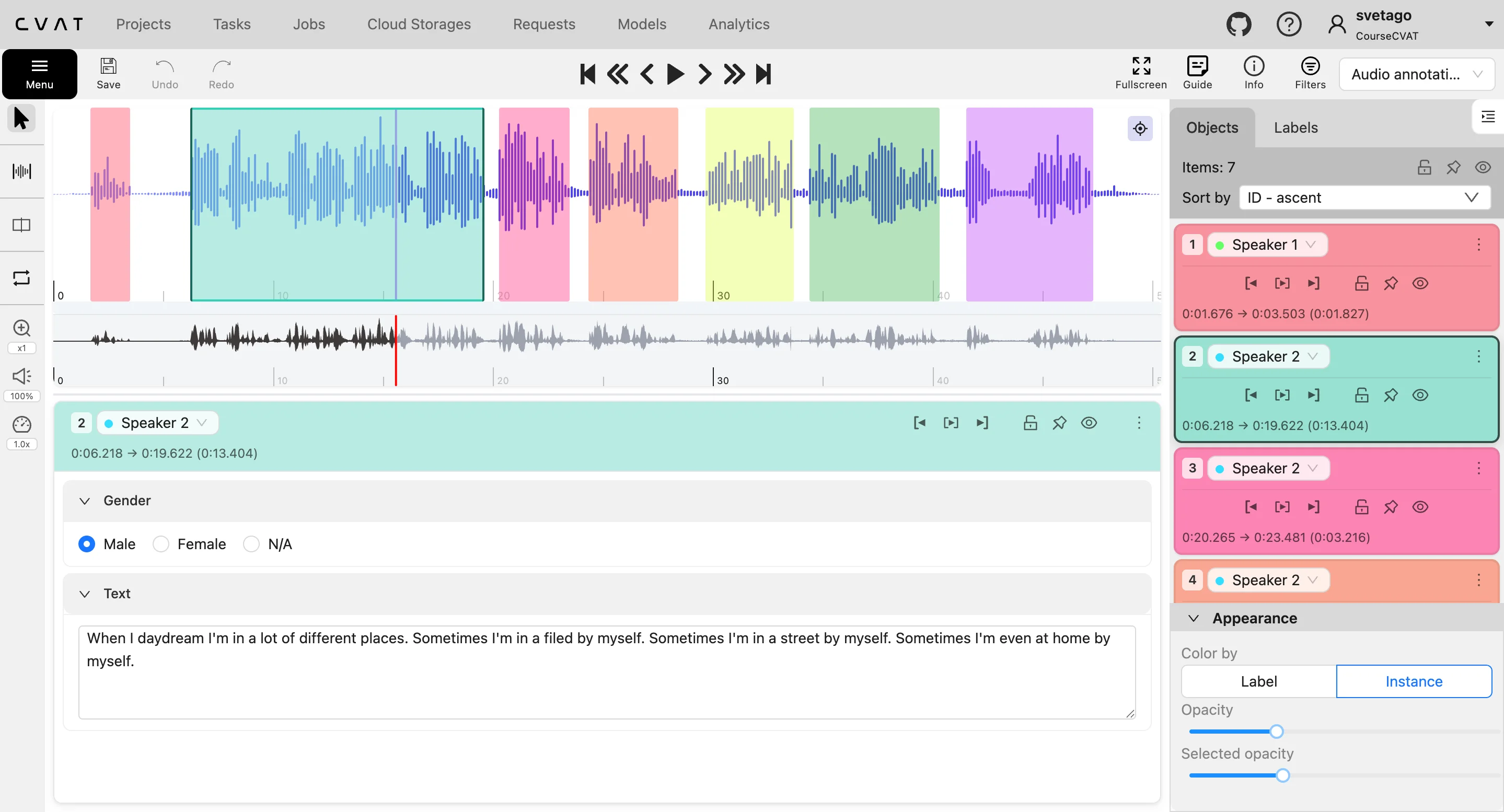
The text remains connected to its interval, preserving when something was said as well as what was said. Additional attributes can capture information such as the speaker, language, accent, emotion, or type of speech.
For difficult sections, annotators can replay or loop an interval, reduce the playback speed, adjust the volume, and zoom into the waveform before entering or correcting the transcription.
Edit intervals precisely
Move an interval or adjust its start and end points to align it with the corresponding speech or sound. Hold Alt while moving or resizing an interval to snap it to nearby boundaries. This is useful for tasks that require seamless annotation.
Longer intervals can be split into smaller annotations. When neighboring intervals share a boundary, annotators can hold Shift and move the nearby boundaries together, which is particularly useful for consecutive speaker turns.
Playback and navigation controls make it easy to move through the track, replay specific sections, and check interval boundaries.
Organize complex recordings
Every interval appears on the waveform and in the object list. Intervals can be colored by label or individual instance, helping annotators distinguish speakers, sound categories, and separate occurrences of the same event.
You can:
- Filter annotations by labels and attributes
- Hide intervals that are not currently relevant
- Lock completed intervals to prevent accidental changes
- Apply actions to all intervals with the same label
- Edit labels, transcriptions, and attributes
- Review annotation counts and track coverage
- Import and export annotations with their timestamps and associated data
Together, these controls help annotators work through recordings while keeping labels, transcriptions, and sound events organized.
For detailed instructions on creating tasks, configuring labels, working with intervals, and importing or exporting annotations, read the audio annotation documentation.
From voice assistants to physical AI: Use cases for labeled audio data
Speech and language applications are among the most established uses of labeled audio. Time-aligned transcripts, speaker labels, and speech attributes can support automatic speech recognition, voice assistants, wake-word detection, speaker diarization, multilingual interfaces, call analysis, meeting search, captions, pronunciation analysis, and language research.
Audio also provides valuable context for systems operating in the physical world. Robots can use spoken instructions and sounds associated with human activity, impacts, material interactions, alarms, and events outside the camera’s field of view. Industrial systems can learn to recognize machine states, mechanical faults, leaks, tool usage, and changes in production processes. Automotive applications include in-cabin speech recognition, siren and horn detection, road sounds, engine anomalies, and collisions.
In homes, workplaces, hospitals, and public spaces, labeled audio can support smart devices, safety monitoring, calls for help, fall and impact detection, clinical dictation, speech analysis, breathing and cough research, accessibility tools, and voice-controlled interfaces.
Other applications include podcast and interview transcription, searchable media archives, content indexing, sound effect classification, wildlife monitoring, bird and animal call recognition, marine acoustics, and environmental soundscape analysis.
These applications may require very different annotation schemas, but they share the same foundation: connecting meaningful labels and metadata to exact moments in a recording. And teams can now create these annotations themselves using the CVAT platform or have their datasets prepared by the CVAT Labeling Services team.
Build your next audio dataset with CVAT
Audio support expands CVAT beyond visual data and gives teams a new way to prepare datasets for AI systems that need to understand people, machines, and the physical world through sound.
Choose the fully managed CVAT Online service, deploy CVAT Enterprise in your own infrastructure with enterprise controls and dedicated support, or self-host the free, open-source CVAT Community edition.
If you need additional annotation capacity, the CVAT Labeling Services team can define the workflow, label your recordings, run quality checks, and deliver a completed dataset. With 300+ annotators across 12 time zones, we can assign native speakers of the required languages to account for pronunciation, dialects, and local speech patterns.
The next generation of AI will understand more of the world than it can see. CVAT can help you build the data that makes that possible.


.svg)
.png)

.png)




.png)