


Welcome to the September edition of the CVAT Digest. This month, we shipped four releases: v2.74.1, v2.75.0, v2.76.0, and v2.77.0.
Highlights include:
- Audio annotation support
- Faster drawing of rotated rectangles and ellipses
- Server-level webhooks for user and organization events
- Improved CVAT Online network performance
- Automatic backing cloud storage for eligible new video tasks
Audio annotation
CVAT officially supports audio annotation alongside images, video, and 3D data.
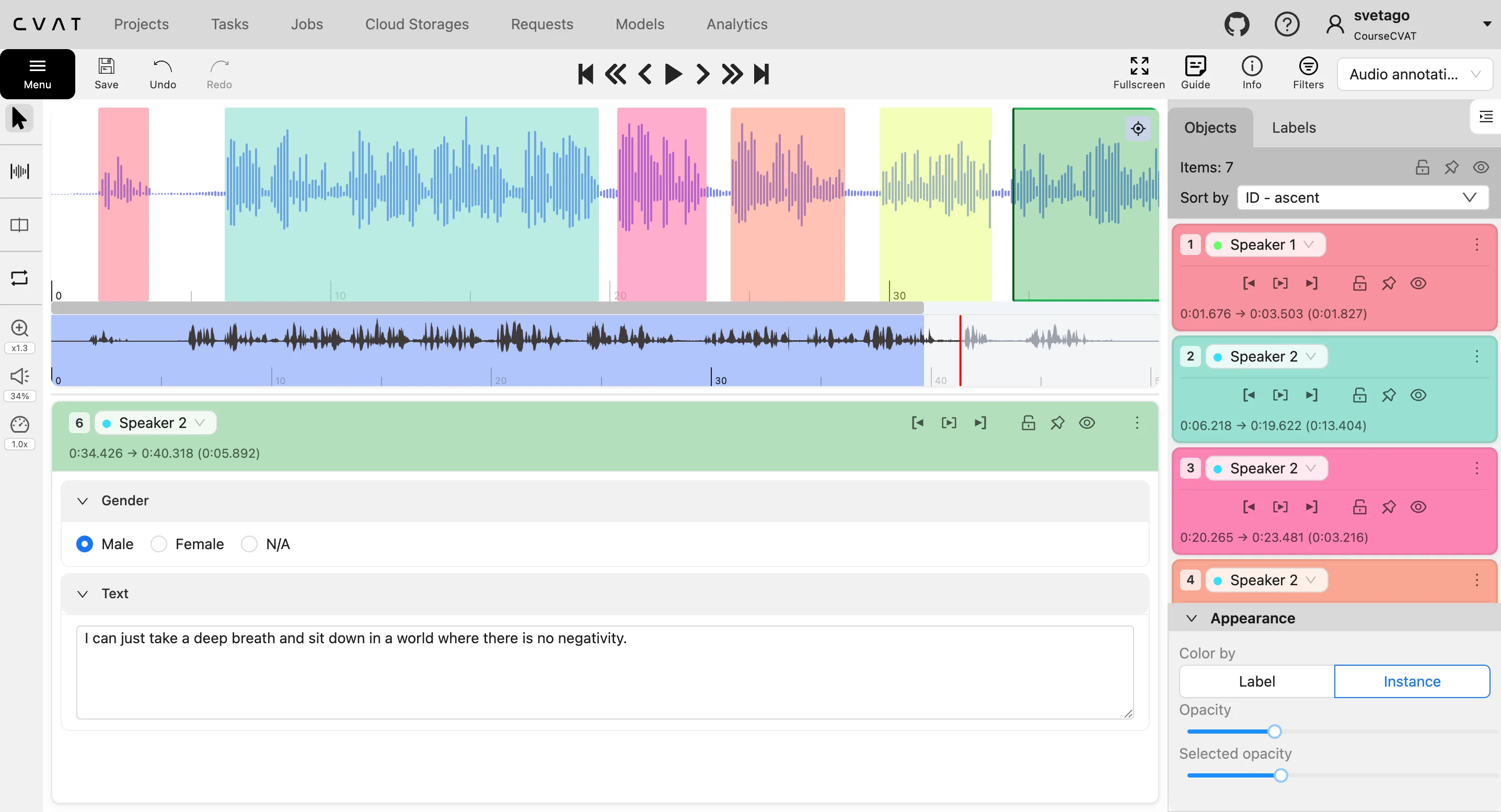
You can now create intervals directly on the waveform, assign labels, add transcriptions and other attributes, and adjust interval boundaries precisely. Common supported formats include WAV, MP3, FLAC, and OPUS.
September releases also added a number of tools for more detailed audio work:
- Split an interval at the current playback position.
- Snap interval boundaries while drawing, moving, or resizing them.
- Search labels and sort audio regions by ID, end time, or duration.
- Resize the waveform and use the minimap to navigate longer recordings.
- Create audio tasks from projects configured for 1D data.
CVAT’s existing label and attribute system also makes it possible to attach information such as speaker, language, emotion, sound source, or other project-specific metadata to each interval.
Explore audio annotation in CVAT
Draw rotated rectangles and ellipses faster
In v2.75.0, we added a new Rotated drawing method for rectangles and ellipses.
Previously, annotating an angled object often required drawing a shape and then resizing and rotating it. With the new method, you place points around the object while CVAT previews the resulting rotated rectangle or fitted ellipse.
For rectangles, the first point helps set the orientation. Existing rectangles can also be rotated by 90 or 180 degrees without changing their geometry.
This reduces the steps needed to annotate angled targets such as vehicles, objects in aerial imagery, packages, and infrastructure components.
Filter annotations by source
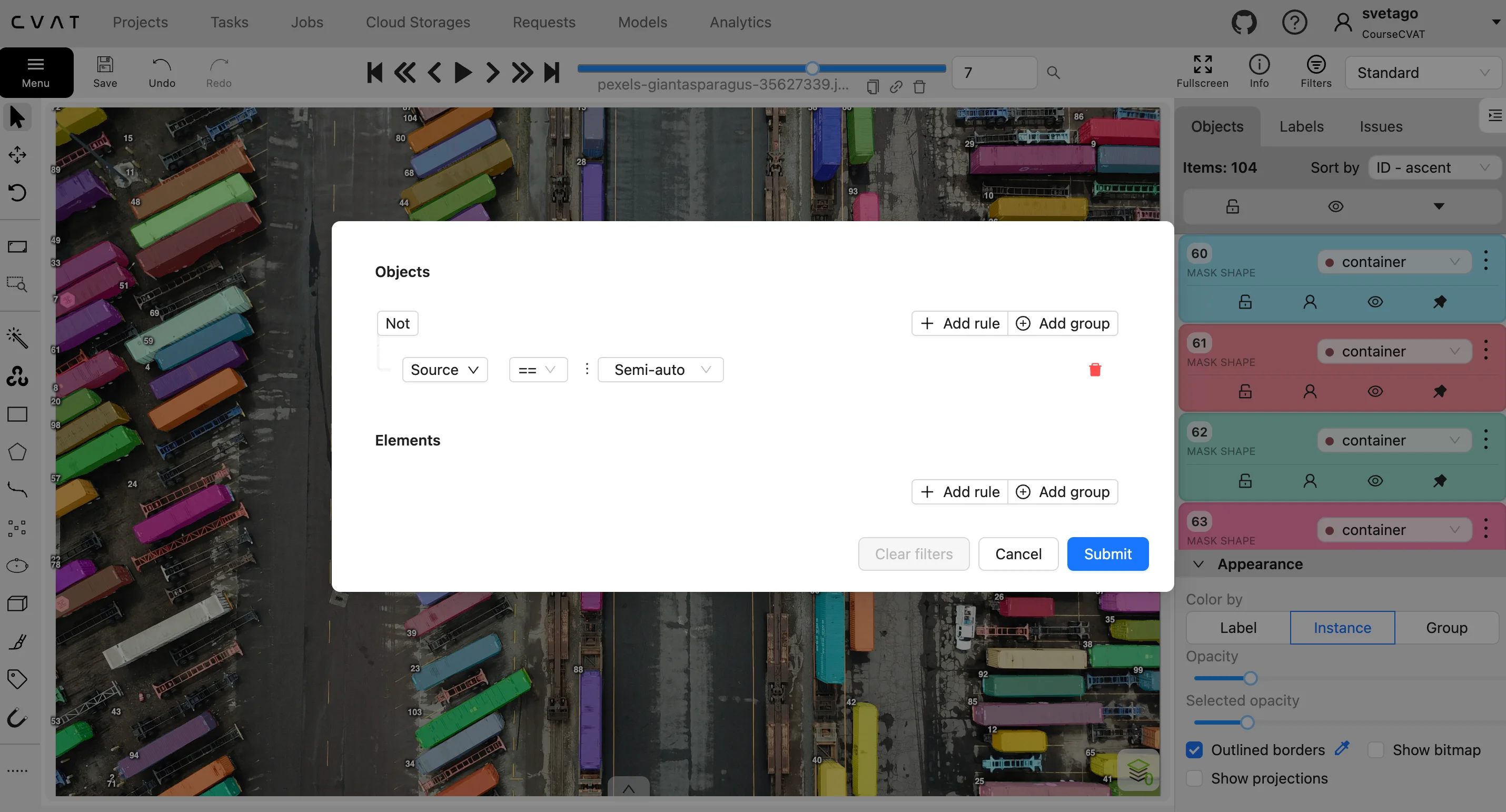
You can now filter annotations by their source directly from the Filters panel:
- Auto
- Semi-auto
- Manual
- File
- Consensus
This is useful in mixed workflows: you can isolate model-generated annotations from manual work, imported annotations, or consensus results during review.
Server-level webhooks for user and organization events
We expanded webhook support in v2.76.0 with a new server-level webhook type.
Project- and organization-level webhooks are scoped to those resources. Server-level webhooks cover instance-wide user and organization events, including:
create:userupdate:userdelete:usercreate:organizationdelete:organization
This is useful for CVAT Enterprise and other self-hosted deployments that need to synchronize CVAT with identity management, provisioning, reporting, or other external systems.
Server-level webhooks can be configured through Django admin, which can now also manage project- and organization-level webhooks.
More reliable imports, exports, and backups
In v2.77.0, background import and export jobs for datasets, annotations, and backups now retry automatically after a failure.
In self-hosted deployments, administrators can configure the retry count and intervals through environment variables.
This reduces manual restarts when long-running operations fail because of temporary network or infrastructure issues.
Automatic backing cloud storage for new video tasks
When default S3-compatible backing cloud storage is configured, eligible newly created video tasks can now be moved there automatically.
This removes a manual storage-management step and helps teams apply the same backing-storage policy consistently to new video tasks.
Improved CVAT Online network performance
We updated the network infrastructure behind CVAT Online to improve how traffic from selected regions reaches our servers.
Traffic from selected regions can now enter a global network closer to the user, reducing the distance it travels over the public internet before reaching CVAT.
In early internal measurements from India, median data-chunk download speed improved by almost 3×, while retries per megabyte decreased by approximately 92% in the compared measurement windows.
The change is intended to improve data-loading speed and connection stability for users farther from CVAT’s primary infrastructure.
Other annotation and interface updates
Other workflow improvements in September include:
- Default save, undo, redo, copy, and paste shortcuts now use the standard OS modifier: Ctrl on Windows and Linux and Command on macOS.
- Compatible attribute values are preserved when changing an annotation’s label.
- Undo and redo now handle bulk hide/show and lock/unlock actions as a single operation.
- Several mask-editing issues were fixed, including undo and redo during mask drawing, redraw cancellation, slicing disconnected regions, and Remove underlying pixels behavior.
API and quality-control updates
The Server API gained additional quality metrics in v2.75.0.
Jaccard Index and Dice Coefficient can now be used as target metrics, alongside new micro, macro, and worst-label aggregation modes for Accuracy, Precision, Recall, Jaccard Index, and Dice Coefficient.
For the complete technical list, see the release notes for v2.74.1, v2.75.0, v2.76.0, and v2.77.0.




.svg)
.png)

.png)




.png)