


.webp)
In computer vision, machine learning, and spatial analysis, 3D point cloud annotation is often used to help convert raw 3D data into structured, meaningful information.
In doing so, the transformation enables algorithms to recognize objects, environments, and spatial relationships and powers the use of real-world applications from autonomous navigation to industrial inspection.
But what exactly is a point cloud, what applications use them, and what are the best ways to annotate them?
This article explains what point clouds are, where they’re used, and how CVAT streamlines the annotation process, from raw scan to labeled dataset.
What is a Point Cloud?
A point cloud is a digital map of an object's surface, made up of individual points captured by a scanning system.
These datasets form the foundation for most 3D computer vision tasks and are produced using methods such as LiDAR, photogrammetry, stereo vision, laser light or structured light-based systems. There are subtle variations between how each type of 3D scanner works, but fundamentally, they all use light to capture surface geometries, resulting in a 3D map.
Depending on the size of the object, the number of points can range from just a few up to trillions of points.
For example, a point cloud of a cube could be created from just 8 points (one for each corner), while the recent 3D scan of the Titanic wreck resulted in a 16 terabyte dataset comprising billions of points. The Titanic scan (made using photogrammetry) is so detailed that individual bolts on the ship and even a necklace are visible in the scan data.

Urban planning and planetary LiDAR scans are even bigger and can feature trillions of points in the point clouds.
Once the raw scan data has been acquired by the scanning hardware of choice, it can be processed into a usable format. This is typically achieved by aligning, filtering, and converting the raw data into a structured point cloud for visualization, measurement, modeling…or annotation.
Applications of Point Clouds Data in Computer Vision
From autonomous vehicles and robotics to drones and geospatial analysis, point clouds enable machines to interpret real-world geometry. Annotated 3D data enables detection, reconstruction, and spatial reasoning across a broad swath of AI applications such as:
- Autonomous Driving
LiDAR-generated point clouds are used for 3D object detection, lane and road mapping, obstacle avoidance, and real-time vehicle localization. - Robotics
Robots need point clouds to map their surroundings, stay clear of crashes, spot objects, and move around in dynamic environments. - Augmented and Virtual Reality (AR/VR)
Used to reconstruct real-world environments for immersive experiences, enabling realistic interaction with virtual objects. - Industrial Inspection and Quality Control
Capture precise 3D models of manufactured parts to detect defects, verify tolerances, and ensure conformity with design specifications. - Construction and Architecture
Used for as-built documentation, site surveys, clash detection, and the creation of accurate digital twins for buildings and infrastructure. - Geospatial Analysis and Mapping
Point clouds from aerial LiDAR or drones are used for terrain modeling, land classification, flood simulation, and urban planning. - AI and Machine Learning
Annotated point clouds are used by researchers to train machine learning models for segmentation, object classification, and scene understanding in 3D.
Each application relies on the precision and richness of point cloud data to bridge the gap between raw spatial input and actionable digital insight.
How Do You Annotate a Point Cloud?
Annotating a point cloud means assigning meaningful labels to the 3D spatial data captured by a LiDAR or depth sensor.
Unlike 2D image annotation, where you work with flat pixels, point cloud annotation requires you to work in three dimensions, accounting for depth, volume, and spatial orientation. The technique you choose depends on what your model needs to learn.
Here is an overview:
3D Bounding Boxes (Cuboids)
The cuboid is the most common starting point for point cloud annotation.
An annotator draws a 3D box around each object of interest, capturing its position, size, and orientation in space. Because LiDAR returns precise depth measurements, cuboids can be placed with a level of spatial accuracy that is simply not possible with 2D bounding boxes.
Each cuboid carries attributes such as object class, heading angle, and dimensions, giving downstream models everything they need to detect and locate objects in a 3D scene. Cuboid annotation is the right choice when your project requires:
- Detecting and classifying vehicles, pedestrians, and cyclists in autonomous driving scenes
- Robotics applications where objects need to be located and grasped
- Any use case where object-level detection is the primary goal
Because of its relative simplicity compared to segmentation, cuboid annotation scales well for large datasets and is often the first technique teams reach for when building a new 3D perception pipeline
3D Semantic Segmentation
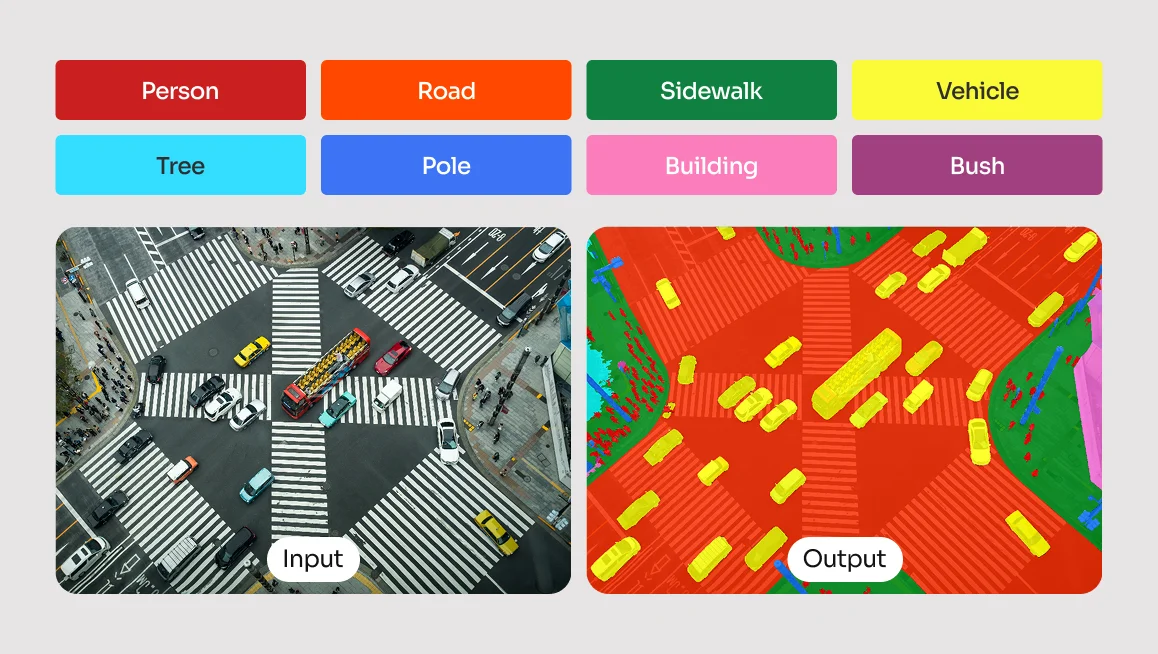
Rather than drawing a box, semantic segmentation assigns a class label to every individual point in the cloud. In a typical outdoor driving scene, a LiDAR scan can contain hundreds of thousands of points — semantic segmentation classifies each one as belonging to a road surface, a building, vegetation, a moving vehicle, and so on.
This produces a far more granular understanding of the environment than cuboid annotation alone, and is essential for models that need to reason about free space, drivable surfaces, or complex scene geometry. This technique is typically the right fit for projects that require:
- HD mapping and environment reconstruction
- Distinguishing drivable surfaces from obstacles
- Applications where the model needs to understand the full scene, not just individual objects
The trade-off is annotation effort. Labeling every point in a dense cloud is significantly more time-consuming than placing cuboids, which is why semantic segmentation projects often rely on AI-assisted pre-labeling tools to generate an initial pass that human annotators then review and correct.
3D Object Tracking
3D object tracking extends bounding box annotation across time. This temporal consistency is what allows models to learn not just where an object is, but where it is going.
Accurate tracking annotations are particularly demanding because any drift in label placement between frames introduces noise that can degrade model performance significantly. 3D object tracking is the appropriate method for projects that involve:
- Predicting the movement, velocity, and trajectory of dynamic objects
- Multi-object tracking in autonomous driving datasets
- Any scenario where understanding behavior over time is required
Getting tracking annotations right requires careful attention to frame-to-frame consistency. Tools that support interpolation can significantly reduce the manual effort involved while maintaining the accuracy that tracking models depend on.
Keypoint Annotation
Instead of bounding an entire object, annotators mark specific landmark points, such as the joints of a human body or key structural points on a vehicle, using keypoint annotation. In the context of point clouds, keypoints are placed directly within the 3D space, giving models a precise understanding of how an object is oriented and structured rather than just where it sits.
This technique is particularly powerful when combined with LiDAR's depth accuracy, as it allows models to reason about pose and articulation in three dimensions rather than inferring it from a flat image. Keypoint annotation is best applied to projects focused on:
- Human pose estimation and motion capture
- Robotic manipulation tasks requiring precise spatial awareness
- Object pose estimation where orientation and structure matter
While less common than cuboid or segmentation annotation in large-scale LiDAR datasets, keypoint annotation plays a critical role in specialized applications, particularly in healthcare robotics, industrial automation, and any domain where understanding the precise configuration of a human or mechanical body in 3D space is essential.
Readily Available 3D Datasets
2D datasets are quite laborious to obtain manually, so you can imagine how much of a resource-intensive task gathering training data for 3D applications is.
Thankfully, there is a wide range of publicly available point cloud datasets available. Many are free and open access, and some require the purchase of a license. The table below shows a selection of popular datasets available, which you may wish to use for your model training.
Can You Perform 3D Point Cloud Annotation in CVAT?
Yes, you can perform 3D point cloud annotation in CVAT. But before beginning the annotation workflow in CVAT, it helps to understand how labeling tasks are structured and what techniques can improve accuracy and consistency.

What Is a Labeling Task in CVAT?
In CVAT, a labeling task defines the scope of your annotation project. Each task includes:
- A name and description
- A set of labels or object classes (e.g., “car,” “pedestrian,” “tree”)
- Optional attributes (e.g., “moving,” “occluded”)
- A dataset to be annotated (images, video frames, or 3D point clouds)
For 3D point clouds, tasks support both static scans and sequential frames, allowing for temporal annotation (e.g., tracking objects across time). Each task can contain multiple jobs, which are the individual segments of data assigned to annotators.
How Do You Define Clear Labels and Attributes?
Before uploading your dataset, define your label structure carefully. Avoid vague labels, and keep class names consistent. For example, use “vehicle” consistently instead of alternating with “car” or “van.” Add attributes to capture additional information, such as:
- Object state: moving, stationary, partially_visible
- Physical characteristics: damaged, open, closed
Attributes can be marked as mutable (changes over time) or immutable (stays constant), which helps simplify the annotation interface and improve training consistency.
Techniques for Effective 3D Annotation
To annotate efficiently:
- Use Track mode to maintain object IDs across frames
- Place cuboids in the main 3D viewport and refine them in the Top, Side, and Front orthogonal views
- Use contextual 2D images (if available) to support difficult annotations
- Apply interpolation for objects in motion across multiple frames
- Flag ambiguous or occluded annotations with appropriate attributes
Proper task setup and labeling discipline not only make the process smoother, they also ensure that the resulting dataset is accurate, structured, and ready for downstream AI training.
Annotating Point Clouds in CVAT: Overview
CVAT’s 3D point cloud annotation workflow is straightforward. The user simply creates a task, loads the dataset, places and adjusts cuboids, and optionally propagates or interpolates the cuboids across frames.
Here’s an abbreviated overview of the full process, from start to finish.
- Navigate to the Tasks page.
- Open the task and explore the interface layout.
- Navigate the 3D scene using mouse and keyboard controls.
- Create and adjust cuboids for annotation.
- Copy and propagate annotations across frames.
- Interpolate cuboids between frames.
- Save, export, and integrate annotated data into your pipeline.
Before training begins, it’s good practice to run a validation script to check for label inconsistencies, misaligned cuboids, or frame mismatches. Ensuring clean, well-structured annotation data is just as critical as the model architecture itself.
For a more fleshed out tutorial on how to annotate 3D point clouds, head on over to CVAT Academy.
Best Practices for High-Quality Point Cloud Data Annotation
Getting 3D point cloud annotation right isn’t complicated, but it does require discipline. The most common issues come from inconsistency and lack of structure, both of which are easy to avoid if you put the right systems in place from the start.
- Be consistent: Start with label consistency. Stick to a fixed label set. Don’t call something a “car” in one frame and a “vehicle” in another. CVAT’s label constructor locks this down, so use it. It stops annotators from improvising with naming conventions.
- Attribute properly: If you’re annotating objects with different states (like “open/closed” or “damaged”), don’t create separate labels. Add a mutable attribute. For fixed traits (like color or make), use immutable ones. It keeps the label space clean and keeps your training data flexible.
- Establish Annotation Guidelines: Whether you're working solo or with a team, define clear rules for edge cases, like how to handle partial occlusion, ambiguous shapes, or overlapping objects. A short internal guideline document can eliminate confusion and reduce rework later on.
- Quality assurance: Apply some basic QA. Do a second pass. Spot-check frames. Use annotation guidelines. If multiple annotators are involved, establish consensus rules for edge cases. You don’t need a formal pipeline, you just need to try to avoid leaving junk labels, floating cuboids, or inconsistent tags in the data.
- Don’t Over-Label: Last, but not least, it can be tempting to annotate every object in the scene, but not all data is equally useful. Focus on what your model actually needs to learn. Prioritize annotation quality over quantity, especially when resources are limited.
Clean data is trainable data. Anything else just provides more work unnecessarily down the line.
Challenges in 3D Point Cloud Annotation
Annotating 3D point clouds comes with a distinct set of challenges (both technical and human) that can significantly affect the quality of your dataset.
One of the biggest issues is occlusion. Since point clouds are generated from specific sensor perspectives, any surfaces not visible to the scanner (the back of an object or areas blocked by other objects, for example) simply don’t appear. This missing data can make it difficult to annotate complete geometries with confidence.
This lack of visual information can make it difficult to fully interpret object boundaries, identify shapes, or distinguish between overlapping items. In dense or cluttered scenes, occlusion can lead to under-representation of key objects and introduce ambiguity during annotation.

Point density is another problem. Objects close to the sensor may be richly detailed, while distant objects can appear sparse or fragmented. Low-density regions often result in uncertainty when drawing precise cuboids or estimating object boundaries.
Add to that sensor noise, which can result from misfired points, ghosting from reflective surfaces, or jitter from moving elements in a scan, and the result is a lot of visual clutter that annotators must mentally filter out.
Then there’s annotation fatigue. Unlike 2D image annotation, working in 3D often involves constant panning, zooming, and adjusting the scene from different angles. This level of interaction increases the mental load and can lead to inconsistency across sessions.
To help mitigate this, CVAT allows the use of contextual 2D images alongside point clouds, displayed in separate windows within a 3D annotation task.
Get Professional 3D Data Annotation Help with CVAT Labeling Service
While point cloud data annotation with CVAT is relatively straightforward, not everybody has the luxury of time or other resources to commit to the data annotation process - it can be time-consuming after all, particularly when dealing with huge datasets.
If you fit into this category and would rather outsource your data labeling needs, you will be pleased to know that CVAT offers our own services for such tasks.
Our professional data annotation services offer expert annotation of your computer vision data at scale, regardless of if the data is point cloud, image- or video-based. Our team of experts ensures high-quality annotations and provides detailed QA reports so you can focus on your core experience and computer vision algorithms.
Why You Should Consider CVAT for Point Cloud Data Annotation
3D point cloud annotation isn’t glamorous, but it’s a vital step in building reliable 3D perception systems. Whether you’re working on autonomous vehicles, machine learning, robotics, or spatial AI, well-structured annotations make the difference between a model that just runs and a model that performs.
CVAT offers annotation tools such as cuboids, multi-view layouts, contextual 2D images, and export formats compatible with common frameworks like OpenPCDet, TensorFlow, and MMDetection3D.
Getting high-quality annotations means doing the basics right: using consistent labels, applying attributes carefully, and maintaining coherence across frames. CVAT’s propagation and interpolation tools help speed that up while reducing manual error. And before you push your dataset into training, take the time to review and validate it, because annotation mistakes are a lot cheaper to fix before the model starts learning from them.
In short, clean data leads to cleaner results. The effort you put into annotation shows up later in model accuracy, stability, and generalization. And CVAT gives you the foundation to build clean datasets. What you choose to do with the annotated data afterwards is down to your own ingenuity!
Ready to start annotating 3D point cloud data?
CVAT Online lets you get started immediately in the browser, with no installation required. It supports 3D point clouds, 2D images, and video, so you can begin labeling LiDAR data and evaluating your workflows right away.
CVAT Enterprise is built for teams annotating at scale. It adds dedicated support, enterprise security options including SSO and LDAP, and collaboration and reporting features that help large production teams maintain quality and throughput across complex 3D annotation projects.
Frequently Asked Questions About Point Cloud Annotation
What is 3D LiDAR annotation?
3D LiDAR annotation is the process of labeling spatial data captured by LiDAR sensors. It involves identifying and tagging objects within a 3D point cloud using techniques like bounding boxes or segmentation, enabling machine learning models to understand depth, shape, and movement.
What Format Are Point Clouds Captured In?
Point clouds are typically represented using Cartesian (XYZ) coordinates, but they aren't always captured that way at the source. Many 3D scanners (LiDAR systems in particular) initially collect data in spherical coordinates, recording each point’s distance from the scanner (r), horizontal angle (θ), and vertical angle (φ).
In other cases, such as tunnel inspection or pipe mapping, scanners may use cylindrical coordinates. Range imaging systems often store depth as pixel intensity in a 2D grid. These native coordinate systems reflect the scanner’s internal geometry and sensing method, optimized for capturing specific environments.
However, for consistency and compatibility (whether in CAD, simulation, or AI pipelines) these formats must be converted.
Using trigonometric transformations, spherical and cylindrical data are recalculated into standard XYZ coordinates, where each point is defined by its position along three perpendicular axes.
The XYZ format is universally supported by common point cloud file types like .ply, .pcd, .xyz, and .las, making it essential for downstream processing.
So, while point clouds may originate in various coordinate systems, they are almost always converted into XYZ for storage, visualization, and further analysis.
What is the difference between point cloud annotation and image annotation?
Image annotation deals with 2D pixels on a flat plane, typically using bounding boxes or polygons. Point cloud annotation works in a 3D space using Cartesian (XYZ) coordinates, requiring annotators to account for depth, volume, and spatial orientation using tools like 3D cuboids.
What are the challenges of annotating sparse LiDAR data?
Sparse LiDAR data lacks point density, making it difficult to determine the exact boundaries or shapes of objects, especially those far from the sensor. This often requires annotators to rely on contextual 2D images or temporal tracking across multiple frames to accurately label the data.
Can point cloud annotation be automated?
Partially. AI-assisted labeling tools can generate an initial set of annotations, such as pre-labeling objects with bounding boxes or segmentation masks, which human annotators then review and correct.
This hybrid approach significantly reduces the time and cost of building large 3D datasets without sacrificing the accuracy that safety-critical applications require. Fully automated annotation is not yet reliable enough for production use in most domains.



.svg)
.png)

.png)




.png)
