


Introduction
Data annotation plays a fundamental role in preparing training datasets for machine learning systems. The quality of annotation directly affects the accuracy of models and their applicability in real-world scenarios. Errors at the annotation stage can not only reduce the effectiveness of an algorithm but also distort results entirely.
Annotation quality is determined by several factors: completeness, accuracy, consistency of classes and attributes, and adherence to additional rules specified in the project specification. Let’s examine these aspects in more detail.
Common Quality Issues
Based on annotation practice, several typical errors can be identified that frequently occur and significantly reduce the value of the data:
- Missing objects or frames.
- Crude geometry.
- Class inconsistencies.
- Attribute errors.
- Ignoring additional rules.
Each of these issues may seem minor on its own, but together they create systematic distortions: the data becomes incomplete, inconsistent, and fails to reflect reality. Therefore, attention to detail and compliance with all specification rules is a key factor in successful annotation. Let’s look at each point in more detail.
Annotation Completeness
The first and fundamental requirement is completeness. This means that all images included in the task must be processed, and all objects specified in the project specification must be annotated without exception.
If even a portion of objects is missed, the dataset becomes incomplete. This leads to distorted model training results: the algorithm cannot "see" all possible object variations, and its predictions become less accurate. For example, if rare or small objects are consistently not annotated, the model will not learn to recognize them.
Completeness also requires attention to detail. Small, partially occluded, blurred, or infrequent elements should be annotated along with primary objects. Their absence is often critical, as such examples help the model be more versatile and robust under various conditions.
Additionally, annotation completeness involves:
- Processing all frames/images - no part of the dataset should remain unannotated. Even seemingly "empty" or unimportant frames should be carefully reviewed, otherwise objects present in these frames may be missed.

- Covering the full range of classes - every object listed in the specification should be annotated. Missing a class creates a data bias and leads to "blind spots" for the model.

- Consistency among annotators - if multiple annotators work on a project, everyone must interpret what counts as an object in the same way.
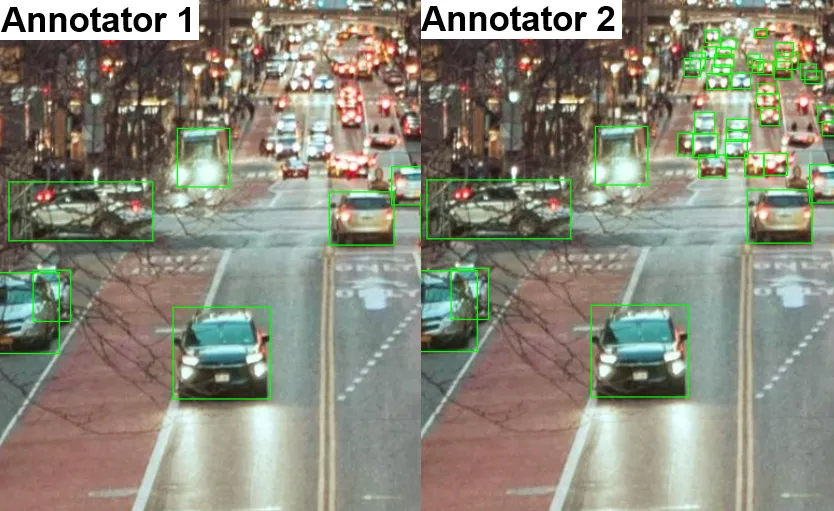
Thus, completeness is not just about the number of annotated objects but about the integrity and systematic approach to annotation. It ensures the final dataset reflects all aspects of real data and can reliably train a model.
Geometric Accuracy
Another critical aspect is geometric accuracy when outlining objects. This determines how closely the shape and boundaries of the annotated object match its actual contour in the image.
In some projects, simplified polygons are sufficient. A polygon may roughly follow the object’s outline without tracing every curve or fine detail. This approach allows faster annotation when the main goal is to separate objects from the background rather than to achieve perfect pixel-level accuracy.

However, other projects demand much higher precision. Polygons must closely match the object’s true shape, capturing fine curves and intricate details. For instance, when annotating road signs, medical images, or small technical components, coarse polygons are insufficient, even minor inaccuracies in the outline can significantly affect model performance.

Therefore, the level of geometric accuracy should always align strictly with the project specification. If approximate boundaries are allowed, there is no need for meticulous outlining. Conversely, if detailed annotation is required, any simplification counts as an error.
In other words, geometric accuracy is not always “the more precise, the better.” The key is that the level of detail matches the objectives and tasks of the specific project.
Consistency of Classes and Attributes
Consistency is equally important. Even perfectly outlined objects lose value if assigned to incorrect categories or if attribute logic is violated.
Annotation relies on two main elements:
- object classes (for example: “car,” “bicycle,” “motorcycle”)
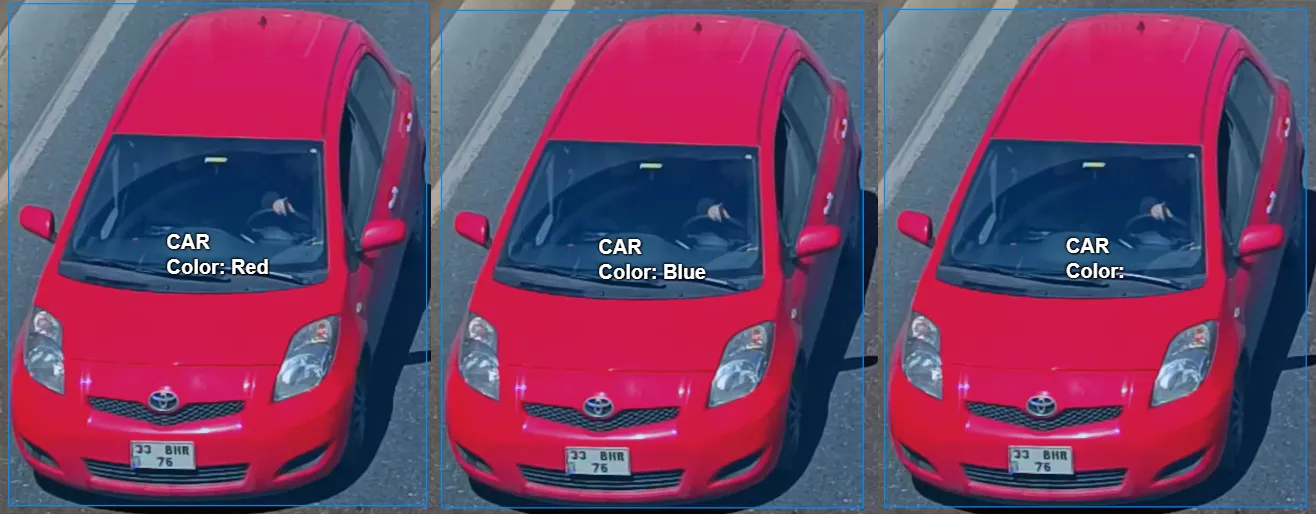
- attributes (for example: “car color,” “object condition”).
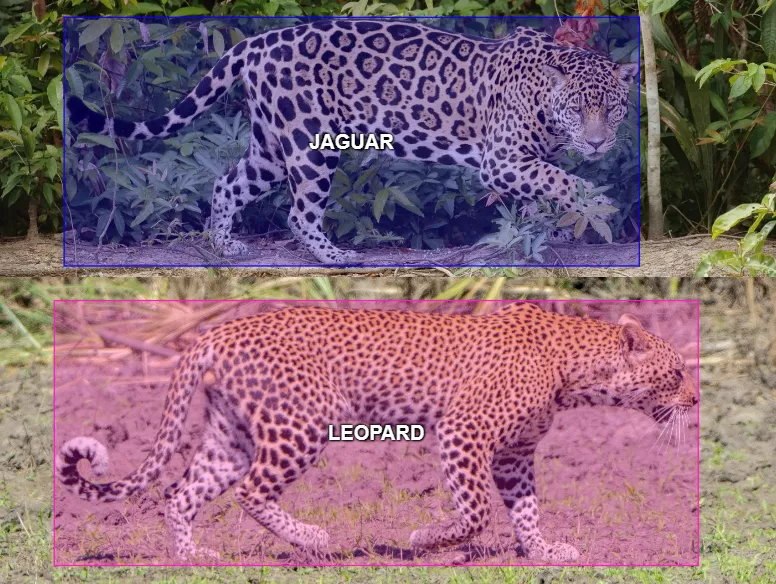
If different annotators interpret the same object differently, the dataset becomes inconsistent. For the model, this creates contradictory examples: the same object might be labeled “bicycle” in some cases and “motorcycle” in others. As a result, the algorithm becomes less stable and confused in its predictions.
Consistency is particularly critical in cases of:
- Similar classes - for example, “jaguar” and “leopard,” “sedan” and “hatchback,” ‘bush’ and “tree.” If you don't follow strict specification rules, such objects can easily be confused.
- Attribute values - for example, when annotating a car’s color, values must be used consistently. If one annotator writes “red”, another writes “blue”, and a third leaves the attribute blank, the resulting data becomes inconsistent.
To ensure consistency:
- Strictly follow the specification - it defines how objects are classified and described.
- Train and calibrate annotators - so the team shares the same understanding of class and attribute criteria.
- Review and validate results - validation helps identify discrepancies and correct them before forming the final dataset.
Thus, consistency of classes and attributes is fundamental to annotation integrity. Without it, even accurate and complete annotation loses meaning because the data is no longer uniform and cannot train the model effectively.
Additional Requirements
Beyond basic rules, many projects include specific constraints tailored to the intended use of the data. These requirements balance completeness and annotation usefulness.
Common constraints include:
- Object size - for example, only annotate objects occupying at least 20×20 pixels. Very small elements may be noise and interfere with model training.

- Rare categories - in some projects, rare objects are emphasized to provide sufficient examples. In others, they may be excluded if they have low value. For example, in a traffic scene, dozens of cars may appear alongside a single construction vehicle, which may be specially annotated or ignored depending on the task.

- Annotation conditions - for example, annotate only moving cars and ignore parked ones, or annotate only full-body humans, excluding partially visible pedestrians.
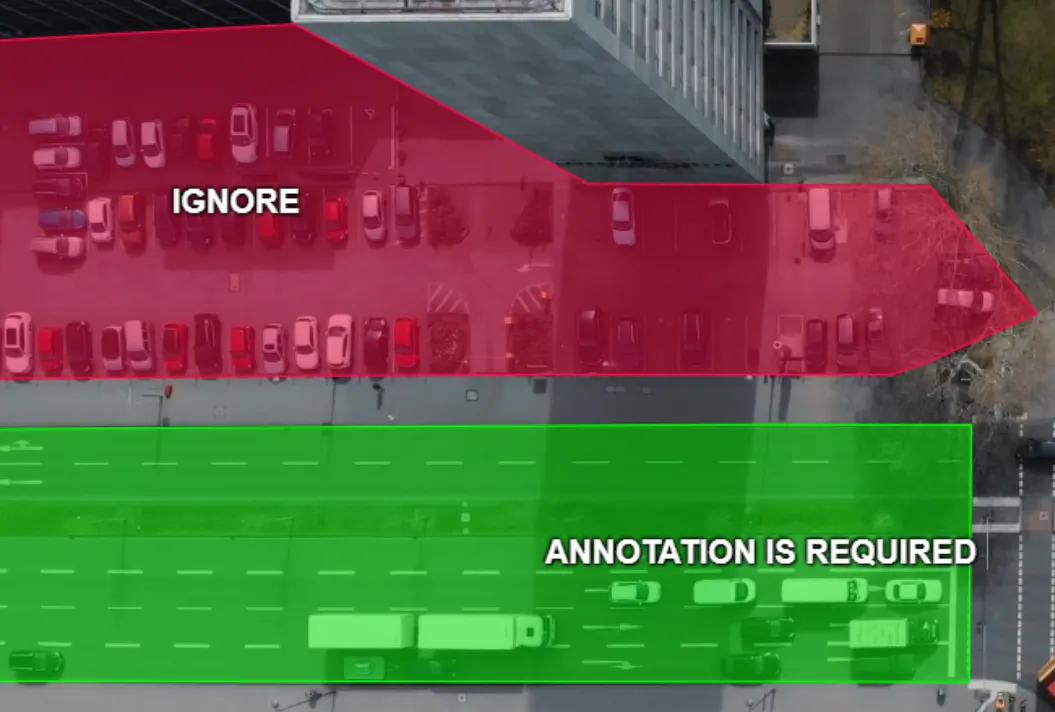
Violating these rules makes the dataset inconsistent with project goals. Annotating very small or irrelevant objects may reduce model accuracy on important examples, while ignoring rare classes prevents the algorithm from learning them.
Thus, additional requirements act as filters defining the “rules of the game” for annotators. They focus efforts on objects and situations that matter most, excluding irrelevant elements.
Conclusion
Annotation quality is the foundation for reliable and effective machine learning models. It encompasses several interrelated aspects:
- Completeness - all images and objects specified must be annotated. Missing elements, even small or rare, create blind spots and distort data, reducing model accuracy.
Geometric accuracy - object contours must meet project requirements, from rough bounding boxes for quick detection to pixel-level segmentation. Incorrect shapes lead to training errors and lower prediction quality. - Consistency of classes and attributes - objects must be correctly categorized, and attributes consistently applied. Inconsistencies create contradictory examples that hinder learning and reduce model stability.
- Compliance with additional requirements - object size, annotation conditions, rare categories, and other rules maintain balance between completeness and utility. Violating these rules renders the dataset unsuitable for project objectives.
High-quality annotation ensures the reliability and applicability of a model in real-world conditions. Any errors during labeling propagate into training, reducing algorithm accuracy and stability. Strict adherence to the specification, attention to detail, and consistent annotator practices produce coherent, consistent, and complete datasets.
In summary, good annotation is not only careful work by annotators but also the result of well-defined project rules, diligent oversight, and a systematic approach. It minimizes errors, ensures data reliability, and provides a foundation for robust and accurate machine learning models.

.svg)

.webp)




.svg)
.png)

.png)


