


A labeling guideline or specification is a regulatory document that contains a detailed description of the rules, requirements, and criteria governing the data annotation process within a specific project. It ensures a shared understanding of tasks between the client, who defines the goals and expected outcomes, and the annotators, who perform the labeling work.
Specification Structure
1. Project Goal
The specification helps annotators clearly identify which objects need to be annotated and why. This is a key element of the project context, without it, annotation results may be formal but misaligned with the intended objectives.
For example, one project may require annotating people for counting purposes, while another may focus on tracking movement and trajectories.
Understanding the project goal reduces the risk of ambiguous decisions, errors, and rework.
2. List of Classes and Their Descriptions
Each annotation project specification must include a set of classes, object categories that need to be labeled.
Additionally, attributes may be added, extra properties that describe an object’s condition, behavior, or characteristics without introducing new classes.
Example: Classes Car and Motorcycle
Class: Car

Description:
A four-wheeled motor vehicle designed for transporting passengers. Includes sedans, hatchbacks, station wagons, SUVs, crossovers, and coupes.
Include:
- All body types
- Taxis
- Cars both moving and parked
Exclude:
- Trucks, buses
- Specialized vehicles
Attributes:
- color: red, blue, white, black, gray, other
- type: sedan, hatchback, SUV, pickup, wagon, coupe
- license_plate_visible: yes, no
Class: Motorcycle

Description:
A two- or three-wheeled motor vehicle designed to carry one or two people. Includes standard motorcycles and scooters.
Include:
- Motorcycles with or without riders
- Scooters, mopeds
- Motorcycles with sidecars
Exclude:
- Bicycles
- Electric scooters
- Toy or unconventional vehicles
Attributes:
- color: red, black, blue, white, green, other
- rider_present: yes, no
- type: standard, sport, scooter, off-road, cruiser
3. Shape Types
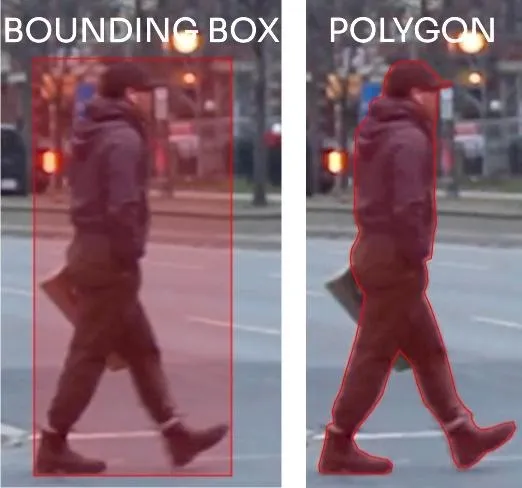
The specification should define which shapes should be used: bounding box, polygon, polyline, points, etc.
Different shapes may be used for different objects within the same project. In some cases, shapes may be combined, for example, a bounding box used together with a skeleton to detect humans and their poses.
4. Annotation Accuracy

This is a critical parameter. The higher the required accuracy, the more time-consuming and expensive the annotation becomes. The specification must clearly state:
- Whether pixel-perfect accuracy is required or if small offsets are acceptable
- Whether fine details need to be captured (e.g., individual branches of a tree vs. the general outline of the crown)
5. Corner Cases and Additional Rules
Every project includes rare, ambiguous, or unusual scenarios (corner cases), that may not be fully predictable. However, common ones should be documented in the specification, and the rest should be identified and clarified during the annotation process.
Examples of issues and considerations:
- Overlapping Objects

- Rules for handling partially or fully overlapped objects
- Allowable overlap threshold for annotation (e.g., less than 70%)
- Whether to label only visible parts or reconstruct hidden areas
- Distant or Small Objects

- Minimum pixel size for objects to be annotated
- Whether to annotate all visually recognizable objects, even tiny ones
- Special rules for segmentation tasks, whether to annotate or consider them as background
- Object Interactions

- Rules for compound or closely interacting objects
E.g., does a bag count as part of a pedestrian or should it be annotated separately?
- Masks and Holes

- Guidelines for using masks, including handling holes and gaps
E.g., should holes in fences be annotated or left empty?
- Reflections and Printed Images

- Clarify whether to annotate reflections in glass, water, or metal
- Define treatment of people and objects depicted on billboards, posters, screens, or packaging
By default, these are not annotated unless specified (e.g., for ad or screen content detection)
How Annotators Should Work with the Specification

The specification is a key project document that defines all annotation rules. The quality of annotation directly depends on how thoroughly the annotator studies and applies the specification. Every section matters, so it’s important to read the entire document to understand all requirements and nuances.
Since the document can be lengthy, take time to review it. It’s recommended to first read it carefully as a whole to form a general understanding, then study sections one by one while asking clarifying questions.
Below is a step-by-step guide on how to work with the specification:
1. Project Goals and Main Requirements (Top Priority)
Before you begin, ask yourself the following key questions to understand the context and avoid systematic mistakes:
- What is the project's goal?
Knowing the final goal is the foundation for accurate annotation. - Which objects need to be annotated?
The specification lists all object classes. Be sure you clearly understand what each class includes and excludes. Descriptions and examples will help with edge cases. - Do objects have attributes?
In addition to object annotation, you may need to specify extra parameters like color, condition, or movement direction. Study these requirements in advance. - Which objects should be excluded?
It's equally important to know what not to annotate. For example, there might be ignore zones or minimum object size rules. - Which shapes should be used?
The specification usually defines the correct shape type for each object: bounding box, polygon, polyline, keypoints, etc. Using the wrong shape may lead to re-annotation. - What is the required accuracy level?
The specification must state the level of contour precision: whether gaps or overlaps are allowed, and to what extent.
2. Additional Details and Special Cases (Second Priority)
After understanding the core rules, focus on detailed guidance. This helps when dealing with more complex scenarios:
- How to handle partially visible or overlapping objects?
Should you annotate someone if only part of their body is visible? Should hidden areas be reconstructed or not? - How to handle corner cases (rare or debatable situations)?
Specifications usually include examples of such cases in a dedicated section. - What to do if in doubt?
If there are gaps or ambiguities in the document, ask your team lead or project coordinator before you start. This avoids widespread errors.
3. Work Through Classes Step-by-Step
If the specification is extensive, after your initial review, you may focus on one class at a time:
- Select a class and study all rules and nuances carefully
- Annotate only objects from that class on one frame (if there are many) or the entire task (if there are few)
- Then move on to the next class and repeat the process
This method helps solidify the rules for each class and reduce mistakes.
4. Use the Specification During Annotation
The specification should serve as your working reference at every step:
- Refer to it whenever you’re unsure
- Compare your annotations with visual examples
- Check whether you're following all described rules throughout the task
5. Quality Control of Your Work
During annotation, ask yourself:
- Am I annotating only the objects listed in the specification?
- Are my annotations precise and aligned with project requirements?
- Are there extra or missing objects?
- Am I handling edge cases correctly based on the guidelines?
Self-monitoring helps prevent errors and reduces the need for revisions.
6. Feedback and Clarifications
If you encounter an unclear point or conflict in the specification:
- Document the question and provide an example
- Send it to the team lead or project coordinator for clarification
- Never assume the rules, this can cause systematic errors in the dataset
Conclusion
The specification is the foundation of a successful annotation project. It defines clear rules and standards that ensure consistency and high-quality data.
Understanding the project goal, accurately interpreting classes, knowing shape requirements, and handling corner cases all contribute to effective, error-free annotation.
Even with a large specification, a structured approach and class-by-class workflow can reduce the burden and improve comprehension.
Always refer back to the document during your work and seek clarification when needed, this guarantees that the annotations meet the expected standards and client goals.
Only a responsible and attentive approach to the specification ensures high data quality and the success of the entire project.

.svg)





.svg)
.png)

.png)


