


Data annotation is the process of structuring information so that a computer can "understand" it. This job is done by data annotators, who manually label data by indicating what is shown in an image, said in audio, or written in text.
This task, repeated millions of times across large datasets, is a critical part of how AI systems are trained to recognize patterns, follow instructions, and make accurate predictions.
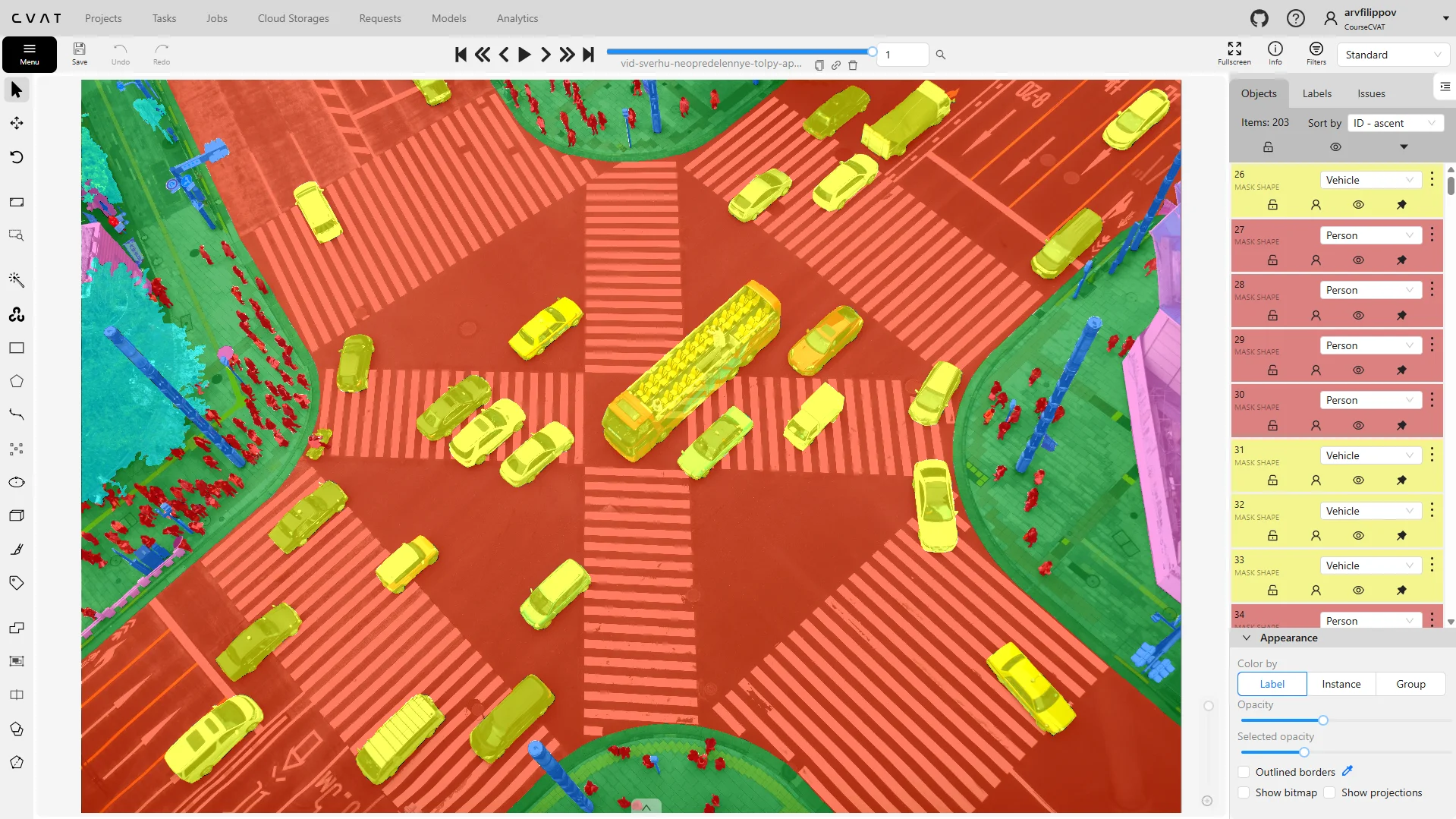
What Applications is Data Annotation Used In?
Now that we know what data annotation is, let's take a look at how it is being used in real-world applications so you can get a better sense of its impact.
Automotive & Autonomous Driving
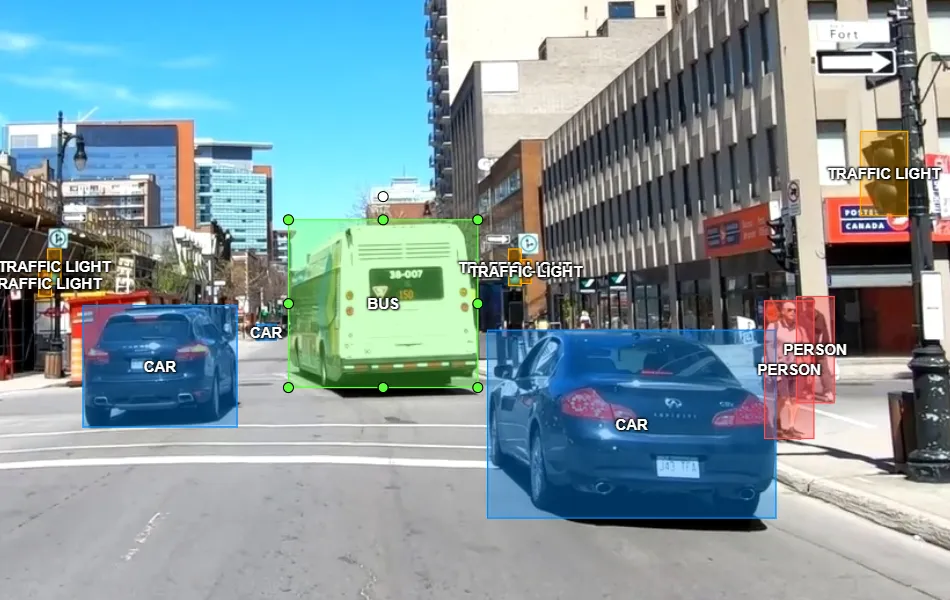
Autonomous vehicles need to interpret their environment in real time, at speed, and without human input. Annotation is what makes that possible.
Every frame of dashcam footage used in training must have its objects precisely labeled so the model learns to distinguish a cyclist from a bollard, or a stop sign from a billboard.
What is annotated:
- Pedestrians, cars, road signs, traffic lights
- Lane markings, road structure
- Danger zones and obstacles
Real-World Examples: Waymo and Tesla use hundreds of millions of annotated video frames to train their perception systems.
Medicine & Healthcare
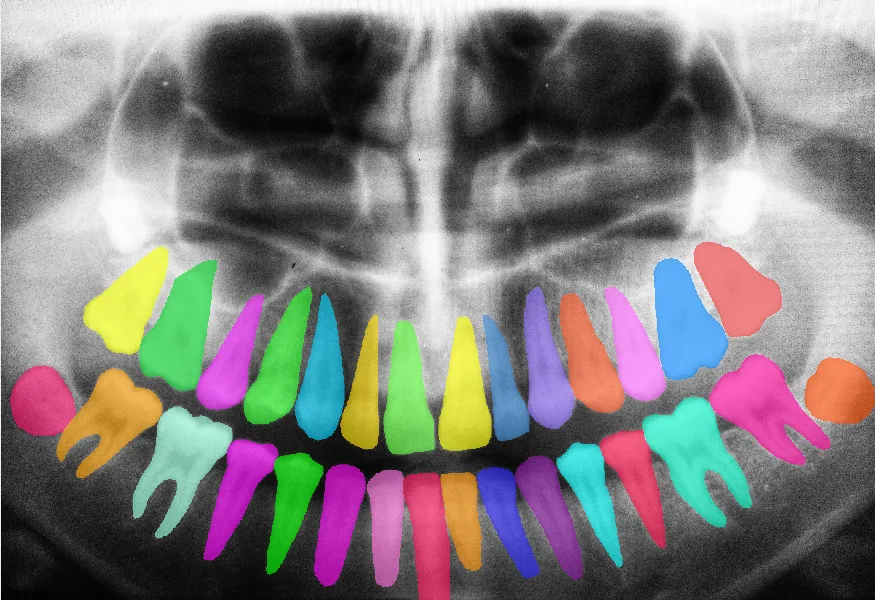
Medical AI models assist radiologists, pathologists, and clinicians in detecting conditions that are easy to miss under time pressure. But these models are only as reliable as the annotated data they were trained on.
Annotation here is often done by or in close collaboration with medical professionals, making it one of the most specialized and high-stakes annotation domains.
What is annotated:
- Tumors, blood clots, fractures in MRI, CT, and X-rays
- Organ contours (lungs, heart, brain)
- Cells, viruses, bacteria in microscope images
Real-World Examples: AI tools trained on annotated medical imaging are now used in cancer screening, tuberculosis detection, diabetic retinopathy diagnosis, and automated blood cell counting.
Retail & E-Commerce Stores

Retailers use computer vision to understand what happens inside stores and across supply chains, information that was previously invisible or too expensive to collect manually.
What is annotated:
- Products on shelves, their positioning
- Visitors: how many people, where they look, where they stand
- Emotions, age, gender (for personalized advertising)
Real-World Examples: Major retailers annotate in-store video to train inventory management models that flag empty shelves automatically. E-commerce platforms annotate product images at scale to power visual search and recommendation engines.
Satellite & Drone Imagery

Aerial and satellite imagery generates enormous volumes of visual data that no human team could review manually. Annotated datasets allow AI to extract structured, actionable information from this imagery at a global scale.
What is annotated:
- Fields, roads, buildings, bodies of water
- Trees, animals, crops, fires, destruction
- Agricultural deforestation, wildfire spread, flood zones, and disaster damage
Real World Examples: Google Maps uses annotated satellite imagery to keep its maps current. Conservation organizations use annotated drone footage to monitor illegal logging. Governments use annotated satellite data for disaster response and infrastructure planning.
Security & Surveillance
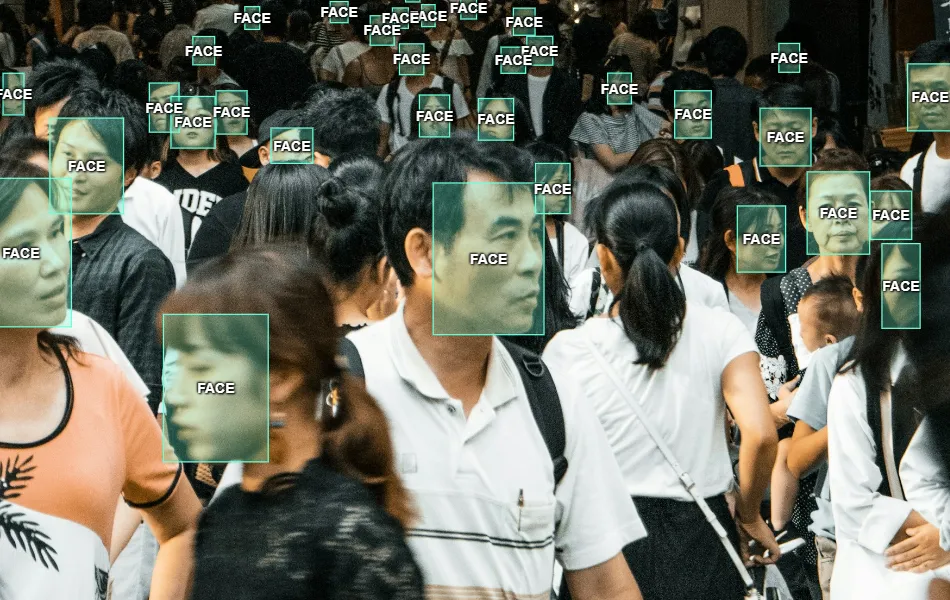
AI-powered security systems need to distinguish normal activity from anomalous behavior in real time, across dozens of simultaneous camera feeds. Annotation defines what normal and suspicious look like to the model.
What is annotated:
- Faces, human figures, and suspicious actions
- Access to restricted zones
- Objects of interest, such as unattended bags or vehicles in no-park zones
Real World Examples: Airports train models on annotated footage to flag unattended baggage and screen restricted-area access automatically. Stadiums and event venues apply the same approach to perimeter intrusion detection and crowd-flow management on match days.
Education & AI Research
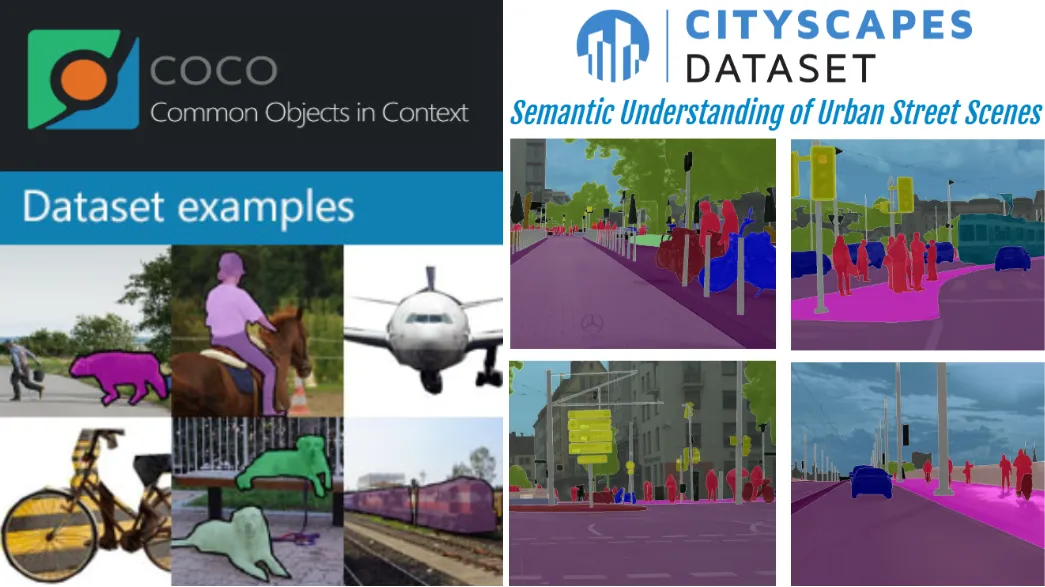
Academic institutions and research labs depend on publicly available annotated datasets to develop, benchmark, and compare new models. Without these shared resources, progress in computer vision and NLP would be far slower.
What is annotated:
- Images, text, audio, and video for open science projects
- Edge cases, rare classes, and deliberately difficult examples to stress-test models
Real-World Examples: COCO (Common Objects in Context), ImageNet, and Cityscapes are landmark datasets built through large-scale manual annotation efforts. They remain the standard benchmarks against which new models are measured, years after their creation.
What Problems Does Data Annotation Solve?
The point of data annotation is not just adding labels to data — it’s focused on solving the core problem of making data understandable for machine learning.
The main goal of data annotation is to prepare raw data so that a neural network can learn from it and make intelligent predictions.
In practice, machines don't understand images like humans — they only see pixels. That is what makes labelling an object on a image/video so important. With a label saying: “This is a pedestrian,” “Here’s a dog,” or “This is a field boundary.”, the information becomes the “correct answer” for training the model.
Without annotation, a model would:
- Have no idea what is right or wrong
- Learn “blindly” from noisy, unstructured data
- Make unacceptable errors in real-world tasks (especially in medicine or transportation)
Examples of problems annotation solves:
- A self-driving car must recognize pedestrians → people must be annotated in dashcam images
- A radiology model must flag tumors in MRI scans → tumor regions must be outlined by annotators first
- A store's inventory system must detect empty shelves → every product on the shelf must be labeled
In summary: annotation turns data into knowledge — the foundation for artificial intelligence.
What Are The Main Data Annotation Types?
When working with CVAT (Computer Vision Annotation Tool), you'll encounter various types of annotation. Here's a quick overview:
Classification (What is in the image?)
Definition: The model sees the entire image and determines what is depicted, without specifying object locations.
Process: The annotator selects an appropriate label for the whole image using tags.
Example:

Key point:
- No location specified
- Only the meaning of the image is captured
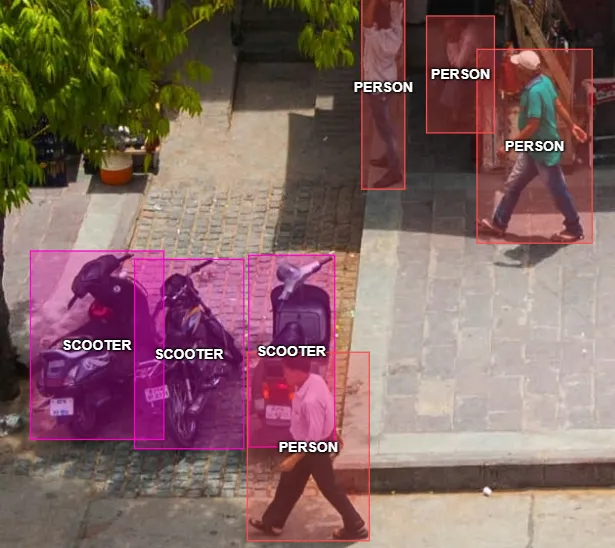
Object Detection (What and where is it?)
Definition:
Now it’s important not only what is in the image, but also where the objects are located.
Rectangles (bounding boxes) are drawn around objects, each labeled accordingly.
Process:
Draw a box around each object and label it (e.g., “car,” “person,” “bike”).
Example:
Key point:
- Object count and location are visible
Segmentation (Precise shape of the object)
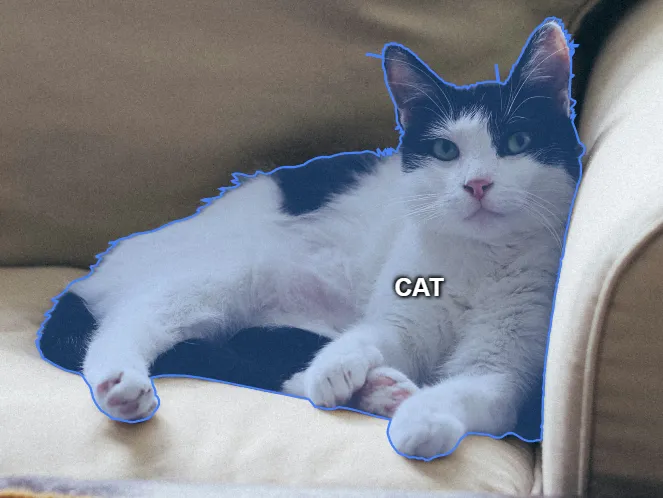
Definition: More advanced than bounding boxes — draw the exact shape of the object to show its outline in detail.
Process: Draw the object’s boundary using polygons or masks.
Example:
Key point:
- Maximum precision
- Annotation of an object with background exclusion
Tracking (Follow the object across video)
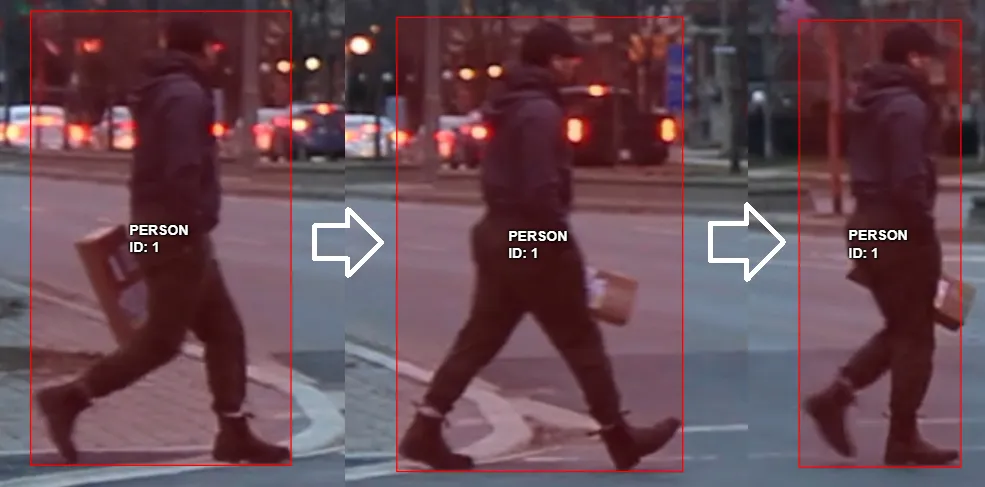
Definition: In video, it’s important not only to find an object but to follow it across frames. The goal is to understand that it’s the same object moving through the scene.
Process: Draw a box or contour in each frame Assign an ID to track the same object through time
Example:
Key point:
- Object is tracked over time
- Enables analysis of movement, speed, direction
Skeleton Annotation (Keypoints and body pose)
Definition: This type of annotation focuses on identifying the precise position of specific keypoints on an object — most often a human or animal. These keypoints are then connected to form a skeleton that represents the pose or posture.
Process: The annotator marks each keypoint (e.g., head, shoulders, elbows, knees, etc.) and connects them according to a predefined skeleton structure. Each keypoint can also have visibility flags (e.g., visible, occluded, not labeled).
Example:
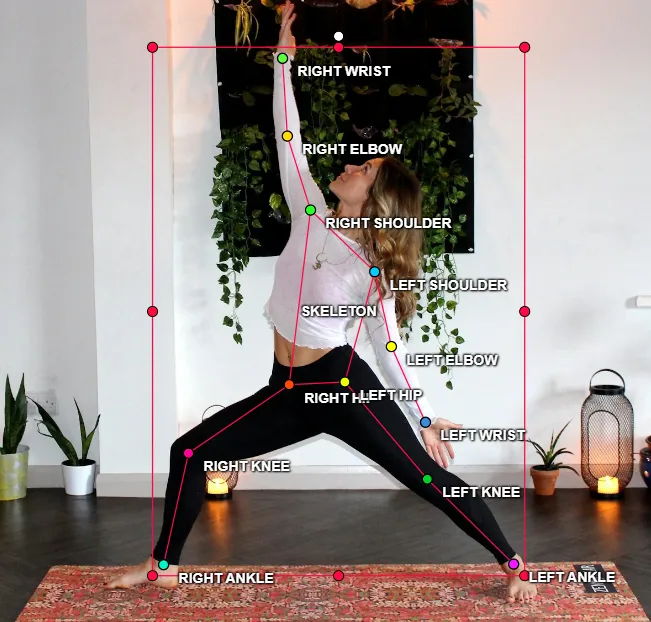
Key point:
- Allows detailed analysis of body movements and postures
- Essential in sports analytics, gesture recognition, animation, healthcare, and safety monitoring
- Often used together with tracking to follow poses across video frames
3D Annotation (Depth and spatial position of objects)
Definition: 3D annotation allows annotators to mark objects in three-dimensional space, adding depth information to traditional 2D labeling. This is essential in applications like autonomous driving, robotics, and augmented reality.
Process: Use cuboids (3D boxes) to surround the object. Each cuboid includes not only width and height, but also depth and orientation in space. The annotator adjusts the cuboid’s perspective to align it with the object's shape and position in the scene.
Example:
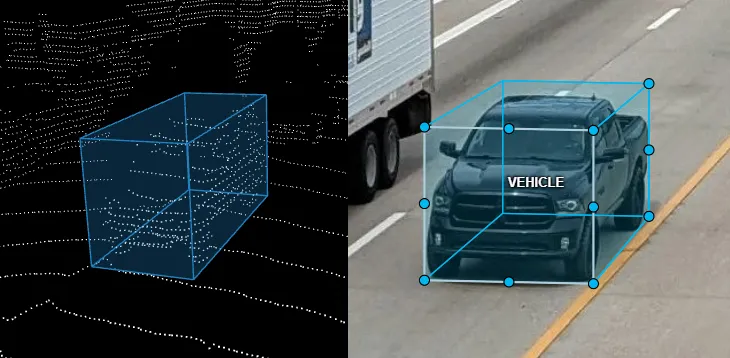
Key point:
- Captures real-world spatial orientation and size
- Crucial for depth-aware models
- Used with multi-view camera systems or LiDAR data
- Adds complexity, but provides richer geometric context
Roles in the Annotation Process
Annotation projects don't run on individual effort alone. They depend on a defined team structure where each role has a specific function, and the quality of the final dataset depends on all three working in coordination.
Data Annotator
The annotator is the primary worker responsible for labeling raw data according to the project specification. Their work forms the foundation on which everything else is built.
Responsibilities:
- Study the guidelines carefully before starting
- Annotate accurately: use the correct tools and name object classes properly
- Meet deadlines and required volume
- Ask the team lead when in doubt
Validator / Reviewer
The validator reviews completed annotations against the project instructions and identifies errors before the data moves forward. They are the quality gate between the annotator and the final dataset.
Responsibilities:
- Assess quality: accuracy of contours, correct classes, completeness
- Mark and fix errors (if allowed)
- Request revision and provide feedback
- Ensure project quality standards are met
Team Lead
The team lead manages the entire annotation workflow and acts as the link between the annotation team and the client. They are responsible for both the process and the outcome.
Responsibilities:
- Create and explain the guidelines
- Train team members, answer questions
- Distribute tasks among annotators and validators
- Monitor deadlines and progress
- Perform spot checks
- Communicate with the client and deliver results
Annotation Accuracy
Data annotation is meticulous data work, not a mechanical drawing exercise. Every bounding box, polygon, and segmentation mask an annotator creates becomes part of the training data, and machine learning algorithms can't tell a careful label from a careless one.
They learn from both with equal confidence. That's why quality training data is the single biggest factor separating a model that works in the real world from one that fails quietly.
That's why whatever the annotation type — image annotation, semantic segmentation, text, or audio annotation — four principles apply to every data annotation task:
- Precise object positioning — contours and bounding boxes must closely follow the object's shape, without excessive background or clipped regions. Loose boxes teach the model that background pixels belong to the object; over-tight ones cut away features it needs. If looser tolerances are acceptable, the specification must say so explicitly.
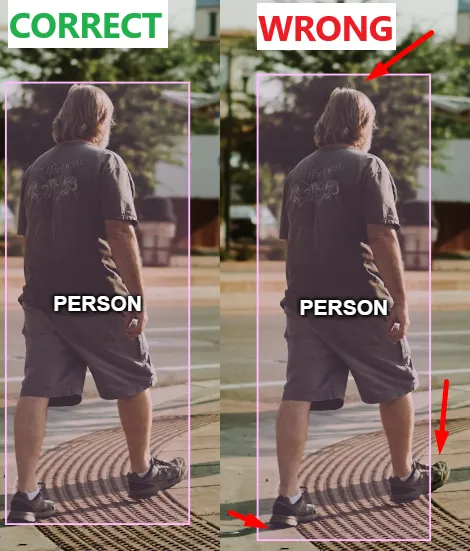
In this example, the person on the right is inaccurately annotated. Red arrows point to critical issues such as large gaps and clipped regions. In most projects, this annotation would be rejected.
- Correct class assignment — every object must carry exactly the label the guidelines dictate. A single mislabel is noise; the same mislabel repeated across a dataset becomes a pattern the model learns as truth.
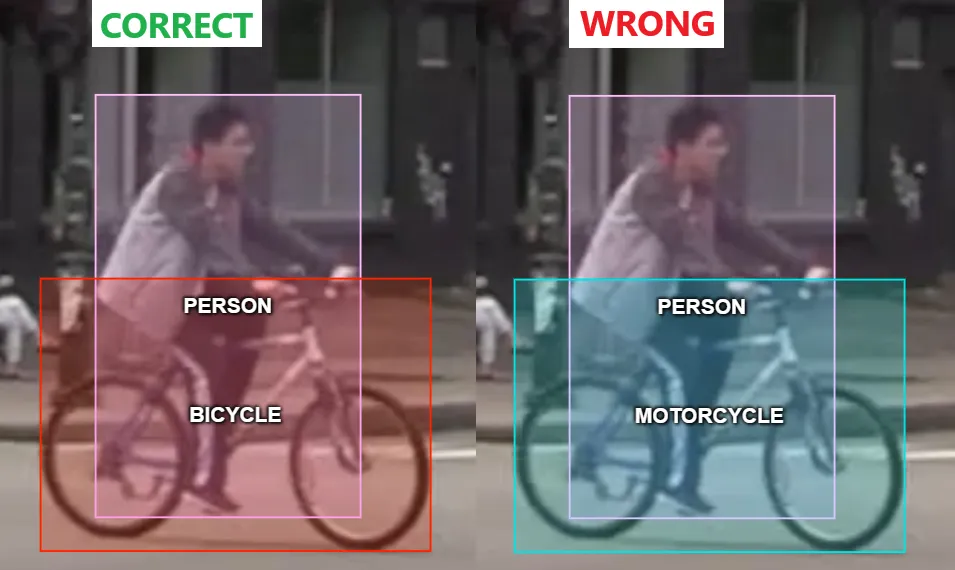
In the example on the right, the object is labeled "motorcycle" when the correct class is "bicycle." Repeated at scale, this teaches the model a systematic error.
- Annotation completeness — very required object in the image must be annotated. A missed object isn't a neutral gap: it tells the model "nothing is here," actively training it to overlook exactly what it's supposed to find. In high-stakes fields like AI diagnostics, a single unlabeled tumor in the training data works against every correctly labeled one.
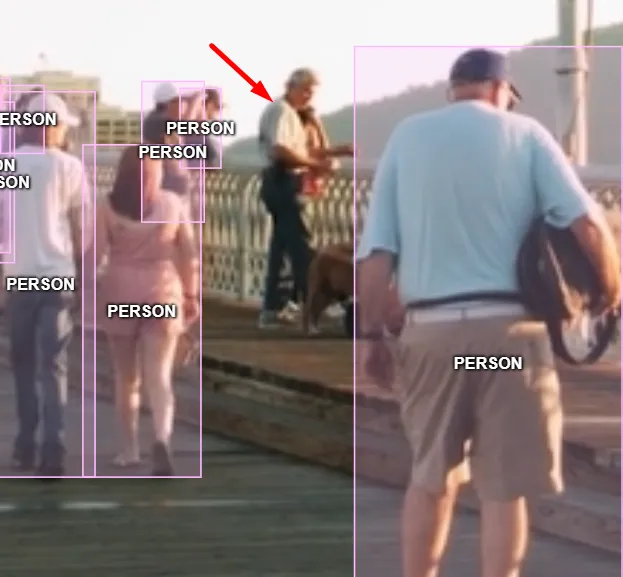
In this example, one person was left unannotated. A data annotation task is only complete when every required object is labeled.
- Consistency with the guidelines — each tool (bounding box, polygon, line) must be used exactly as the project documentation specifies. Mixing annotation methods within one dataset sends the model contradictory signals about what a "correct" label looks like.
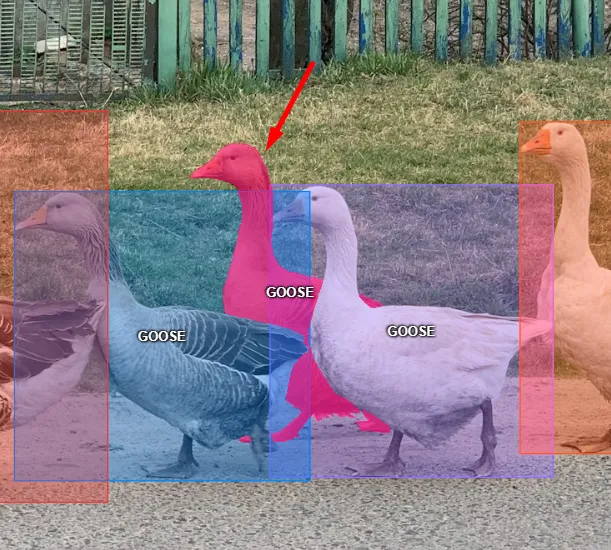
In this example, the goose marked by the red arrow is annotated with a segmentation mask while the others use bounding boxes. If the specification requires bounding boxes only, any other tool is an error.
Key Takeaways From This Lecture
Data annotation serves as the essential bridge between raw information and intelligent machine learning models. The precision and care applied during this stage determine the ultimate success and reliability of the resulting AI system.
Before moving on, here are the core concepts from this lecture worth keeping in mind:
- Annotation transforms pixels into knowledge, enabling AI to understand and interact with the real world.
- Many common real-world use cases involve data annotation
- The process relies on a structured team of annotators, validators, and team leads to maintain quality.
In the next lecture, we take a closer look at the data annotator, including who they are, what their day-to-day responsibilities look like, and what separates a professional annotator from someone just going through the motions.

.svg)



.svg)
.png)

.png)


