When we hear about artificial intelligence, we often imagine smart machines: autopilots, voice assistants, or diagnostic tools. But behind each of these intelligent solutions are thousands of hours of human labor — most of them spent on data annotation, the labeling work covered in Lecture 1. And one of the key roles in that work belongs to the data annotator.
A data annotator is not just someone who draws boxes or polygons around an object. They are specialists responsible for the quality of training data, which are the labeled examples that machine learning models learn from.
For example, when the model behind a self-driving car's perception system, a medical imaging tool, or a store's shelf-scanning camera detects, classifies, segments, or tracks objects in the real world, it is applying patterns it learned from annotated examples, nothing more.
That means the accuracy of tomorrow's AI systems depends directly on the annotator's precision, attention to detail, and understanding of the labeling instructions.
What Types of Data Annotation Do Annotators Work With?
This course focuses on computer vision, but the profession is broader than images. Annotators specialize by data type, and each type trains a different kind of AI system:
- Image annotation — labeling still images with bounding boxes, polygons, or segmentation masks for tasks like classification and object detection. This is the foundation of most computer vision work.
- Video annotation — the same techniques are applied across moving frames, with the added challenge of tracking objects over time.
- Text annotation — preparing text data for natural language processing. This includes entity annotation (marking names, places, and organizations), intent annotation, and sentiment annotation — the groundwork behind chatbots and large language models.
- Audio annotation — transcribing speech and labeling audio data (speakers, sounds, emotions) for voice assistants and speech recognition systems.
- Point cloud annotation — labeling 3D spatial data generated by LiDAR or radar sensors. Annotators use 3D bounding boxes (cuboids) to track the size, position, and movement of physical objects in a three-dimensional space, providing the spatial awareness crucial for autonomous vehicles and robotics.
Whatever the data type, the core job stays the same: applying consistent, documented judgment to raw data, and enriching labels with metadata — such as object attributes — where the project requires it.
Key Responsibilities and Tasks of a Data Annotator
So, what part of an AI system's pipeline is a data annotator responsible for? Here is a short overview of their many tasks.
Studying the Specification
For an annotator, the first step is to understand the established labeling guidelines, as all decisions across the annotation process are based on them.
Before starting a project, the annotator must thoroughly and carefully study the specification. This is essential not only to understand what and how to annotate but also to avoid mistakes, rework, and time loss later.
In large and complex projects, the specification can be extensive, often including dozens of pages. Such documents are impossible to memorize after one reading.
Ignoring the specification or eyeballing leads to errors, decreases data quality, and causes re-annotation.
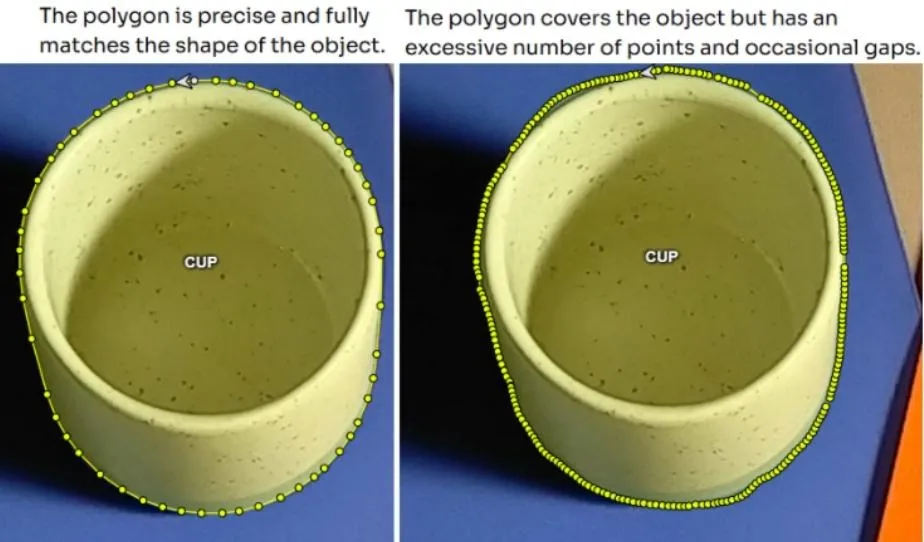
One of the annotator’s main goals is to annotate precisely, carefully, and neatly. Even when following instructions, poor-quality shapes, labels, or borders can render data useless. Each annotation should:
- Match object boundaries exactly,
- Be logically shaped and structured,
- Contain no missing or extra elements,
- Appear clean and visually accurate.
Low precision loses information. Neat and precise annotations keep data labels clean and free of bias.
Accuracy and Speed: Balancing Project Requirements
Not every project demands pixel-perfect annotation. Some allow minor clipping, small gaps, or angular shapes. What matters is that the acceptable tolerance is defined in the spec and followed consistently. This is because accuracy directly affects speed in manual annotation:
- Higher accuracy = more time per object
- Looser tolerance = faster throughput, within guidelines
If an annotator spends time on ultra-detailed annotation in a project where it’s unnecessary, they risk missing deadlines. This over-precision harms not just speed but overall team performance.
Work Approach and Core Skills
Even when annotating a large batch of similar objects, it’s vital to stay focused. Common errors occur when the work becomes routine:
- Crooked polygons
- Misaligned boxes
- Incomplete lines
- Cropped object edges
A professional annotator regularly self-checks:
- Takes short breaks to review work with a fresh eye
- Revisits earlier images
- Compares results with instruction examples
Routine and order here are a requirement. Careful annotation prevents rework, saves team resources, and impacts overall project success.
Meeting Deadlines
Every annotation task comes with a deadline, and missing one disrupts more than the annotator's own schedule.
Annotation sits directly after data collection in the project chain: validators can't review work that hasn't been submitted, the team lead can't assemble the final training dataset, and the finished dataset can't be delivered to the customer who commissioned the project.
That's why annotators need to treat deadlines as part of the job itself, seeing their tasks as one stage of a shared pipeline to avoid delays unless necessary.
An annotator who manages their time well keeps the entire pipeline on schedule and earns the kind of trust from team leads that leads to bigger tasks and better projects.
Communication with the Team Lead and Validators
An annotator isn’t an isolated worker but part of a team. Smooth project progress depends on clear, regular communication with team leads and validators.
Annotation projects are rarely perfect from day one — there are clarifications, edits, and edge cases. The faster and more accurately an annotator communicates, the more valuable they are. Most annotation tools, including CVAT, make this easier with built-in review comments that anchor feedback directly to specific annotations.
While it may not be the first skill you think of, communication isn’t a secondary skill. It’s an essential part of annotation. An annotator who can ask questions, clarify edge cases, align with guidelines, and respond to feedback is a valuable team member.
Self-validation
Before submitting a task for review, an annotator can and should self-check their work. This is part of a professional approach.
What to check:
- All required objects are annotated; no image is left out.
- Classes are correctly assigned (e.g., a pedestrian isn’t marked as a cyclist).
- All instructions were followed, and the right tools were used.
- Shapes and boundaries match the object’s geometry.
- No duplicates exist — each object should be annotated only once, unless multiple tools are required.
Self-validation is an investment in quality datasets. Proactively checking your work reduces mistakes and increases the chance of promotion to roles like validator or team lead.
What Essential Tools Do Data Annotators Need?
Annotation work involves the right equipment that can sustain precision over long sessions, especially on comprehensive data annotation projects that run for weeks. Having an optimal physical setup reduces errors, prevents fatigue, and lets you work at the speed the project demands. Here is what matters and why.
Computer Mouse
Your mouse is your primary input tool that controls every polygon point, bounding box corner, and contour adjustment passes through it.
A good annotation mouse should be:
- Accurate – it should not “jump” on the screen during small or slow movements.
- Responsive – it should work without delay.
- Predictable – cursor movement should match hand movement.
Recommendations:
- Use a gaming mouse (entry- or mid-level) as these are usually accurate and have quality sensors.
- Use moderate sensitivity for annotation
- Avoid cheap office models that stutter or lose tracking.
- If possible, choose a wired or high-quality wireless mouse.
Mouse Pad
Even a high-quality mouse performs poorly on the wrong surface. Glossy desks, glass, and uneven textures cause optical sensors to drift, skip, or freeze mid-stroke — which translates directly into inaccurate annotations.
A good mouse pad should be:
- Flat and consistent — no texture variation that disrupts sensor tracking
- Large enough — you should never need to reposition mid-annotation
- Non-reflective — matte cloth surfaces work best for optical sensors
A standard cloth mouse pad covers all three. It is one of the cheapest upgrades an annotator can make, and one of the most noticeable.
Monitor
Small objects, fine contours, and subtle class distinctions are all harder to label correctly on a low-resolution or small screen. What you can't see clearly, you can't annotate accurately.
A good annotation monitor should be:
- High resolution — 1080p minimum, 1440p or 4K preferred for detailed work
- IPS panel — accurate color reproduction and consistent brightness at any viewing angle
- Large enough — 24 inches or above; avoid annotating on a laptop screen for extended sessions
A larger, sharper display reduces eye strain over long sessions and makes it easier to catch errors before they reach the validator.
Workspace
Annotation requires sustained concentration over long sessions. A poorly organized workspace compounds fatigue, increases errors, and slows output in ways that are easy to underestimate.
A good annotation workspace should be:
- Ergonomic — chair height, desk height, and monitor distance set so your arm, wrist, and neck are not under strain
- Stable — a wobbling desk or loose mouse pad introduces micro-movements that affect cursor control
- Distraction-free — a quiet, visually calm environment makes it easier to maintain the focus precision work demands
Small adjustments to your physical setup take minutes to make and pay off across every session that follows.
Why the Annotator Determines a Machine Learning Project’s Success
The annotator sits at the start of the entire AI and machine learning pipeline. Every decision they make, from where to draw a boundary, to which class to assign, or which objects to include, becomes part of the dataset a model will learn from.
Errors at this stage do not stay contained. They propagate through training, surface in model behavior, and ultimately affect the product, the client, and the team's reputation. Even the best AI experts cannot compensate downstream for flawed labels. Which is why human annotators remain accountable for what a model learns, no matter how much of the drawing is automated.
So don’t think of a professional annotator as a temporary worker filling a quota. They are a specialist who:
- Understands the project goals and annotates with that context in mind
- Applies accuracy and consistency as a standard, not an occasional effort
- Follows guidelines precisely and flags anything the spec does not cover
- Communicates proactively with validators and team leads
- Takes ownership of quality before the work reaches review
Professional data annotation services are built on exactly these qualities: the more an annotator demonstrates them, the more trust they earn and the more complex, higher-value work they get assigned.
Key Takeaways From This Lecture
Being a data annotator is a skilled profession, not a mechanical task. The work requires attention to detail, disciplined consistency, and a genuine understanding of how each decision affects the AI system being built.
Before moving on, here are the core points from this lecture:
- Annotators are responsible for the quality of the data that AI models learn from — errors at this stage become errors in the model
- Following the specification precisely, on every task, is the single most important habit an annotator can develop
- Deadlines, communication, and self-validation are professional responsibilities, not optional extras
- The right physical setup — mouse, mouse pad, monitor, workspace — directly affects output quality over long sessions
- Annotators who take ownership of their work earn trust, access more complex projects, and advance into validator and team lead roles
In the next lecture, we cover data privacy and confidentiality: what it means for annotators, what the legal frameworks require, and what happens when those rules are not followed.

.svg)



.svg)
.png)

.png)